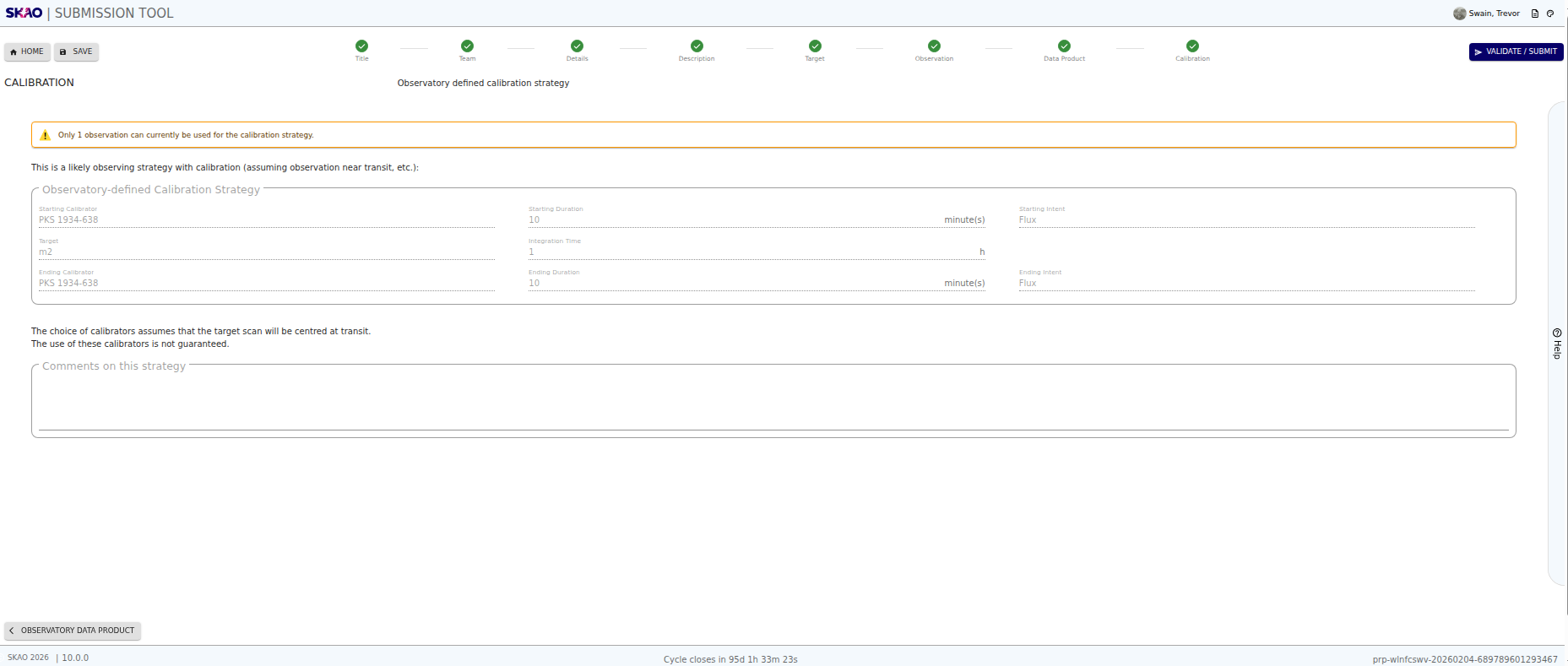
The calibration strategy is defined by the SKA Observatory. You have the option to add comments.
You need to have observations and targets added to your proposal to see the calibration strategy.
The calibration page allows you to view the observatory defined calibration strategy for an observation and target combination.
If there are several observations or targets for the proposal, the page displays the first observation/target combination by default.
Appart from the comment section, all the fields are automatically populated.
The calibration page is divided into the following sections:
Starting Calibrator: Displays the calibrator selected for pre-processing the observation data. This includes:
- Calibrator Name: The name of the calibrator.
- Duration: The duration (in minutes) for which the calibrator is used.
- Intent: The purpose of the calibration (e.g., phase, amplitude).
Target name and integration time of the observation: This section shows:
- Target Name: Automatically retrieved from the proposal based on the linked observation.
- Integration Time: The total integration time (in minutes) for the linked observation.
Ending Calibrator: Displays the calibrator used at the end of the observation. This section mirrors the starting calibrator fields (name, duration, intent) and is currently assumed to be the same.
Comments:
- Comment Field: A multi-line text field for entering additional notes or suggestions related to the calibration strategy.
- Validation: The comment field is optional.
Have questions or need technical assistance? Contact
SKAO Help desk ·