

How Feature Flags Work#
Understand feature flag concepts, the SKAO implementation, and best practices.
What are feature flags?#
Feature flags (also called feature toggles or flippers) let you turn functionality on or off at runtime without deploying new code.
A feature flag is a decision point that changes application behaviour based on the flag’s state:
if feature_flags.is_enabled("new-shiny-feature"):
    show_new_shiny_feature()
else:
    show_old_feature()
Implement feature flags as:
Runtime configurable toggles — Via API calls (Unleash, GitLab)
Tango attributes — For device-level control
Static configuration — Deployment configuration or program parameters
Compile-time options — Build flags
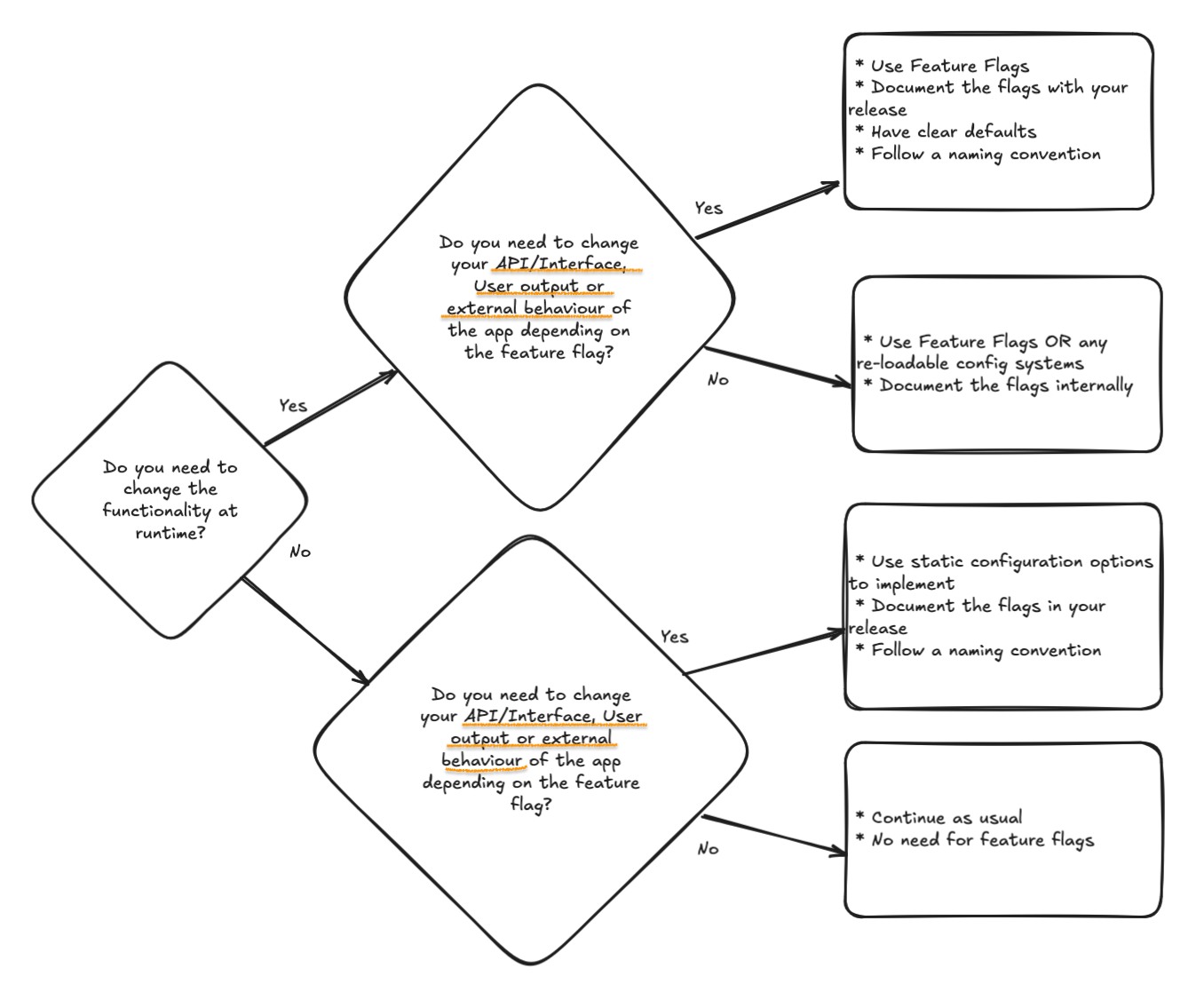
Use this flowchart to determine which implementation suits your needs. Many SKA components only require static configuration options.
Use cases#
Feature flags provide these advantages:
- Decouple deployment from release
Deploy code to production frequently, but only release features when ready. Configure systems fully before enabling functionality.
- Canary releases and gradual rollouts
Release features to a subset of users (PSIs, AIV, software-only cloud) before full rollout, reducing risk.
- A/B testing and compatibility
Expose different versions of a feature to test new functionality or compatibility with other components — different algorithms, data formats, or UIs.
- Kill switches
Disable problematic features in production instantly without rollback or hotfix deployment.
- Development
Merge incomplete features to the main branch, hidden behind a flag. This reduces merge conflicts and integration pain, especially for features requiring updates to many components.
- Operational control
Enable or disable features for specific operational needs, such as disabling resource-intensive features during peak load.
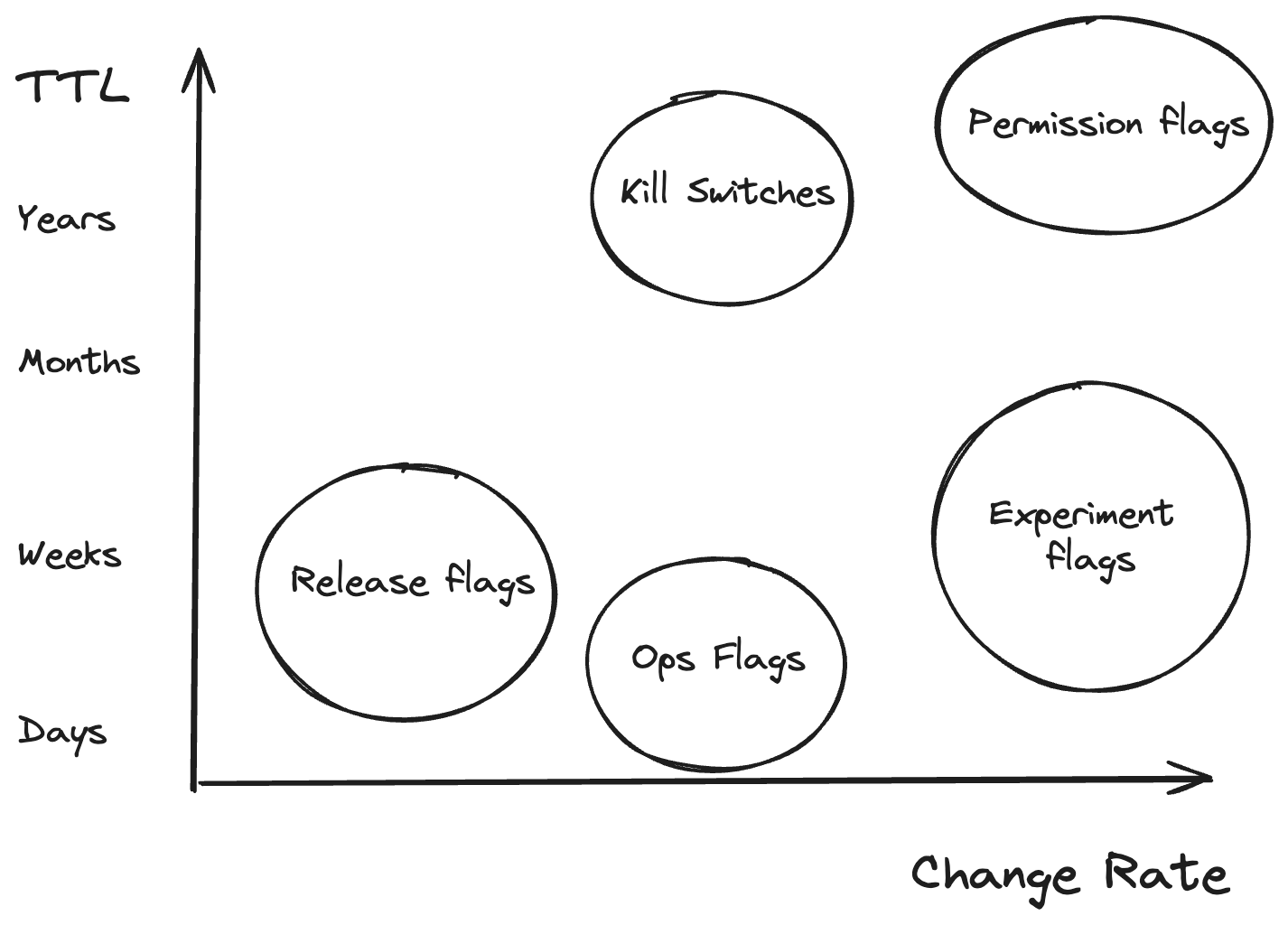
Read more about feature flag types.
Anti-patterns#
Feature flags require discipline. Avoid these pitfalls:
- Long-term configuration
Flags are temporary. Don’t use them as a permanent configuration system — use proper configuration management instead. Plan for flag removal from the start.
- Excessive complexity
Too many flags, especially nested ones, make code hard to reason about, test, and maintain. Each flag doubles the number of possible code paths.
- Replacing proper design
Don’t use flags to implement architectural decisions, refactor code, or reduce technical debt. Address these through proper engineering practices.
- Core architectural changes
Don’t use flags to toggle fundamental architectural differences. Moving from NoSQL to SQL introduces too much code complexity and migration issues to control via a flag.
Naming conventions#
Follow these conventions for consistent, understandable flags:
- Prefix with component and/or subsystem name
This identifies the flag’s purpose and scope.
Example:
component-x-enable-new-function- Use the same flag name across repositories
If a flag in Component A needs control during integration testing of Subsystem X, keep the flag name consistent. The definition and control plane shifts, but the code-level flag name stays the same.
- Use the same flag name across environments and components
This simplifies configuration management and reduces errors.
Example configuration matrix:
Datacentre |
Environment |
Component |
Flag Status |
|---|---|---|---|
STFC |
CI/Test |
Component X |
enabled |
STFC |
Integration/Staging |
Subsystem A |
enabled |
ITF |
Integration |
SKA MID ITF |
disabled |
AA |
Production |
SKA MID AA |
enabled |
Best practices#
- Define flags at the highest necessary level
If a flag in Component A only affects A’s internal behaviour and isn’t relevant to higher-level systems, manage it within its own project. If the feature needs coordinated rollout across the integrated system, document usage and default behaviour clearly.
- Use configurable client initialisation
Always configure Unleash client options via environment variables so different data centres can use different environments.
- Remove flags after fulfilling their purpose
Old flags add complexity and cognitive load. Schedule flag removal as part of the feature rollout plan.
- Provide graceful degradation
Always use
fallback_valueor checkclient.is_initializedin case the Unleash server is unreachable.- Log flag decisions
Log when behaviour changes based on flags to aid debugging.
- Secure API tokens
Manage tokens using Kubernetes secrets or Vault. Never hardcode or commit tokens to version control.
Feature flag lifecycle#
A typical lifecycle for a feature controlled by runtime flags using the Unleash client and GitLab backend:
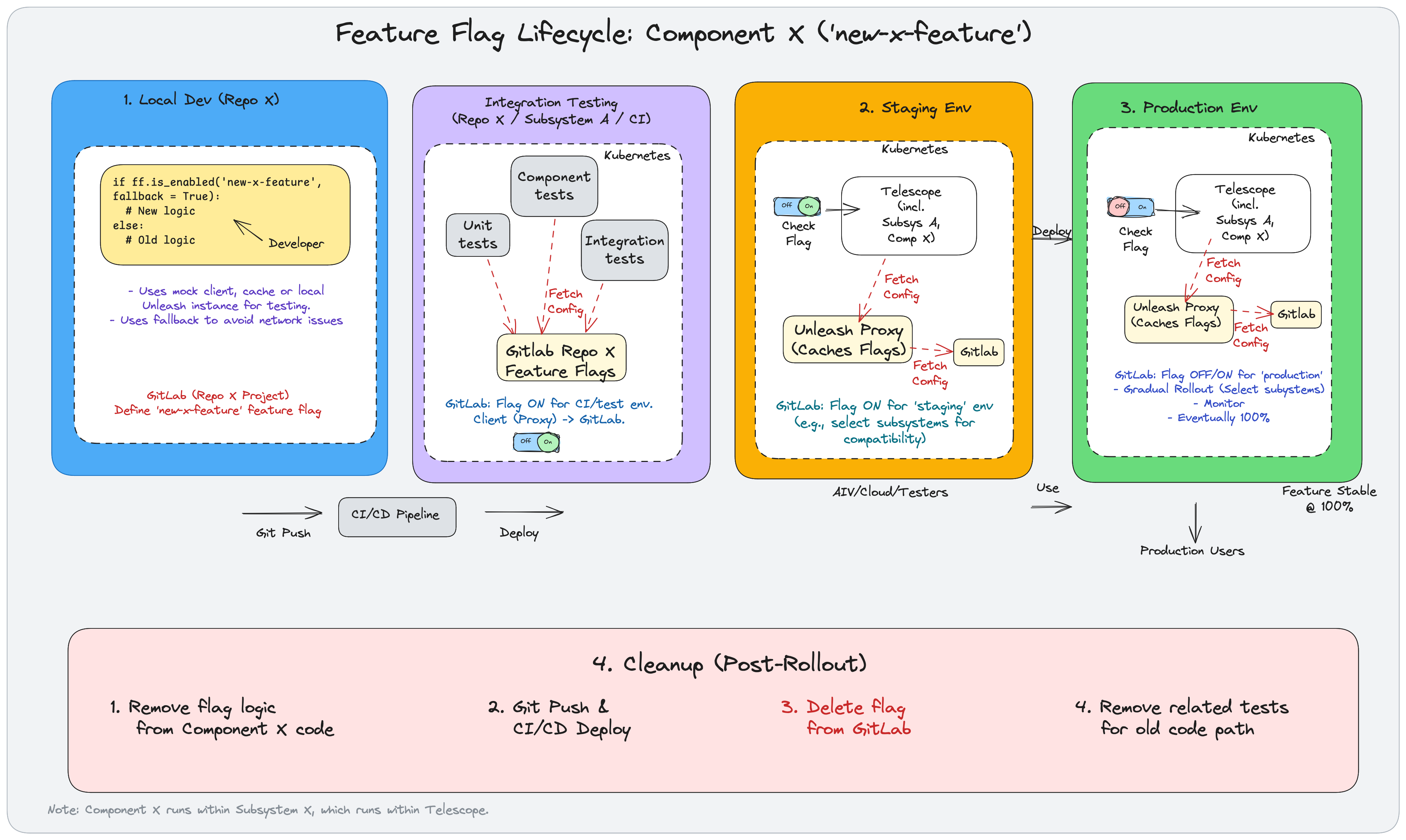
The lifecycle has six stages:
1. Local development#
A developer introduces new functionality in the Component X repository, wrapping the new and old code paths in a conditional controlled by the new-x-feature flag:
if ff.is_enabled('new-x-feature', fallback=True):
    new_logic()
else:
    old_logic()
During local development, use:
A mock client
Cached values
A local Unleash instance
Define the flag initially in the repository’s GitLab project settings for team control during development.
2. CI/CD pipeline#
Git push triggers the CI/CD pipeline, which builds, tests, and deploys the application to subsequent environments.
3. Integration testing#
Automated tests run against the integrated code: unit tests, component tests, and integration tests.
Tests fetch flag configurations from GitLab Feature Flags defined in the repository’s project. For CI/test environments, configure the flag to ON to test the new code path.
4. Staging environment#
The CI/CD pipeline deploys to a persistent staging environment.
An Unleash Proxy service runs within staging, periodically fetching flag configurations from GitLab. The application checks flag status by querying the local proxy.
Configure the flag to ON for the staging environment. Strategies might enable it for specific subsystems or user groups.
AIV, Cloud, or other testers can verify the new feature in staging.
5. Production environment#
After successful staging validation, deploy to production.
Manage the flag strategy for production environment in GitLab:
Toggle OFF/ON as needed
Use Gradual Rollout — enable for specific subsystems, user percentages, or user IDs
Eventually enable for 100% of users
Once stable, proceed to cleanup.
6. Cleanup#
After full rollout and stability confirmation:
Remove flag logic from Component X code, keeping only the new path
Deploy the cleaned code through CI/CD
Delete the flag definition from GitLab
Remove related tests for the old code path
JIRA organisation#
For complex feature rollouts, create JIRA tickets to track:
Flag creation and initial configuration
Environment-by-environment rollout
Cleanup and flag removal
Documentation updates
Link these tickets to the feature’s main story or epic for traceability.