

How BDD Testing Works#
Understand BDD concepts, the SKA testing architecture, and how tests connect to requirements.
What is BDD?#
BDD (Behaviour Driven Development) describes system behaviour using plain language. Tests focus on what the system does in response to specific inputs, not how it works internally.
BDD tests use the Gherkin specification language with three core keywords:
Given — the initial context or state
When — an action or event
Then — the expected outcome
This example tests a login page:
Given the SKA Community Confluence website
And I am not logged in
When I click on the login button
Then I see a login page
Developers, testers, project managers, and stakeholders can all read and understand this test. This shared understanding is BDD’s key benefit.
Why SKA uses BDD testing#
BDD testing addresses specific SKA needs:
- Formal requirements verification
The SKA has thousands of formal requirements at L1 (observatory), L2 (sub-system), and interface levels. BDD tests provide clear traceability from implementation back to requirements.
- Stakeholder communication
Plain language test definitions enable Feature Owners, Product Owners, and verification engineers to review and contribute to test design without reading code.
- Living documentation
BDD tests serve as executable specifications. When tests pass, they document current system capabilities. When they fail, they identify gaps between requirements and implementation.
- Integration testing
The SKA integrates software with extensive hardware across multiple sub-systems. BDD tests describe expected interactions at component and system boundaries.
- Automated verification
BDD tests run automatically in CI/CD pipelines, continuously verifying requirements and catching regressions early.
The SKA BDD architecture#
This diagram shows how BDD tests flow from requirements to automated verification:
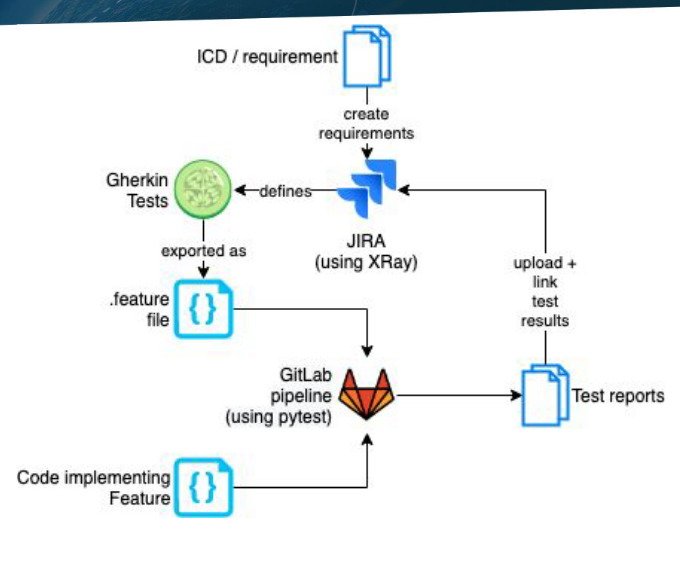
BDD testing workflow: from requirements through JIRA to automated CI/CD execution.#
The workflow:
ICDs and JAMA requirements import into JIRA (L1, L2, IFID, VTS projects)
Teams define Gherkin tests in JIRA’s XTP project and link them to requirements
Teams export feature files from JIRA and add them to GitLab repositories
pytest-bdd implements the test steps in Python
CI/CD pipelines run tests and output results as JSON
XRay (JIRA plugin) imports results and updates requirement statuses
This creates a complete traceability chain from formal requirements to automated test results.
JIRA organisation#
Understanding BDD test organisation in JIRA helps you navigate the system effectively.
Requirements hierarchy#
Requirements live in dedicated JIRA projects:
L1 — Observatory-level requirements
L2 — Sub-system requirements
IFID — Interface requirements between sub-systems
VTS — Verification requirements
JAMA remains the source of truth for formal requirements.
Test organisation#
The XTP project organises tests:
- Test
An individual test case with Gherkin steps. Each test verifies one specific behaviour.
- Test Set
A collection of tests that together verify a requirement. One requirement typically has one Test Set, but can have multiple Test Sets for different aspects.
- Test Plan
Describes test conditions and environment. Most useful for manual test executions.
- Test Execution
Records the results of running tests. CI/CD pipelines create these automatically.
Example structure#
Consider verification requirement VTS-221 (configure a sub-array for imaging scan):
VTS-221 (Requirement)
  └── XTP-494 (Test Set) — "tests" relationship
        ├── XTP-417 (Test) — Configure with valid parameters
        ├── XTP-427 (Test) — Handle invalid configuration
        ├── XTP-428 (Test) — Timeout handling
        └── XTP-436 (Test) — State transitions
The Test Set groups related tests. You can reuse individual tests across multiple Test Sets, and link Test Sets to multiple requirements.
How results flow back to JIRA#
When CI/CD pipelines run BDD tests:
pytest-bdd executes the tests and generates a JSON report
The pipeline uploads the JSON to JIRA via the XRay API
XRay creates Test Execution tickets showing pass/fail status
Test and Requirement tickets update to reflect current status
Dashboards aggregate results across requirements
This automation means requirement verification status stays current without manual updates.
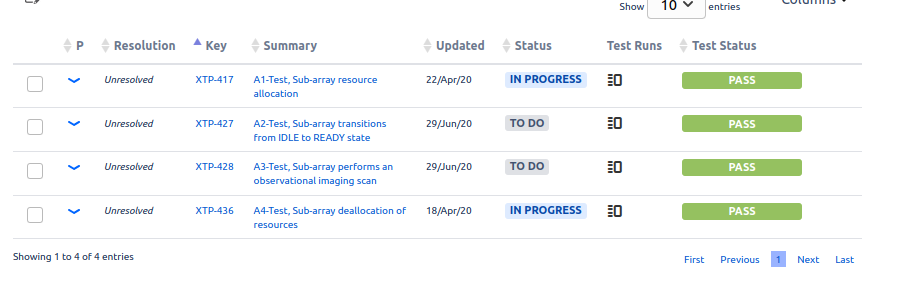
A VTS ticket showing the status of associated tests.#
When to use BDD vs standard testing#
BDD testing adds value in specific situations:
Use BDD when:
Verifying formal SKA requirements
Tests need to be understood by non-developers
Traceability to JIRA is required
Testing component interactions or system-level behaviour
Documentation of system capabilities is valuable
Use standard pytest when:
Unit testing internal functions
Testing implementation details
Rapid iteration during development
JIRA traceability is not needed
You can use BDD style (given/when/then) with pytest-bdd without JIRA integration, giving you readable tests without generating JIRA tickets.
Tip
Use PI planning to identify requirements or features that benefit from BDD tests. Work with Feature Owners and verification colleagues to define effective test scenarios.
Writing good BDD tests#
Effective BDD tests require domain expertise and understanding of what can go wrong.
- Know the system under test
Understand the expected behaviour, edge cases, and failure modes. Work with domain experts to identify what matters.
- Use consistent language
Reuse existing step phrasing from other tests. Consistency enables step reuse and makes tests easier to understand as a collection.
- Keep steps declarative
Describe what happens, not how.
When I configure the subarrayis better thanWhen I send a JSON payload to the REST endpoint.- Test one behaviour per scenario
Each scenario verifies one specific behaviour. Use multiple scenarios for different aspects of a requirement.
- Collaborate on test design
Feature Owners, Product Owners, testers, and developers all contribute different perspectives. The best tests come from collaborative definition.
Current limitations#
The BDD testing system has known limitations:
- Manual feature file export
Exporting
.featurefiles from JIRA requires manual steps. We are exploring automation options.- Test execution volume
Running tests on every branch generates thousands of JIRA tickets. Run JIRA integration only on main/master branches of integration repositories.
- JAMA synchronisation
The process for integrating new verification requirements with JAMA is still evolving.
- Dashboard complexity
As the number of tests grows, maintaining useful dashboards requires ongoing curation.
We are addressing these limitations as the system matures.