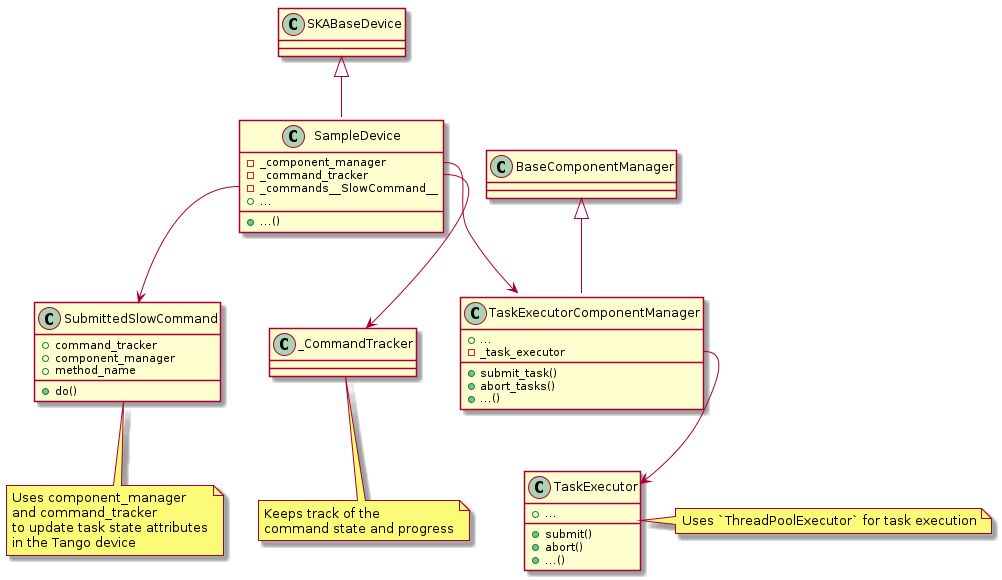
Long Running Command client/server interface
This page describes the protocol built on top of Tango used by ska-tango-base to implement Long Running Commands.
Initiating Long Running Commands
To initiate an LRC, a client must invoke the corresponding Tango command. This
Tango command either returns a (ResultCode, str) pair or raises an
exception if argument validation fails. The return value is to be interpreted
depending on the value of the ResultCode as follows:
ResultCode.QUEUED– The command has been queued, the second return value contains the generated command ID for the LRC.ResultCode.STARTED– The command has been started immediately, the second return value contains the generated command ID for the LRC.ResultCode.REJECTED– The command has been rejected (because, for example there is no room in the Input Queue). The second return value contains a reason string.
Monitoring progress of Long Running Commands
Once a client has initiated an LRC as described above the following LRC
attributes are provided for monitoring the progress of their command.
Associate task data of status, progress and result can be obtained
corresponding to the command ID they were returned from the initiating Tango
command.
LRC attributes
Attribute |
Example Value |
Description |
|---|---|---|
longRunningCommandsInQueue |
(‘Standby’, ‘On’, ‘Off’) |
Keeps track of which commands are known. Note the name is misleading as it includes LRC IN_PROGRESS and LRC that are COMPLETED/ABORTED/ REJECTED/FAILED |
longRunningCommandIDsInQueue |
(‘1636437568.0723004_235210334802782_On’, ‘1636437789.493874_116219429722764_Off’) |
Keeps track of IDs in that have been allocated. Note the name is misleading as it includes LRC IN_PROGRESS and LRC that are COMPLETED/ABORTED/ REJECTED/FAILED |
longRunningCommandStatus |
(‘1636437568.0723004_235210334802782_On’, ‘IN_PROGRESS’, ‘1636437789.493874_116219429722764_Off’, ‘QUEUED’) |
ID, status pair of the currently allocated commands |
longRunningCommandInProgress |
(‘On’) (‘Configure’, ‘Abort’) () |
Name of all commands currently executing |
longRunningCommandProgress |
(‘1636437568.0723004_235210334802782_On’, ‘12’, ‘1636437789.493874_116219429722764_Off’, ‘1’) |
ID, progress pair of the currently executing commands |
longRunningCommandResult |
(‘1636438076.6105473_101143779281769_On’, ‘[0, “On command completed OK”]’) |
ID, JSON encoded result of the completed command |
Associated data for a command will remain present in the above attributes for
(by default) at most 10 seconds after it has reached a terminal
TaskStatus (one of
TaskStatus.COMPLETED
TaskStatus.FAILED
TaskStatus.ABORTED
TaskStatus.REJECTED) . This is
controlled by the removal_time passed to the
CommandTracker initialiser. Note
that associated data for a command may be evicted earlier than 10 seconds after
reaching a terminal TaskStatus to make room for
other commands.
The device has change events configured for all the LRC attributes which clients can use to track
their requests. The client has the responsibility of subscribing to events to receive changes on
command status and results, unless using the new
invoke_lrc() function, which handles the
events for you. The longRunningCommandStatus,
longRunningCommandProgress and
longRunningCommandResult is
considered as v1 of the LRC client-server protocol.
New LRC client-server protocol (v2)
The _lrcEvent attribute is only meant for internal use by the
invoke_lrc() function. Reading it
directly just returns an empty list. For any currently executing command, _lrcEvent
pushes a change event containing the command ID and a JSON encoded dictionary of all
task updates received by the
CommandTracker.update_command_info()
callback in a single call.
_lrcEvent example:
('1636438076.6105473_101143779281769_On', '{"status": 5, "result": [0, "On command completed OK"]}')
The JSON encoded dictionary can be loaded with json.loads(), and contains at least
one or more key-value pairs of status, progress and result. The value of
status and progress is an integer, with the status corresponding to a
TaskStatus. The result value can by anything, but is
typically a list contaning the command’s ResultCode as an
integer and a message.
Now invoke_lrc() rather subscribes to
_lrcEvent (if it’s available on the device server) and then a client can know if a
change to the status and result of a command are related via the callback the client
passed to invoke_lrc().
User facing LRC attributes
SKABaseDevice has three user facing LRC
attributes that provide information to operators/engineers about the current state of
the device’s long running commands. The attributes are called
lrcQueue,
lrcExecuting and
lrcFinished. Each attribute is a
list of commands and their data encoded as JSON blobs.
For providing information to users about LRCs, the following attributes have been deprecated in favour of the user facing attributes mentioned above:
The user facing attributes provide all the same information as those that have been deprecated, but in a more concise and consistent form.
Each LRC can only appear in one of the attributes at a time, and will transition
from one attribute to the next depending on its TaskStatus.
When a LRC is successfully queued, it will appear in
lrcQueue, and can then transition
to lrcExecuting if it starts, or
lrcFinished after it has reached
a terminal status. Up to the last 100 finished LRCs are kept in
lrcFinished, with no removal time.
The JSON blob of each command in lrcQueue
will always contain key value pairs for uid, name and submitted_time. When a
command transitions to lrcExecuting,
a started_time and optional progress key is added, and when it transitions to
lrcFinished, a finished_time,
status and optional result key is added. The submitted_time, started_time
and finished_time are strings in the ISO 8601 date and time format.
Attribute |
Example value |
|---|---|
lrcQueue |
(‘{“uid”: “1727445658.30851_110382742366161_On”, “name”: “On”, “submitted_time”: “2024-09-27T14:00:58.308597+00:00”}’,) |
lrcExecuting |
(‘{“uid”: “1727445658.30851_110382742366161_On”, “name”: “On”, “submitted_time”: “2024-09-27T14:00:58.308597+00:00”, “started_time”: “2024-09-27T14:00:58.360072+00:00”, “progress”: 33}’,) |
lrcFinished |
(‘{“uid”: “1727445658.30851_110382742366161_On”, “name”: “On”, “status”: “COMPLETED”, “submitted_time”: “2024-09-27T14:00:58.308597+00:00”, “started_time”: “2024-09-27T14:00:58.360072+00:00”, “finished_time”: “2024-09-27T14:00:58.761918+00:00”, “result”: [0, “On command completed OK”]}’,) |
Key value pairs matrix:
Key |
Type |
In lrcQueue? |
In lrcExecuting? |
In lrcFinished? |
|---|---|---|---|---|
uid |
str |
Always |
Always |
Always |
name |
str |
Always |
Always |
Always |
submitted_time |
str |
Always |
Always |
Always |
started_time |
str |
No |
Always |
Not if rejected/aborted from queue |
finished_time |
str |
No |
No |
Always |
status |
str |
No |
No |
Always |
progress |
int | str |
No |
Optional |
No |
result |
JSON |
No |
No |
Optional |
LRC commands
In addition to the above attributes, the following commands are provided for interacting with Long Running Commands.
Command |
Description |
|---|---|
CheckLongRunningCommandStatus |
Check the status of a long running command by ID |
Abort |
Abort the currently executing LRC and remove all enqueued LRCs |
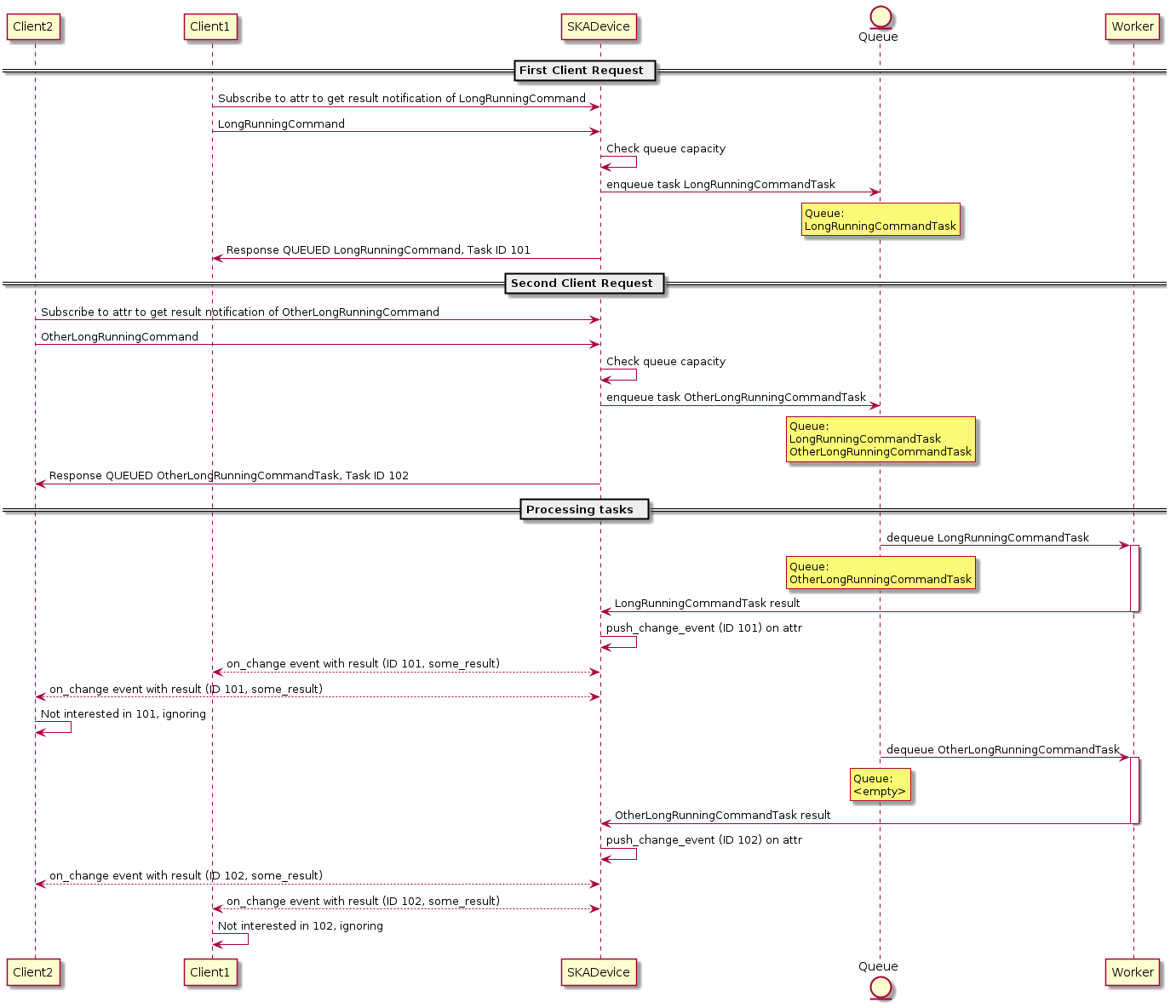
UML illustration
Multiple clients invoke multiple Long Running Commands:
Class diagram