SPEAD Antenna Buffer Test
Purpose
This test verifies that the SPEAD header fields of the Antenna Buffer data match the expected values. The SPEAD packets are captured using the DAQ receiver. The captured SPEAD header fields are then passed to the test via a callback by the DAQ. Given below is the SPEAD header specification which is verified in this test.
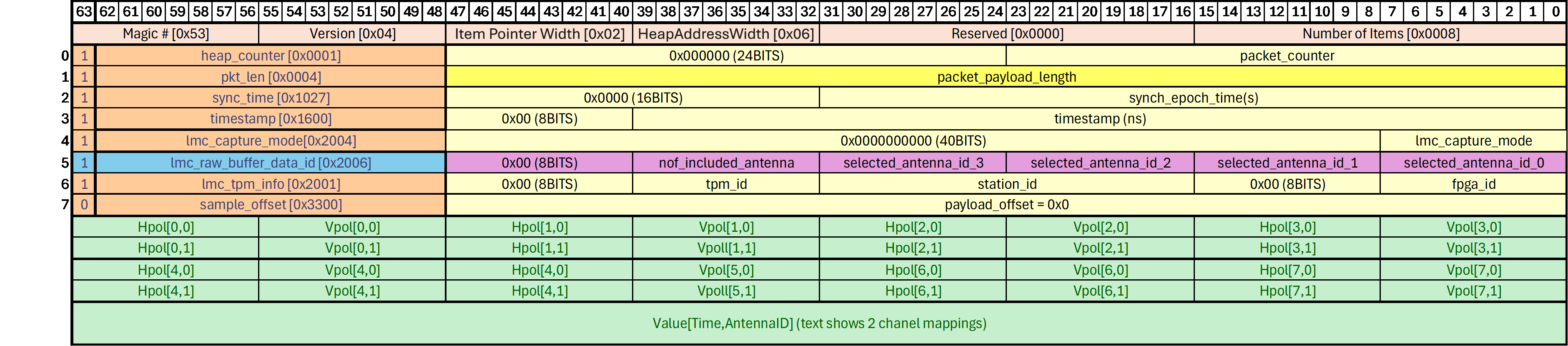
Antenna Buffer data is requested from 2 randomly selected antennas for a capture duration of 1 timestamp. This corresponds to 2*864*512 samples of ADC data which comes out to 576 SPEAD packets. This data is requested from one FPGA at a time. By default, the test does 5 iterations per FPGA; at each iteration verifying 576 packets. The number of iterations parameter can be modified in the test parameters tab of the testsuite.
NOTE: This test operates on all TPMs in a station individually (when single_tpm_id=-1). For data acquisition to function correctly, the network interfaces on the TPM must be working, as well as the link to the LMC destination. The LMC destination must be configured to route traffic to the server running the tests. For all tests the simplest option is for the CSP and LMC destinations to be the same network interface, routing all traffic to the server running the tests.
Methodology
Establish connection to the station and specified TPM(s).
Stop integrated data and station beamformed data.
Set up the Antenna Buffer for each tile
Configure and initialise the DAQ receiver with the required UDP port and network interface.
Start the DAQ in Antenna Buffer data mode.
Request Antenna Buffer data for a specific TPM and FPGA for 2 randomly selected antennas. This will be stored in the DDR memory of the TPM.
Request the data stored in DDR to be read out from the TPM.
Wait for the DAQ to receive the data.
Extract the spead header fields from the DAQ callback.
Verify SPEAD header fields by comparing with the expected values.
Repeat steps 6-10 for set number of iterations.
When all iterations are finished, stop the DAQ.
Repeat steps 5-12 for the rest of the TPMs.
Stop the DAQ and clean up temporary directory.