Test Auto-Build Widget Step
Use the scaffolder output to smoke-test a widget inside the
ska-octopus-frontend dashboard. The steps below create a trivial
TestWidget, wire it into the dashboard with a path alias, and highlight the
IIFE alternative provided in vite.config.ts.
Requirements
ska-octopus-build-widgetscloned locally with dependencies installed.ska-octopus-frontendchecked out alongside your widget workspaces.A directory (for example
~/octopus-widgets/) where the generated widget sources will live.
Note
The instructions assume both repositories sit under the same parent folder, so
the relative path ../octopus-widgets/test-widget resolves from the frontend
project. Adjust the path if your layout differs.
1. Generate a Sample Widget
Create a minimal widget that exercises the scaffolder end-to-end. The UI (shown
below) and CLI example both use a concrete GraphQL query so the generated code
matches the screenshot: it fetches a jsonApi record by myID and prints
userId, id, title, and completed fields.
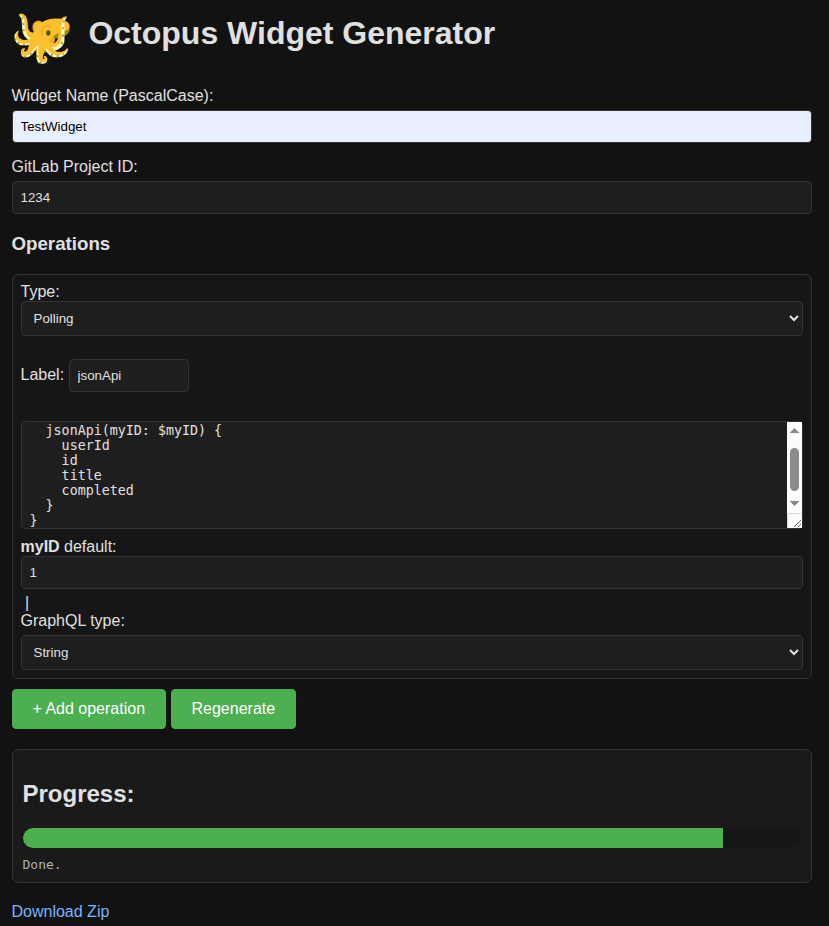
UI overview screenshot
or by command line:
poetry run python octopus_widget_scaffolder.py \
  --name TestWidget \
  --kind mix \
  --ops-json '[
    {
      "type": "polling",
      "gql": "query TestWidget($myID: ID!) { jsonApi(myID: $myID) { userId id title completed } }",
      "vars": {
        "MY_ID": {
          "default": "1",
          "type": "ID!"
        }
      }
    }
  ]' \
  --app-id 99999
When the command finishes, copy the generated sources somewhere your frontend can import from:
cp -R output/ska-octopus-test-widget-widget ~/octopus-widgets/test-widget
2. Add a Path Alias for Local Source Imports
Open ska-octopus-frontend/vite.config.ts and append the alias inside the
resolve.alias section.
"@ska-octopus-widgets/test-widget-widget": path.resolve(
  __dirname,
  "../octopus-widgets/test-widget/src"
),
This tells Vite to import the widget straight from your local source tree, avoiding the need to publish a package.
3. Import the Widget in the Dashboard
In ska-octopus-frontend/src/dashboard.ts, add the module import so the widget
registers itself with the runtime registry.
import "@ska-octopus-widgets/test-widget-widget";
The dashboard scripts automatically pick up every widget that calls
Octopus.registerWidget, so no further wiring is necessary.
4. Run the Frontend
From the ska-octopus-frontend directory, start the dev server and verify the
widget appears in the widget picker.
npm install
npm run dev
Rebuild the widget (for example npm run build inside the widget directory)
whenever you change its source. Because the alias points at src/, changes are
reflected immediately without a rebuild.
Alternative: Use the IIFE Loader
If you prefer testing the production bundle, use the LOCAL_IIFE helper inside
vite.config.ts instead of a source alias:
Build the widget with
npm run buildsodist/index.iife.jsexists.Map the package name in
LOCAL_IIFE, for example:'test-widget-widget': path.resolve( __dirname, '../octopus-widgets/test-widget/dist/index.iife.js' ),
Enable the loader (keep the module import in
dashboard.ts).
The dev server then serves the bundle at /iife/<package-name>, mimicking how
the widget would load when published to npm.
Tip
Remember to remove temporary aliases or IIFE mappings before committing unless they are meant to live in the repository.