Testing
Unit Tests
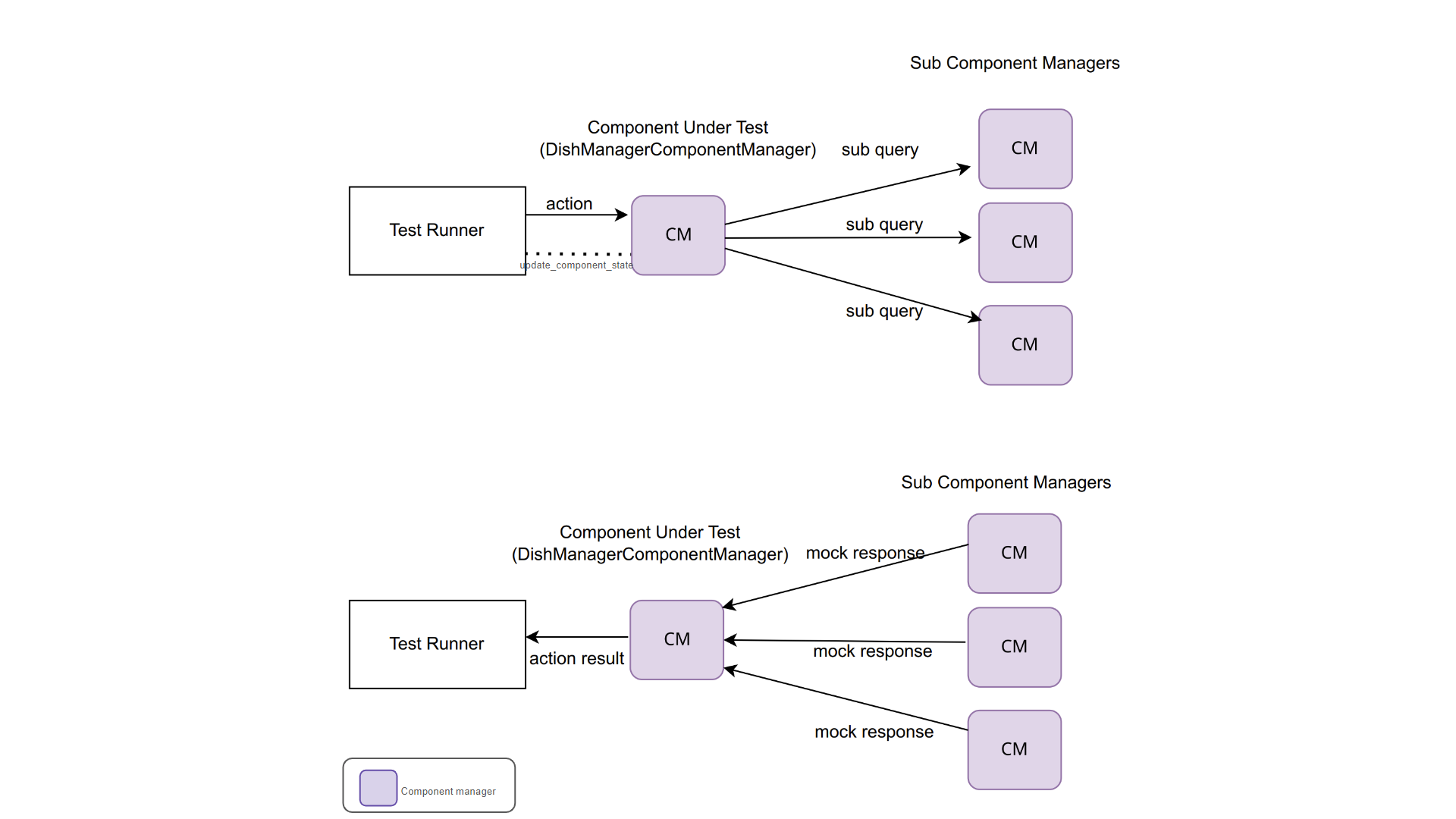
Since the component managers handle the interactions with the devices, we are able to check the robustness of our component manager and the business rules captured in our model without spinning up any tango infrastructure. All tests exercising only objects with no tango are executed under the
python-testjob: primarily running tests exercising the business logicpython-test-interface-no-tangojob: primarily running exercising the command handlers of the component manager
See diagram below explaining the test setup in the
python-test-interface-no-tangojob.
Additionally, the device server interface is tested (using a DeviceTestContext)
without having to set up client connections to the sub component devices. The
necessary triggers on the sub components needed to effect a transition on DishManager
are manipulated from weak references to the sub component managers. This test runs in
the python-test-interface-tango job.
See diagram below explaining the test setup in the python-test-interface-tango job.

Acceptance Tests
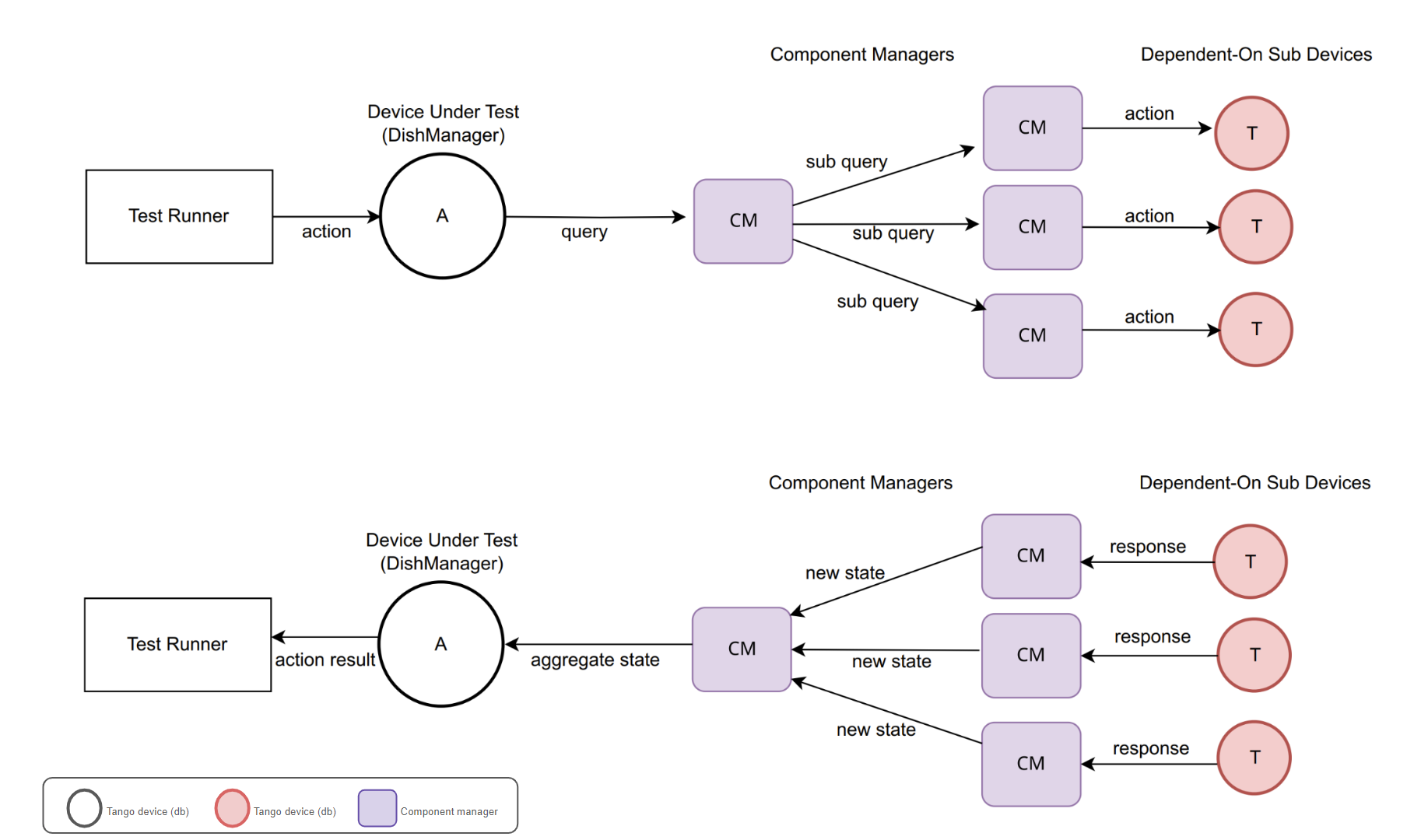
This deploys the entire tango infrastructure (devices, database, etc) in a kubernetes
cluster to test the entire chain from events to callbacks on the various component
managers down to the DishManager device server attribute. These tests use simulated devices
with limited api and functionality for the SPF Controller, SPFRx Controller
and the DS Simulator. These acceptance tests are captured in the k8-test-runner job.
See diagram below explaining the test setup in the k8-test-runner job.
Testing Locally without Kubernetes
DishManager is packaged as a helm chart to be deployed in a kubernetes cluster. Beyond verifying
changes based on pipeline outputs from python-test* and k8s-test-runner jobs, it’s beneficial (in some cases)
to be able to deploy the devices locally without needing to spin up a kubernetes cluster to quickly verify
changes. This is not meant to rival our deployment process in the project but rather, provide alternatives
for the developer to verify their changes locally before pushing them upstream.
Deploy DishManager with no DB
This can be run in an isolated environment (virtual environment, docker container, …)
$ python DishManagerDS.py SKA001 -v4 -nodb -host 127.0.0.1 -port 23456 -dlist mid-dish/dish-manager/SKA001
`deploy all simulators in ska-mid-dish-simulators/src/ska_mid_dish_simulators/devices/`
$ python SPFRX.py SKA001 -v4 -nodb -host 127.0.0.1 -port 56789 -dlist mid-dish/simulator-spfrx/SKA001 &
$ python SPF.py SKA001 -v4 -nodb -host 127.0.0.1 -port 45678 -dlist mid-dish/simulator-spfc/SKA001 &
$ python ds_opcua_server.py &

`deploy DSManager in ska-mid-dish-ds-manager/src/ska_mid_dish_ds_manager/`
$ python DSManager.py SKA001 -v4 -nodb -host 127.0.0.1 -port 12345 -dlist mid-dish/ds-manager/SKA001

`deploy DishManager (this will require updating fqdn property values to point to addresses for the sub devices)`
`keep the simulators and DSManager running while continuously re-running DishManager to test new changes`
$ python DishManagerDS.py SKA001 -v4 -nodb -host 127.0.0.1 -port 23456 -dlist mid-dish/dish-manager/SKA001
Tip
Device server can be deployed directly from docker image as:
$ docker run -p 45450:45450 -it <image-name:tag> /usr/bin/python3 /app/src/ska_mid_dish_manager/devices/DishManagerDS.py SKA001 -v4 -nodb -port 45450 -dlist mid-dish/dish-manager/SKA001
Deploy DishManager with DB
TODO in KAR-865 (using docker-compose).