WMS Component Manager
In order to protect the dish under inclement weather conditions, dish manager monitors the weather data published by 1 or more weather station devices and stows the dish under the following conditions;
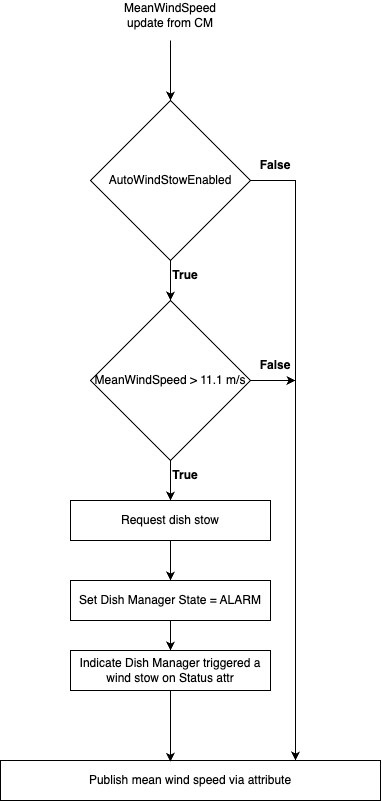
10 minute moving average wind speed > 11.1m/s
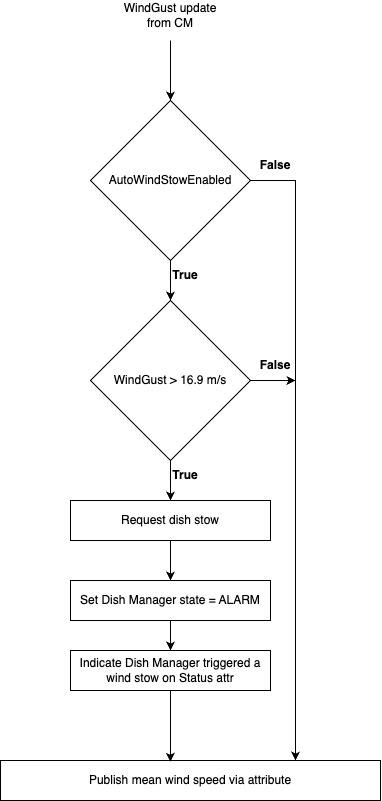
3-second wind gust speed > 16.9m/s
To enable control and monitoring of the WMS device(s) the dish manager instantiates the WMS component manager as shown in the diagram below;
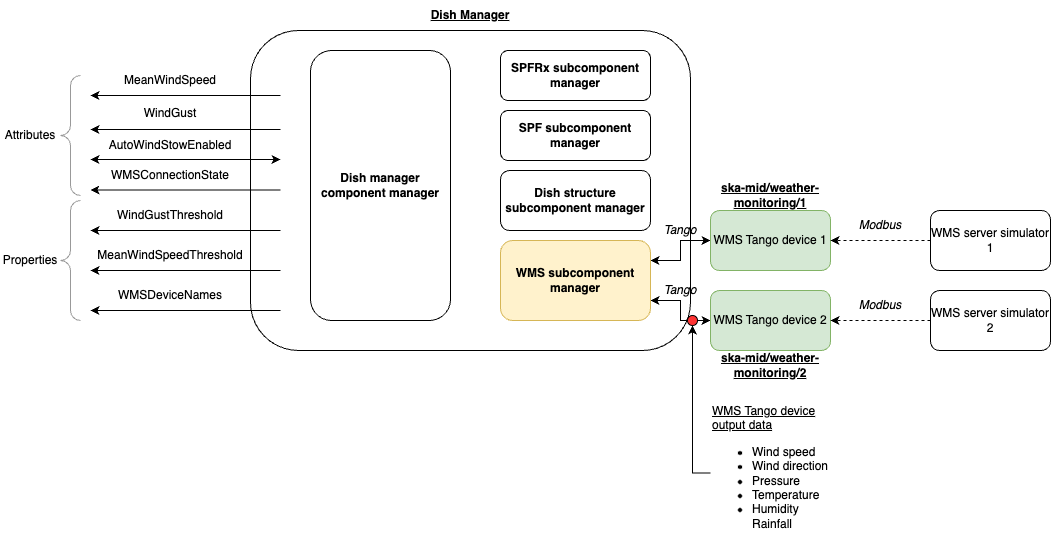
On instantiation of the WMS component manager, the component manager will;
Set the adminMode attribute of all monitored WMS device instances to ONLINE. This start the monitoring of the weather station servers by the WMS tango devices.
Update the connection state to ESTABLISHED. The “WMSConnectionState” attribute of dish manager will reflect this connection state update.
Start a polling loop which periodically reads the windSpeed attribute of all monitored WMS device instances at a period of 1 second.
The WMS component manager considates the wind speed data fetched from all monitored weather station devices, returning the mean wind speed and wind gust readings via a component state update. These updates are reflected on the dish manager via the following attributes.
Mean wind speed attribute
The WMS component manager keeps an internal circular buffer, containing the all wind speed values from all monitored weather stations. The mean wind speed is the average of wind speeds in the buffer in the preceeding 10 minute period (or less, if less than 10 minutes have elapsed since monitoring began).
Wind gust attribute
The WMS component manager keeps an internal circular buffer, containing only the maximum wind speed values polled between all monitored weather stations in each polling interval in the preceeding 3 seconds (or less, if less than 3 seconds have elapsed since monitoring began).
The reported wind gust is the maximum amongst the buffered maximum wind speeds.
AutoWindStowEnabled attribute
The ability of dish manager to request a dish stow in the event that a high average wind speed or wind gust is detected can be configured using the read-writable boolean attribute “autoWindStowEnabled”.
Auto wind stow
The Dish manager component manager receives the updated values of mean wind speed and wind gust from the wms subcomponent manager. The dish manager cm will evaluate the received wind speed update values against the value of the flag ‘autoWindStowEnabled’ and the threshold values as show in the following decision tree diagrams;
On receipt of mean wind speed update;
On receipt of wind gust update;