Command Map

DishManager Command Fan-out

The command fanout page details the Dish component level flow of commands, showing the command, its pre-condition, triggers (command fan-out) and post condition. The reported value is an aggregation of values from the sub component determined by a list of transition rules.

Note

MAINTENANCE mode is not computed from aggregating operating modes it is commanded on dish manager.

Command Execution (ADR-93 not considered)

In a naive example, the fan-out only considers the sub-components which have the mapped commands from DishManager. Thus, the propogated respective commands and transition rule aggregation consider all the participating devices. The sequence diagram below shows a transition to STANDBY-FP.
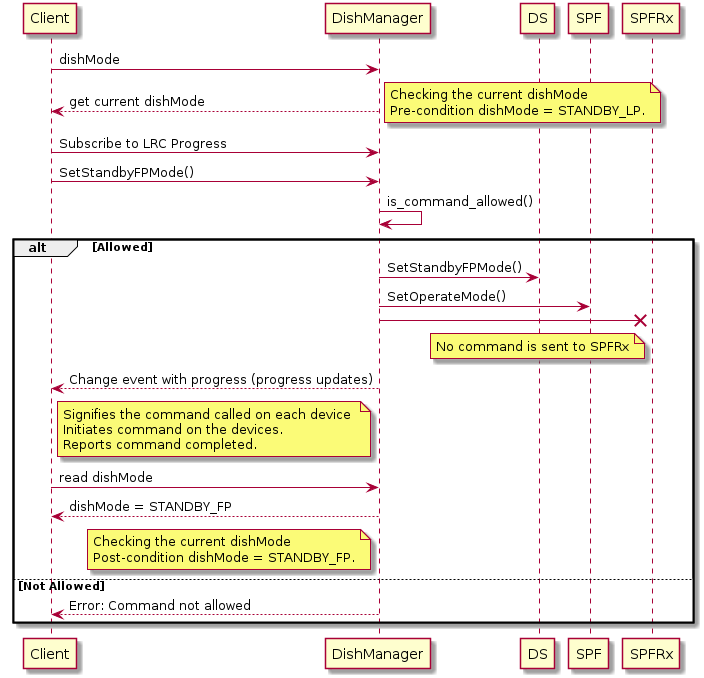
@startuml

Client -> DishManager: dishMode
DishManager --> Client: get current dishMode
note right 
	Checking the current dishMode 
	Pre-condition dishMode = STANDBY_LP.
end note

Client -> DishManager: Subscribe to LRC Progress

Client -> DishManager: SetStandbyFPMode()

  DishManager -> DishManager: is_command_allowed()
  alt Allowed
      DishManager -> DS: SetStandbyFPMode()
      DishManager -> SPF: SetOperateMode()
      DishManager -x SPFRx
      note left of SPFRx: No command is sent to SPFRx
      DishManager --> Client: Change event with progress (progress updates)
      note left of DishManager: Signifies the command called on each device \nInitiates command on the devices.\nReports command completed.
      Client -> DishManager: read dishMode
      DishManager --> Client: dishMode = STANDBY_FP
      note left of DishManager: Checking the current dishMode \nPost-condition dishMode = STANDBY_FP.
  else Not Allowed
      DishManager --> Client: Error: Command not allowed
  end
@enduml

Command Execution (ADR-93 considered)

Since ADR-93, DishManager now considers whether a sub-component has been ignored to determine which device receives a command propoagation and is included in the transition rule aggregation. The sequence diagram below shows a transition to STANDBY-LP (using the ignored attributes).
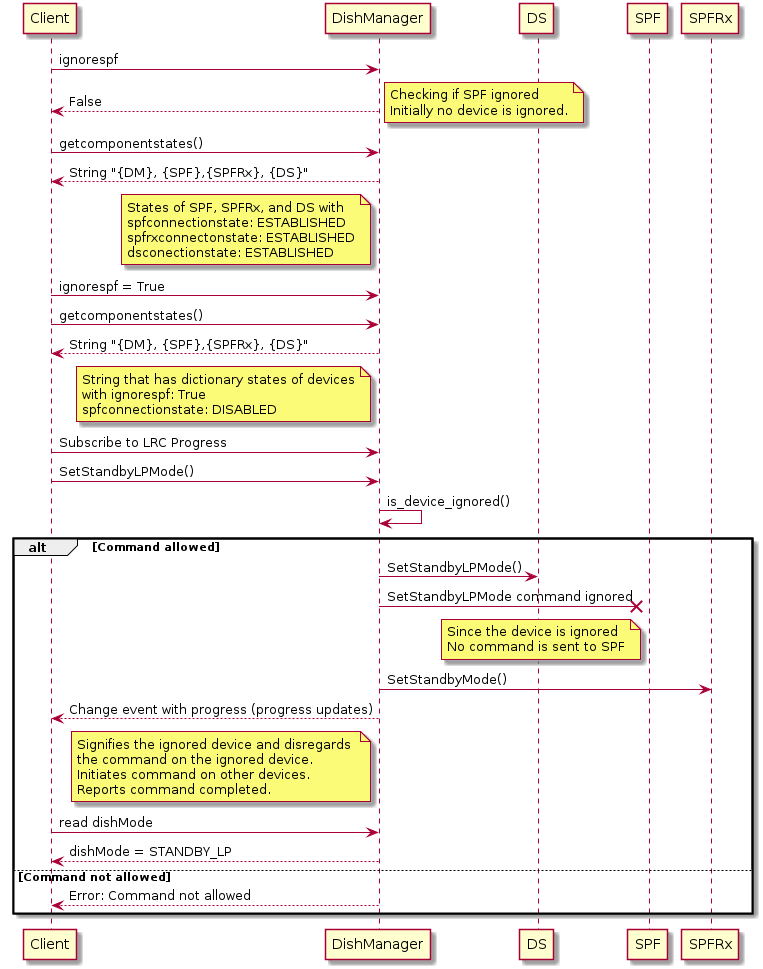
@startuml

Client -> DishManager: ignorespf
DishManager --> Client: False
note right 
	Checking if SPF ignored 
	Initially no device is ignored.
end note

Client -> DishManager: getcomponentstates()

DishManager --> Client: String "{DM}, {SPF},{SPFRx}, {DS}" 
note left of DishManager: States of SPF, SPFRx, and DS with \nspfconnectionstate: ESTABLISHED\nspfrxconnectonstate: ESTABLISHED\ndsconectionstate: ESTABLISHED

Client -> DishManager: ignorespf = True
Client -> DishManager: getcomponentstates()
DishManager --> Client: String "{DM}, {SPF},{SPFRx}, {DS}"
note left of DishManager: String that has dictionary states of devices\nwith ignorespf: True\nspfconnectionstate: DISABLED

Client -> DishManager: Subscribe to LRC Progress

Client -> DishManager: SetStandbyLPMode()

DishManager -> DishManager: is_device_ignored()
alt Command allowed
	DishManager -> DS: SetStandbyLPMode()

	DishManager -x SPF: SetStandbyLPMode command ignored
	note left of SPF: Since the device is ignored \nNo command is sent to SPF

	DishManager -> SPFRx: SetStandbyMode()

	DishManager --> Client: Change event with progress (progress updates)
	note left of DishManager: Signifies the ignored device and disregards \nthe command on the ignored device.\nInitiates command on other devices.\nReports command completed.

	Client -> DishManager: read dishMode

	DishManager --> Client: dishMode = STANDBY_LP
else Command not allowed
DishManager --> Client: Error: Command not allowed
end
@enduml