Low CBF Health Monitoring
Philosophy
Health means a device’s ability to perform its function.
The
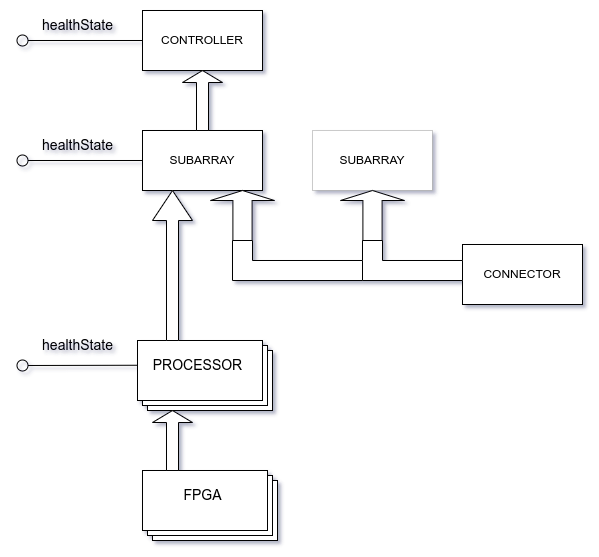
healthStateattribute is used to report the health state of Low CBF Controller, Subarray, Processor and Connector devices.Controller and Subarray aggregate the health of other Tango devices.
Processor and Connector report the health of their underlying hardware as well as their firmware/programming and control software.
The information used by each device to evaluate its health state will be exposed as Tango attributes for use in GUIs or as alarms.
Purpose
Why do all SKA Tango devices have a healthState attribute?
To pinpoint faulty pieces of the telescope.
Health State Definitions
0 - OK: fully functional
1 - Degraded: partial (not full) function available [optional state]
2 - Failed: unable to perform core function
3 - Unknown: initial state / we can’t determine an answer
See also the documentation for ska_control_model.HealthState.
Evaluation is based on the component itself, not the previous/next piece of signal chain or neighbours. To use an analogy: we evaluate “our car”, not the road, bridge, or traffic lights.
Alarms vs Health
Alarms and Health are different things.
An alarm is defined in IEC 62682 as:
An audible and/or visible means of indicating to the operator of an equipment malfunction, process deviation, or abnormal condition requiring a response.
We define health as:
A device’s ability to perform its function.
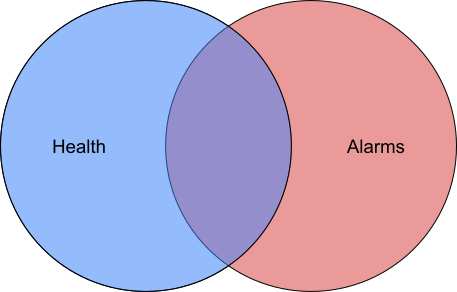
One is not a subset of the other, although there is some overlap. Some parameters that trigger alarms may lead to a change in health state, others may not. Some parameters that are used to calculate health state will have alarms associated with them, some may not. A failed health state in some devices may be alarmed, others may not.
Low CBF devices will provide many diagnostic attributes which may or may not be used
as alarms in the operating telescope. Alarm annunciation and configuration will be via
an instance of the Elettra AlarmHandler Tango device. Its configuration includes a
“formula” that is evaluated to trigger an alarm, alarm priority, group, etc.
Note
An attribute that has an AttrQuality status of ALARM does not necessarily
result in an alarm being announced to the operator! All operator alarms will be
configured and announced via an AlarmHandler Tango device.
Health Aggregation
The Low CBF Controller and Subarray devices will aggregate the health status of their underlying hardware devices.
This means:
The health of a Subarray device will be an aggregation of the health of the Processor and Connector devices that are participating in the subarray.
The health of the Controller device will be an aggregation of the health of all Low CBF Processors and Connectors.
In principle, these aggregated health states should be:
OK if the underlying hardware is sufficiently healthy to perform full functionality (there may be a FAILED state in some redundant piece of hardware)
DEGRADED if there are degradations or failures in underlying hardware that reduces overall functionality (perhaps beyond some threshold of acceptable degradation)
FAILED if no functionality is possible (either due to a single point of failure or to a combination of multiple failures)
In practise, this is very difficult to codify! There will be pathological combinations of degraded hardware that can result in an overall failure. Rather than aim for a perfection that we fail to achieve, we will implement the following “close enough” algorithm:
for each type of hardware (Connectors, Processors):

    if number of devices OK >= number required for full function:
      device_type_health = OK
    else if all devices FAILED:
      device_type_health = FAILED
    else:
      device_type_health = DEGRADED

aggregated health = worst case of all device_type_health values
If the ENGINEERING_MODE_IGNORE_HEALTH environment variable is defined and
set to True (case ignored), the Subarray will ignore health state of
external devices (switches, processors) when its adminMode is
ENGINEERING. This would prevent propagating the healthState to
LowCbfController and possibly confusing the operator.
Controller Health Aggregation
As mentioned above, the healthState attribute of the Low CBF Controller will reflect
the aggregated health of all Low CBF hardware devices.
The Controller device searches the Tango database for all Processor and Connector
devices when its AdminMode is switched ONLINE. Any devices not defined in the
database at this time will not be detected. Beware that the way we deploy Tango
devices for development and testing involves dynamically reconfiguring the Tango
database, so there is a chance we may not discover devices (i.e. any that are late to
inject themselves to the database). We hope that the Tango database used for the real
operational telescope will have a fixed definition, thus avoiding this risk.
The health state of all Processor & Connector devices will be available at the
Controller via Tango array attributes health_processors & health_connectors.
Health of Low CBF Hardware Devices
As well as the healthState attribute, Low CBF hardware-related devices (Connector &
Processor) will expose three health “category” attributes. These categories are intended
to help with triaging faults (e.g. a hardware fault likely needs a technician on site,
but a processing fault might be remedied by restarting the scan). Like healthState,
these health category attributes also use the
ska_control_model.HealthState enumeration data type. The three attributes
are:
health_hardwareto summarise the health of the hardware layer. For example: QSFPs, power supplies, temperatures.health_functionto summarise the health of the ‘functional’ layer. This includes things like driver interfaces, loading firmware, or routing rules.health_processto summarise the health of the ‘processing’ layer. This means the dynamic conditions including other Tango connections. e.g. FPGA error registers, P4 switch queue overflow.
The healthState attribute will report the worst case of the three categories.
The individual parameters that contribute to these three summary attributes will also be exposed as individual Tango attributes. In other words, all the pieces of information that are used to assess health will be available as separate Tango attributes.
Each parameter will be exposed as a single attribute (numeric or boolean). Aggregations (e.g. using JSON structures) or Tango array types will not be used, as these cannot be unpacked by an
AlarmHandler.We expose these individual attributes for the purposes of: helping troubleshooters pinpoint an active failure mode, displaying on user interfaces, and to allow for individual alarms to be configured using an
AlarmHandlerif desired. Using anAlarmHandler, an alarm could be added to a particular parameter for early warning of impending failure, or logic could be used to look at the same parameter across multiple devices - whatever is useful to operations & maintenance.
Each attribute will be associated with its category via a naming convention:
hardware_<parameter_name>for those contributing tohealth_hardwarefunction_<parameter_name>for those contributing tohealth_functionprocess_<parameter_name>for those contributing tohealth_process
When evaluation of an individual parameter is not possible (e.g. FPGA uptime cannot be evaluated when the FPGA is un-programmed), its attribute will report
INVALIDquality using the standard TangoAttrQualitymechanism.Invalid individual parameters will not contribute to their health category summary.
Invalid health category attributes will not contribute to the overall
healthState.
Below is an example of the health evaluation scheme in action, represented as a table
where each cell aggregates its neighbours on the right. Tango
AttrQuality is shown in italics.
Overall Health |
Health Category |
Individual Parameters |
|---|---|---|
FAILED VALID |
OK VALID |
|
|
||
|
||
FAILED VALID |
|
|
|
||
|
||
INVALID |
|
|
|
Implementation Details
A YAML configuration file will provide settings that control how each attribute contributes to health state (this is an indicative concept, not prescriptive specification)
# top level keys are names of attributes that contribute to health assessment
hardware_numeric_example:
  # trigger FAILED when outside the interval (-20,100)
  # i.e. "not -20 < value < 100"
  fail_limits: [-20, 100]
  # set DEGRADED when outside this interval (but not the fail interval)
  degrade_limits: [0, 50]
  # if any "limits" value is 'null' (=> None in Python), that limit does not apply
  # if we are not outside any fail/degrade limit then this parameter is OK

hardware_boolean_example:
  # make hardware_health go to FAILED state if attribute value is True
  fail_state: true

hardware_boolean_example_two:
  # DEGRADED hardware_health if our value is False
  degrade_state: false
Using this, we configure the AttributeInfoEx Tango structure for each attribute,
so the settings are visible to (and modifiable by) clients. Tango will then
automatically drive the WARNING and ALARM status
(AttrQuality).
Note
An attribute that has an AttrQuality status of ALARM does not necessarily
result in an alarm being announced to the operator! All operator alarms will be
configured and announced via an AlarmHandler Tango device.
health_hardware is determined by seeing if any hardware_* attribute is in
WARNING/ALARM state (which implies that it’s past its degrade/fail threshold).
Likewise for health_function & health_process.
healthState evaluation uses a very simple algorithm:
max(health_hardware, health_function, health_process)
Implemented health attributes
As of Jul-2024 the following health related LowCbfProcessor Tango attributes are implemented (subject to change upon review):
Category |
Tango Attributes |
Atribute’s |
Description |
|---|---|---|---|
|
|
FPGA core temperature in degrees C |
|
|
FPGA power consumption in Watts |
||
|
FPGA memory temperature in degrees C |
||
|
Auxiliary power supply voltage in Volts |
||
|
Auxiliary power supply current in Amperes |
||
|
PCIe bus power supply voltage in Volts |
||
|
PCIe bus power supply current in Amperes |
||
|
|
FPGA firmware loaded indicator (boolean) |
|
|
|
FPGA device driver is operational (boolean) |
|
|
|
|
Delay polynomials valid indicator (boolean) |
|
|
Delay polynomials subscription valid indicator (boolean) |
|
|
|
SPS SPEAD packets are arriving at FPGA input (boolean) |
Overrides for Testing
We think that overriding of the healthState attribute and the other attributes
that contribute to health evaluation will be useful for testing (e.g. to test Low CBF
health aggregation logic, or CSP LMC health aggregation logic).
The override will be controlled by the testMode attribute (see
ska_control_model.TestMode). Any override configuration will be cleared when
testMode is changed to NONE (i.e. test mode off), to minimise the chance of
accidentally overriding something.
The override configuration will be set via the test_mode_overrides attribute, using
a (JSON encoded) dictionary with attribute names as keys and their desired state as
values.
Any attribute not listed in the overrides dictionary will operate as normal.
Examples:
To force the healthState attribute to FAILED
{"healthState": "FAILED"}
To force the hardware_12v value to 13.8, as well as the hardware_health to OK
{"hardware_health": "OK", "hardware_12v": 13.8}
Note
All content below here was written for an older health scheme and needs revision!
Attribute Subscription
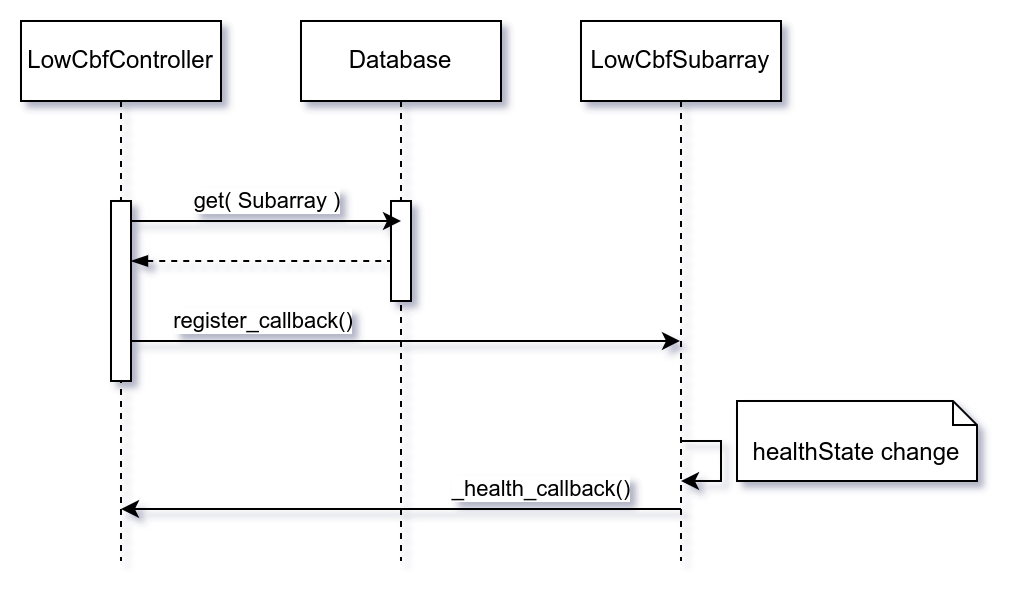
Controller Tango device subscribes to changes in healthState attribute of all
constituent Subarrays; it uses Tango database to retrieve the list of Subarrays:
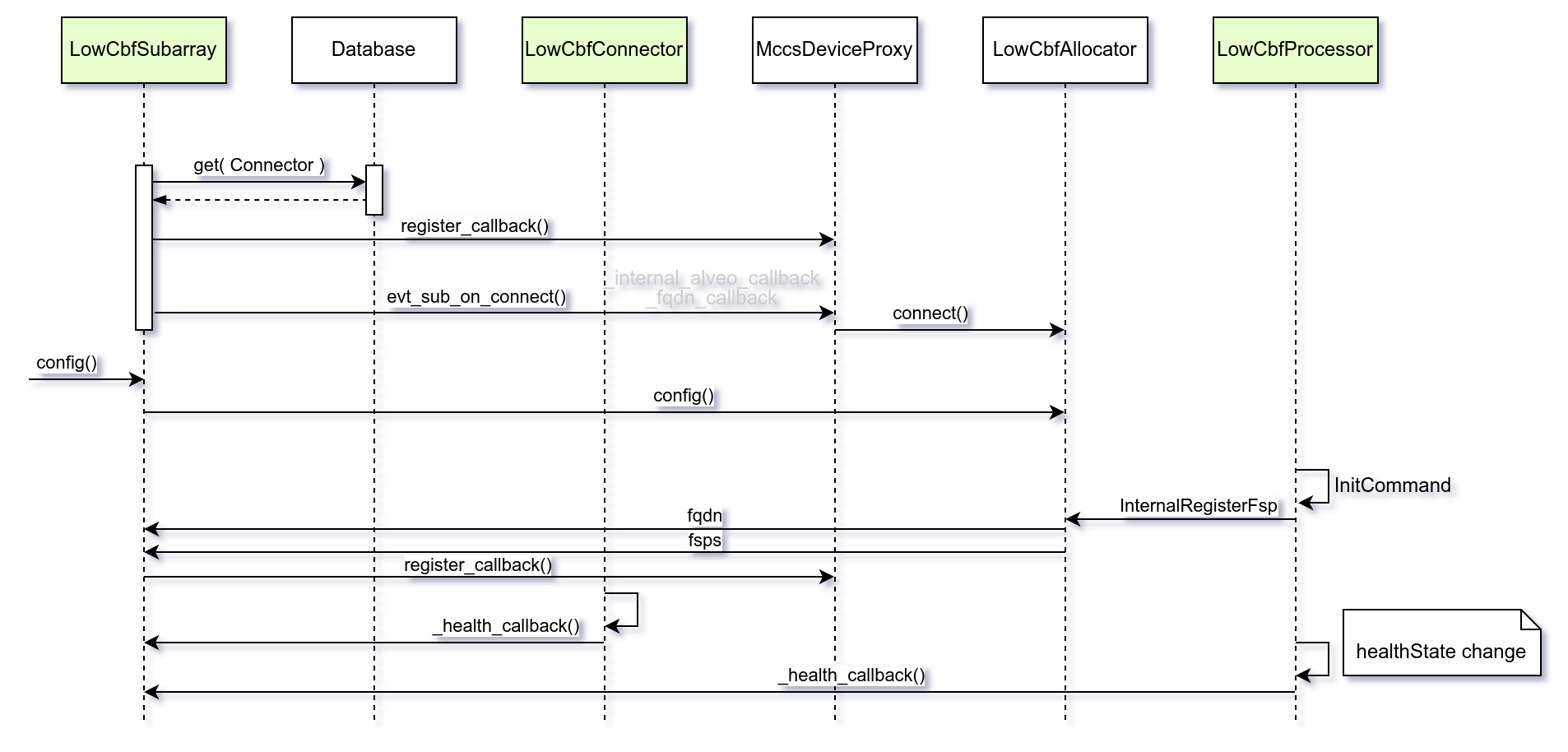
Subarray Tango devices subscribes to changes in healthState attribute of all
Connector devices and all Processors allocated to the Subarray. The list of
Connector Tango devices is retrieved from Tango database. The list of Processors
assigned to Subarray is reported by the Allocator.
Processor health
If the NO_HEALTH_ROLLUP environment variable is defined, the Subarray will not include the health of external devices (switches, processors) in its roll-up. This allows for tests in which switches or procssor devices are not present.