How to spin-up a HDB++ archiver using docker compose
Docker compose and the images produced by this repository can be used to spin-up a basic HDB++ archiver for experimentation.
This how-to provides a docker compose file you can use to startup the necessary HDB++ device servers to be able to archive data from Tango devices.
As an example, the docker compose also starts a TangoTest device, configures the archive to collect data from this device and shows how to collect data from the archive using pyhdbpp.
Create the docker compose configuration
This section describes the files you need to create in order to start the HDB++ instance. The docker compose file will use ska-tango-images-tango-dsconfig to configure the Tango database and ska-tango-images-hdbpp-yaml2archiving to configure the HDB++ archiver.
Step 1: Save the following as
compose.yaml:
networks:
  tango-net:
    name: tango-net
    driver: bridge

services:
  tango-db:
    image: artefact.skao.int/ska-tango-images-tango-db:11.2.6
    platform: linux/x86_64
    networks:
      - tango-net
    environment:
      - MARIADB_ROOT_PASSWORD=root
      - MARIADB_DATABASE=tango
      - MARIADB_USER=tango
      - MARIADB_PASSWORD=tango
    healthcheck:
      test: ["CMD", "healthcheck.sh", "--connect"]
      start_period: 10s
      interval: 500ms
      timeout: 1s
      retries: 3

  tango-dbds:
    image: artefact.skao.int/ska-tango-images-tango-databaseds:5.23.0
    platform: linux/x86_64
    networks:
      - tango-net
    ports:
      - "10000:10000"
    environment:
      - TANGO_HOST=localhost:10000
      - MYSQL_HOST=tango-db:3306
      - MYSQL_USER=tango
      - MYSQL_PASSWORD=tango
      - MYSQL_DATABASE=tango
    depends_on:
      tango-db:
        condition: service_healthy
    entrypoint: Databaseds
    command:
      - "2"
      - -ORBendPoint
      - giop:tcp::10000
    healthcheck:
      test: ["CMD", "sh", "-c", "/usr/local/bin/tango_admin --ping-database || exit 1"]
      start_period: 10s
      start_interval: 500ms
      timeout: 3s
      retries: 3

  load-tango-config:
    image: artefact.skao.int/ska-tango-images-tango-dsconfig:1.8.0
    platform: linux/x86_64
    networks:
      - tango-net
    environment:
      - TANGO_HOST=tango-dbds:10000
    volumes:
      - ./:/mnt:z
    depends_on:
      tango-dbds:
        condition: service_healthy
    entrypoint: "bash"
    command:
      - "-c"
      - "json2tango --write /mnt/tango.json || [ $$? -eq 2 ]"

  archive-db:
    image: artefact.skao.int/ska-tango-images-hdbpp-timescaledb:2.4.0
    platform: linux/x86_64
    networks:
      - tango-net
    ports:
      - "5432:5432"
    environment:
      - POSTGRES_PASSWORD=tango
    healthcheck:
      test: ["CMD", "pg_isready"]
      start_period: 10s
      start_interval: 500ms
      timeout: 1s
      retries: 3

  archive-cm:
    image: artefact.skao.int/ska-tango-images-hdbpp-cm:2.2.1
    platform: linux/x86_64
    networks:
      - tango-net
    environment:
      - TANGO_HOST=tango-dbds:10000
    depends_on:
      tango-dbds:
        condition: service_healthy
      load-tango-config:
        condition: service_completed_successfully
    healthcheck:
      test: ["CMD", "sh", "-c", "/usr/local/bin/tango_admin --ping-device hdb/cm/1 || exit 1"]
      start_period: 10s
      start_interval: 500ms
      timeout: 1s
      retries: 3
    command:
      - "1"

  archive-es:
    image: artefact.skao.int/ska-tango-images-hdbpp-es-timescaledb:2.4.0
    platform: linux/x86_64
    networks:
      - tango-net
    environment:
      - TANGO_HOST=tango-dbds:10000
    depends_on:
      tango-dbds:
        condition: service_healthy
      load-tango-config:
        condition: service_completed_successfully
    healthcheck:
      test: ["CMD", "sh", "-c", "/usr/local/bin/tango_admin --ping-device hdb/es/1 || exit 1"]
      start_period: 10s
      start_interval: 500ms
      timeout: 1s
      retries: 3
    command:
      - "1"

  load-archive-config:
    image: artefact.skao.int/ska-tango-images-hdbpp-yaml2archiving:0.11.0
    platform: linux/x86_64
    networks:
      - tango-net
    environment:
      - TANGO_HOST=tango-dbds:10000
    volumes:
      - ./:/mnt:z
    depends_on:
      archive-cm:
        condition: service_healthy
      archive-es:
        condition: service_healthy
    command:
      - "--write"
      - "/mnt/archive.yaml"

  tango-test:
    image: artefact.skao.int/ska-tango-images-tango-test:3.10.0
    platform: linux/x86_64
    networks:
      - tango-net
    environment:
      - TANGO_HOST=tango-dbds:10000
    depends_on:
      tango-dbds:
        condition: service_healthy
    healthcheck:
      test: ["CMD", "sh", "-c", "/usr/local/bin/tango_admin --ping-device sys/tg_test/1 || exit 1"]
      start_period: 10s
      start_interval: 500ms
      timeout: 1s
      retries: 3
    command:
      - "test"
Tip
This docker compose file includes a Tango database, similar to that described
in How to spin-up a Tango environment using Docker compose. If you want to be able to control the
startup of the Tango database separately from the startup of HDB++, remove
the tango-db and tango-dbds services from this compose.yaml, set
the tango-net network to be external: true and use the
compose.yaml described in How to spin-up a Tango environment using Docker compose.
Step 2: Create the configuration file for ska-tango-images-tango-dsconfig by saving the following file as
tango.json: in the same directory as yourcompose.yaml:
{
    "servers": {
        "hdb++cm-srv": {
            "1": {
                "HdbConfigurationManager": {
                    "hdb/cm/1": {
                        "properties": {
                            "ArchiverList": ["hdb/es/1"],
                            "MaxSearchSize": ["1000"]
                        }
                    }
                }
            }
        },
        "hdb++es-srv": {
            "1": {
                "HdbEventSubscriber": {
                    "hdb/es/1": {
                        "properties": {
                            "LibConfiguration": [
                                "libname=libhdb++timescale.so",
                                "connect_string=user=postgres password=tango host=archive-db port=5432 dbname=hdb"
                            ]
                        }
                    }
                }
            }
        }
    }
}
Note
Here we do not include the TangoTest device because this is included by
default in the ska-tango-images-tango-db OCI image.
Step 3: Create the configuration file for ska-tango-images-hdbpp-yaml2archiving by saving the following file as
archive.yaml: in the same directory as yourcompose.yaml:
db: "tango-dbds:10000"
manager: hdb/cm/1
archiver: hdb/es/1

configuration:
  - class: TangoTest
    attributes:
      short_scalar_ro:
        polling_period: 3000
        archive_rel_change: 5
Warning
The TangoTest device does not manually push archive events for the
short_scalar_ro attribute. This configuration here will enable the Tango
polling for this device. If your device does manually push archive events
you do not need to set the polling_period.
Start the HDB++ device servers
To start the Tango environment, run the following from the directory
containing compose.yaml:
docker compose up -d
After a brief startup time, the Tango database should now be available at
TANGO_HOST=localhost:10000 and the HDB++ TimescaleDB database should be
available at localhost:5432.
Extracting data from the archiver
This section describes how to extract data from the archiver using pyhdbpp.
The HDB++ archiver will be archiving the short_scalar_ro attribute from the
sys/tg_test/1 device.
Step 1: in a virtual environment run the following to install the required dependencies:
pip install --require-virtualenv pyhdbpp psycopg2-binary matplotlib
Step 2: run the following python script:
import pyhdbpp
import matplotlib.pyplot as plt
import numpy as np
from datetime import datetime, timedelta

rd = pyhdbpp.reader(apiclass="pyhdbpp.timescaledb.TimescaleDbReader", config="postgres:tango@localhost:5432/hdb")
yesterday = datetime.strftime(datetime.now() - timedelta(1), "%Y-%m-%d")
values = np.array(rd.get_attribute_values("sys/tg_test/1/short_scalar_ro", yesterday))
plt.plot(values[:, 0], values[:, 1])
plt.savefig("short_scalar_ro.png")
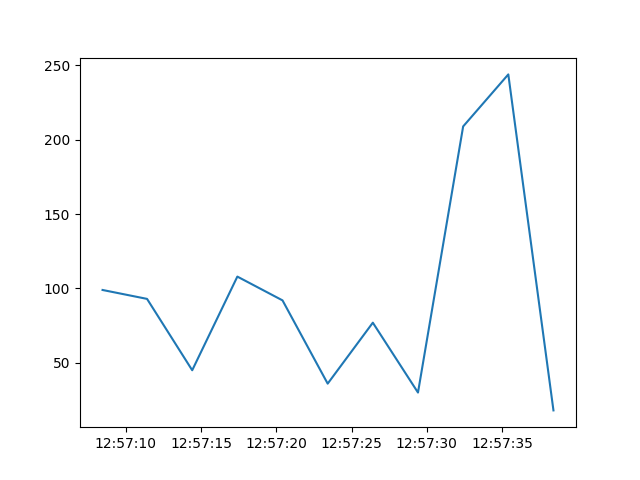
This will save a plot called “short_scalar_ro.png” of the short_scalar_ro
attribute since yesterday. The short_scalar_ro attribute changes randomly,
however, you should produce something similar to the following plot:
Stopping the Tango environment
The Tango environment and archiver can be stopped by running the following from the directory
containing compose.yaml:
docker compose down
Note
Once the Tango environment is stopped, all archive data will be lost. In
order to preserver the archive data you must mount a data directory into the
archive-db image. See the Docker Volumes documentation for details.