Writing your first SKA Tango device using ska-tango-base
Warning
This tutorial is using the Deprecated API and still needs to be updated. It is strongly recommended to use the Future API for new implementations. See Migrating to 1.7 for more details.
This page will guide you through the steps to writing your SKA Tango device based on the ska-tango-base package. This tutorial assumes you are already familiar with Tango, i.e. that you have come across Tango devices, attributes and commands before.
To serve as an example, the device we are going to build for this tutorial is called FileStats. The device will be configurable with a file path and will report statistics about the file at that path via Tango attributes. The device will also support two commands to manipulate the size of the configured file in order to demonstrate how to add “fast” and “long-running” commands.
The intention is for the example device to not require any specific domain knowledge to understand the business logic of the device and we can focus on learning what we need to know to build a SKA Tango device.
Step 0: Setup your environment
To follow along with this tutorial set up your development environment and install ska-tango-base package from the SKAO repository, along with the tutorial dependencies:
$ python3 -m pip --require-virtualenv install --extra-index-url https://artefact.skao.int/repository/pypi-all/simple ska-tango-base[tutorial]
Step 1: Decide on a Tango interface
The SKA Control Model defines several kinds of Tango devices that make up the control system. The ska-tango-base repository provides the following series of <X>Interface base classes that correspond to these kinds of Tango devices:
Each interface defines a set of Tango commands and attributes that the particular kind of SKA Tango device should implement. Each interface is abstract in the sense that subclasses of this interface are expected to provide the behaviour of these commands and attributes by overriding methods. The interfaces form the following inheritance hierarchy with the BaseInterface, unsurprisingly, at the base of the interfaces:
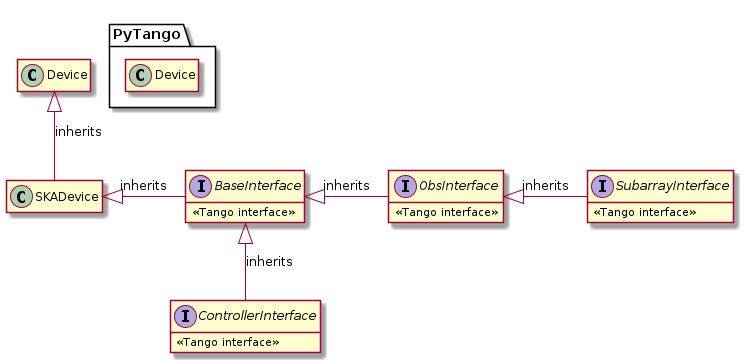
For our FileStats device, we only need the BaseInterface. As this interface is the base of all the others, all SKA Tango devices need to implement it and the steps we follow here are going to be applicable to all SKA Tango devices.
Once you have selected the interface class that is appropriate for your device, you should inherit from this interface, in our case we have the following, which should be saved as file_stats_device.py:
Step 1: A BaseInterface device1import ska_tango_base as stb
2
3
4class FileStats(stb.base.BaseInterface):
5 """Tango device that exposes file statistics as attributes."""
Tip
If, for whatever reason, your device does not need to implement any of the Tango commands/attributes provided by the BaseInterface, it is recommended to at least use SKADevice. This will setup logging so that it can be consumed by the SKA infrastructure and also provides standard SKA attributes for version information. These will help your device fit into the SKA ecosystem.
Step 2: Starting our SKA Tango device
Now is a good time to get into the habit of launching our Tango device and connecting to it to see how it behaves.
Tip
While automated testing is an important practice when developing software, the purpose of this tutorial is to learn how to use ska-tango-base and there is nothing better for learning than getting your hands dirty with a Tango device. So, here we are going to focus on manual testing.
We need to be able to launch a Tango device server with our Tango device. A common way to do this is to add a __name__ == "__main__" block to our file_stats_device.py script, like so:
 1import ska_tango_base as stb
 2import tango
 3
 4
 5class FileStats(stb.base.BaseInterface):
 6    """Tango device that exposes file statistics as attributes."""
 7
 8
 9if __name__ == "__main__":
10    tango.server.run((FileStats,))
Now we can launch the device server in -nodb mode. Here we are specifying the port 12345 and creating a single FileStats device:
$ python file_stats_device.py tutorial -nodb -ORBendPoint giop:tcp::12345 -dlist tut/fs/1
1|2026-02-10T12:22:16.789Z|INFO|MainThread|set_logging_level|ska_device.py#224|tango-device:tut/fs/1|Logging level set to LoggingLevel.INFO on Python and Tango loggers
1|2026-02-10T12:22:16.789Z|INFO|MainThread|update_logging_handlers|logging.py#379|tango-device:tut/fs/1|Logging targets set to ['tango::logger']
Ready to accept request
Finally, from a separate itango terminal, we can create a tango.DeviceProxy to the running device. With this tango.DeviceProxy we can query what commands and attributes
are defined for this device:
In [1]: dp = Device("tango://localhost:12345/tut/fs/1#dbase=no")

In [2]: dp.ping()
Out[2]: 346

In [3]: dp.get_command_list()
Out[3]: ['GetVersionInfo', 'Init', 'State', 'Status']

In [4]: dp.get_attribute_list()
Out[4]: ['buildState', 'versionId', 'loggingLevel', 'loggingTargets', 'adminMode', 'commandedState', 'healthState', 'healthInfo', 'State', 'Status']
Many of these attributes are provided by the BaseInterface and will require us to add code to our device to implement the behaviour of these attributes.
We can also read the device state and notice that we are “stuck” in DevState.INIT:
In [5]: dp.State()
Out[5]: <DevState.INIT: 9>
This is because the BaseInterface requires us to override the init_device() method.
Step 3: Overriding the init_device() method
The init_device() method is called automatically by Tango when the device is created and whenever a Tango client calls the built-in Init() command. The device is created at device server startup but also when a client calls either of the DevRestart() or RestartServer() admin device commands.
The SKA Control Model recommends that a Tango device pushes a state=DevState.INIT change event at the start of device initialisation and then pushes another event at the end of initialisation so that clients can be notified that the device is re-initialising. In order to achieve this, the ska_tango_base.base.base_interface.BaseInterface requires subclasses to override the init_device() method. When you override the BaseInterface.init_device() method, it is important that you:
call
super().init_device()at the start; andcall
init_completed()at the end
Warning
super().init_device() does much more than push the initial change event during initialisation, it is very important this is always called when you override init_device().
While we are at it, we should also provide information so that clients can query the device to determine what version of the software the device is running. This is achieved by setting _version_id and _build_state python attributes.
As is common practice at SKAO, we are going to store the version information in a release.py module, which for this tutorial you should save in the same directory as your file_stats_device.py module.
With this release module, we can add the version information to our init_device() method:
 1import ska_tango_base as stb
 2import tango
 3import release
 4
 5
 6class FileStats(stb.base.BaseInterface):
 7    """Tango device that exposes file statistics as attributes."""
 8
 9    def init_device(self) -> None:
10        """Initialise the device."""
11        super().init_device()
12
13        self._version_id = release.version
14        self._build_state = f"{release.name} {release.version}: {release.description}"
15
16        self.init_completed()
17
18
19if __name__ == "__main__":
20    tango.server.run((FileStats,))
Now, after we restart the file_stats_device.py script, we can query the version information from the device via the versionId and buildState Tango attributes and via the GetVersionInfo() Tango command:
In [1]: dp = Device("tango://localhost:12345/tut/fs/1#dbase=no")

In [2]: dp.versionId
Out[2]: '0.1.0'

In [3]: dp.buildState
Out[3]: 'ska-tut-file-stats 0.1.0: A tutorial SKA Tango device.'

In [4]: dp.GetVersionInfo()
Out[4]: ['FileStats, ska-tut-file-stats 0.1.0: A tutorial SKA Tango device.']
We can also subscribe to change events for the state attribute and observe that events are pushed when we initialise the device:
In [5]: sid = dp.subscribe_event("state", tango.EventType.CHANGE_EVENT, tango.utils.EventCallback())
2026-02-10 12:26:05.196861 TUT/FS/1 STATE CHANGE SUBSUCCESS [ATTR_VALID] DISABLE

In [6]: dp.Init()

2026-02-10 12:26:10.296456 TUT/FS/1 STATE CHANGE UPDATE [ATTR_VALID] INIT
2026-02-10 12:26:10.296552 TUT/FS/1 STATE CHANGE UPDATE [ATTR_VALID] DISABLE
Notice here that the BaseInterface has placed us into DevState.DISABLE after we have called init_completed(). We will discuss what the SKA Control Model says about this state below, but it doesn’t sound like a state we want our device to be in.
Our device is in DevState.DISABLE because our device initially has an adminMode attribute with a value of OFFLINE. We need to move our adminMode to ONLINE to instruct our Tango device that we wish to use it.
Tip
The adminMode is a memorised Tango attribute, meaning its (write) value is saved to the Tango database whenever it is written to by a client. This means that if we restart the device while it is in AdminMode.ONLINE it will come back in AdminMode.ONLINE. However, in our case we are starting the device in -nodb mode so there is no database to save the value to and our device will always start in AdminMode.OFFLINE.
Let’s try setting the adminMode:
In [7]: dp.adminMode
Out[7]: <adminMode.OFFLINE: 1>

In [8]: dp.adminMode = "ONLINE"
PyDs_PythonError: NotImplementedError: 'change_control_level' method must be implemented by 'FileStats'. The parent 'BaseInterface' is an abstract base class.

(For more detailed information type: tango_error)
This doesn’t work because we need to implement the behaviour of the adminMode for our device by overriding the change_control_level() method.
Step 4: Implementing the adminMode attribute
When a device is in AdminMode.OFFLINE the SKA Control Model requires that the device does not communicate with its “component” and reports its state as DevState.DISABLE. Whereas, when a device is in AdminMode.ONLINE, it should be monitoring and controlling its component. This means when a client transitions our device from AdminMode.OFFLINE to AdminMode.ONLINE we need to start monitoring and controlling some component and the BaseInterface notifies us of this by calling the change_control_level() method which we are responsible for overriding in order to start monitoring.
But hang on, what’s a component?
For the SKA Control Model, the “component” is just whatever the Tango device is responsible for monitoring and controlling, for example, it could be a piece of hardware such as a motor, it could be some other subordinate Tango devices or it could be a piece of software responsible for doing some number crunching. It could be almost anything and depends on the device in question. For our FileStats device the system under control is whichever file we are monitoring on the file system.
Note
In other SKA documentation the “component” is often referred to as the “system under control”. In this tutorial we use the term “component” as historically this is the term that has been used in ska-tango-base and is reflected in the ska-tango-base API.
If we are going to start monitoring a file, we need to know which file to monitor. Let’s add a Tango device property for the file path, being sure to provide a default value to make it easier to test. Let’s also override the change_control_level() method to start monitoring this path when we are instructed:
 1class FileStats(stb.base.BaseInterface):
 2    """Tango device that exposes file statistics as attributes."""
 3
 4    FilePath = tango.server.device_property(
 5        dtype="DevString", default_value="dummy", doc="Path of file to monitor"
 6    )
 7
 8    def init_device(self) -> None:
 9        """Initialise the device."""
10        super().init_device()
11
12        self._version_id = release.version
13        self._build_state = f"{release.name} {release.version}: {release.description}"
14
15        self.init_completed()
16
17    def change_control_level(self, control_level: stb.base.ControlLevel) -> None:
18        """Change how the device is interacting with the system under control."""
19        if control_level == stb.base.ControlLevel.NO_CONTACT:
20            self.component_disconnected()
21        elif control_level == stb.base.ControlLevel.FULL_CONTROL:
22            self.component_on()
23        else:
24            raise ValueError(f"Unknown control_level {control_level}")
The change_control_level() method accepts a ControlLevel() parameter which we can use to determine whether we should start or stop monitoring our component. As we start and stop monitoring, we are responsible for updating the state of our Tango device to match the state that we find the component in. The BaseInterface uses an internal state machine (an instance of OpStateModel) to manage the device’s state. We can drive this state machine by calling the various component_<x>() methods which will “perform an action” on the state machine.
For our implementation of change_control_level(), we perform the component_disconnected() action transitioning the device to DevState.DISABLE when we are instructed to stop monitoring (ControlLevel.NO_CONTACT). When we are instructed to monitor the component (ControlLevel.FULL_CONTROL) we transition to DevState.ON via the component_on() action to signal that we are ready to gather some file statistics.
Note
The SKA Control Model defines the DevState.ON, DevState.STANDBY and DevState.OFF states in terms of the monitored power consumption of the component. As there is no power consumption that we can monitor for a file, our FileStats device should just use the DevState.ON state and ignore the others. The SKA Control Model also defines optional On(), Standby() and Off() commands to transition the power consumption of the component. Again our FileStats device should ignore these commands as they are not applicable. Similarly, our FileStats should ignore the commandedState attribute as it does not implement commands to transition the state.
Let’s restart our file_stats_device.py script and check that our Tango device transitions to DevState.ON now that we have implemented the adminMode:
In [1]: dp = Device("tango://localhost:12345/tut/fs/1#dbase=no")

In [2]: sid = dp.subscribe_event("state", tango.EventType.CHANGE_EVENT, tango.utils.EventCallback())
2026-02-10 15:09:10.926130 TUT/FS/1 STATE CHANGE SUBSUCCESS [ATTR_VALID] DISABLE

In [3]: dp.adminMode = "ONLINE"

2026-02-10 15:09:13.383190 TUT/FS/1 STATE CHANGE UPDATE [ATTR_VALID] ON
Great! We are now ready to add our own attributes to expose metadata about the configured file and start “communicating” with our component.
Step 5: Implementing our own attributes
We are going to implement some attributes to expose the file’s size, owner, mode (permissions) and last modified time. We will expose most of these as strings in a similar format to the ls -l command.
To separate concerns somewhat, let’s implement a Metadata class that is responsible for querying the file system for information about the file and converting the data into a string when required.
 1import os
 2import pwd
 3import grp
 4import time
 5import stat
 6import logging
 7
 8
 9class Metadata:
10    """File metadata."""
11
12    def __init__(self, path: str, logger: logging.Logger) -> None:
13        self.path = os.path.abspath(path)
14        self.logger = logger
15        self.data: os.stat_result | None = None
16        self.timestamp: float | None = None
17
18    def reset(self) -> None:
19        """Reset metadata to None."""
20        self.data = None
21        self.timestamp = None
22
23    def refresh(self) -> None:
24        """Refresh metadata."""
25        self.data = os.stat(self.path)
26        self.timestamp = time.time()
27
28    @property
29    def size(self) -> int | None:
30        """Return the size of the file in bytes."""
31        if self.data is not None:
32            return self.data.st_size
33        return None
34
35    @property
36    def mode(self) -> str | None:
37        """
38        Return the mode (permission) of the file.
39
40        :return: mode in the same format as ``ls -l``.
41        """
42        if self.data is not None:
43            return stat.filemode(self.data.st_mode)
44        return None
45
46    @property
47    def owner(self) -> str | None:
48        """
49        Return the owner of the file.
50
51        :return: has the format "<user>:<group>"
52        """
53        if self.data is not None:
54            user = pwd.getpwuid(self.data.st_uid)
55            group = grp.getgrgid(self.data.st_gid)
56            return f"{user.pw_name}:{group.gr_name}"
57        return None
58
59    @property
60    def last_modified_time(self) -> str | None:
61        """
62        Return the time the file was last modified.
63
64        :return: last modified time in the ``ctime`` format
65        """
66        if self.data is not None:
67            return time.ctime(self.data.st_mtime)
68        return None
Separating application specific logic out from the Tango device is generally a good idea to allow unit testing of this functionality and to allow the Tango device to focus on providing a Tango interface. Here, we separated the file system query (i.e. the os.stat() call in refresh()) from the data conversion (i.e. the various properties). We also allow a disengaged state (where data is None) so that the Tango device can support DevState.DISABLE and not “communicate” with its component.
Note
Historically, ska-tango-base has forced Tango devices to follow this pattern by requiring them to implement application specific logic in a “component manager”. While this design pattern is a good one in the abstract, experience has shown that the exact line where concern should be separated is application specific and drawing this line in a foundational library such as ska-tango-base is too opinionated. It is better for each application to decide how to implement this design pattern for their specific case. ska-tango-base still supports the component manager approach via the SKABaseDevice class and its subclasses, however, it is not recommended to use this approach for new devices.
Now let’s use this Metadata class to implement our attributes:
 1class FileStats(stb.base.BaseInterface):
 2    """Tango device that exposes file statistics as attributes."""
 3
 4    FilePath = tango.server.device_property(
 5        dtype="DevString", default_value="dummy", doc="Path of file to monitor"
 6    )
 7
 8    def init_device(self) -> None:
 9        """Initialise the device."""
10        super().init_device()
11
12        self._version_id = release.version
13        self._build_state = f"{release.name} {release.version}: {release.description}"
14        self.metadata = Metadata(self.FilePath, self.logger)
15
16        self.init_completed()
17
18    def change_control_level(self, control_level: stb.base.ControlLevel) -> None:
19        """Change how the device is interacting with the system under control."""
20        if control_level == stb.base.ControlLevel.NO_CONTACT:
21            self.metadata.reset()
22            self.component_disconnected()
23        elif control_level == stb.base.ControlLevel.FULL_CONTROL:
24            self.component_on()
25        else:
26            raise ValueError(f"Unknown control_level {control_level}")
27
28    def read_attr_hardware(self, attr_list: list[int]) -> None:
29        """Prepare for attribute read."""
30        _ = attr_list
31        if self.get_state() != tango.DevState.DISABLE:
32            self.metadata.refresh()
33
34    @tango.server.attribute(dtype=int)
35    def size(self) -> stb.type_hints.ReadAttrType[int]:
36        """Read the size of the file in bytes."""
37        return self._to_read_attr_type(self.metadata.size, 0)
38
39    @tango.server.attribute(dtype=str)
40    def lastModifiedTime(self) -> stb.type_hints.ReadAttrType[str]:
41        """Return the time the file was last modified."""
42        return self._to_read_attr_type(self.metadata.last_modified_time, "")
43
44    @tango.server.attribute(dtype=str)
45    def owner(self) -> stb.type_hints.ReadAttrType[str]:
46        """Return the owner of the file."""
47        return self._to_read_attr_type(self.metadata.owner, "")
48
49    @tango.server.attribute(dtype=str)
50    def mode(self) -> stb.type_hints.ReadAttrType[str]:
51        """Return the mode (permissions) of the file."""
52        return self._to_read_attr_type(self.metadata.mode, "")
53
54    def _to_read_attr_type(
55        self, value: typing.Any, default: typing.Any
56    ) -> stb.type_hints.ReadAttrType[typing.Any]:
57        if value is None:
58            return default, time.time(), tango.AttrQuality.ATTR_INVALID
59
60        return value, self.metadata.timestamp, tango.AttrQuality.ATTR_VALID
Here, we are using read_attr_hardware() to refresh the metadata so that a client will receive data from the same os.stat() call if they read multiple attributes in the same read_attributes() call. We use the same timestamp for each attribute to make it clearer that they have come from the same os.stat() call. We are also using a helper method _to_read_attr_type() to ensure that we report the attribute quality factor as invalid if we do not have any data.
Let’s restart the file_stats_device.py script, and have a go at querying file metadata with our Tango device:
In [1]: dp = Device("tango://localhost:12345/tut/fs/1#dbase=no")

In [2]: print(dp.size)
None

In [3]: dp.adminMode = "ONLINE"

In [4]: dp.size
PyDs_PythonError: FileNotFoundError: [Errno 2] No such file or directory: '/home/tri/skao/ska-tango-base/docs/src/tutorials/create-tango-device/dummy'

(For more detailed information type: tango_error)

In [5]: !touch dummy

In [6]: dp.size
Out[6]: 0

In [7]: !head -c128 /dev/urandom >> dummy

In [8]: dp.size
Out[8]: 128

In [9]: dp.owner
Out[9]: 'tri:tri'

In [10]: dp.mode
Out[10]: '-rw-r--r--'

In [11]: dp.lastModifiedTime
Out[11]: 'Tue Feb 10 15:26:38 2026'

In [12]: print(f"{dp.mode} {dp.owner} {dp.size} {dp.lastModifiedTime}")
-rw-r--r-- tri:tri 128 Tue Feb 10 15:26:38 2026
Great! A client can request the file metadata, but unfortunately, we cannot subscribe to change events for these attributes:
In [13]: sid = dp.subscribe_event("size", tango.EventType.CHANGE_EVENT, tango.utils.EventCallback())
API_AttributePollingNotStarted: The polling (necessary to send events) for the attribute size is not started
(For more detailed information type: tango_error)
The standard way to solve this problem with Tango would be to enable polling, which can be done by configuring the Tango device. However, there are two issues with this approach which means we avoid using the built-in Tango polling at SKAO:
The Tango polling loop does not cope well when running in a resource constrained environment such as a kubernetes cluster. See Tango device server polling loop considered harmful.
Polling introduces latency so it should be avoided if possible. If the component is capable of generating events itself then this should be preferred.
Fortunately, the watchfiles python package (installed as a tutorial dependency) can provide events whenever our file changes allowing us to manually push Tango events with new metadata. This avoids the need to use polling for this device.
Tip
If your component does not support generating events itself, you should use Poller rather than the built in Tango polling loop to avoid the issue 1 above. Team Wombat is working with the wider Tango community to improve the Tango polling loop so that we can use it at SKA.
Step 6: Implementing event driven monitoring
In order for our Tango device to get notified that the file we are monitoring has changed, we need a dedicated background thread to receive these notifications. Let’s start by adding a method, monitor_for_updates() to our Metadata class that can refresh the metadata whenever we receive a change notification from watchfiles:
 1import watchfiles
 2import threading
 3
 4# Disable watchfiles info logs as they can be quite noisy
 5logging.getLogger("watchfiles.main").setLevel(logging.WARNING)
 6
 7
 8class Metadata:
 9    def monitor_for_updates(self, stop_event: threading.Event) -> None:
10        """Setup monitoring for file metadata changes."""
11        parent = os.path.dirname(self.path)
12
13        def only_filename(change: watchfiles.Change, name: str) -> bool:
14            _ = change
15            return os.path.abspath(name) == self.path
16
17        # Monitor from parent directory to know if the file is created or deleted.
18        # TODO: Support missing parent directory
19        watch = watchfiles.watch(
20            parent, watch_filter=only_filename, stop_event=stop_event
21        )
22
23        # Refresh after we start watch to ensure we are up-to-date and
24        # don't miss a change
25        self.refresh()
26
27        self.logger.debug("Watching %s", parent)
28        for changes in watch:
29            self.logger.debug("Got changes=%s", changes)
30            self.refresh()
Here, we setup the watch(), filtering out events not for our file, before refreshing the metadata and waiting for notifications. This ensures that we do not miss any changes. Once we get notified of changes, we don’t look at what the changes are and instead just refresh the metadata. We accept a stop_event parameter to pass on watch() so that the monitoring can be interrupted on request.
Note
As is outlined in the TODO, this implementation of monitor_for_updates() does not handle missing parent directories. If FileStats was a real SKA Tango device, this would need resolving, however, we have omitted this here to keep the implementation simple so that we can focus on the generally applicable behaviour of the Tango device.
Next, let’s spawn a thread from our Tango device to call monitor_for_updates() whenever we change control level:
 1class FileStats(stb.base.BaseInterface):
 2    """Tango device that exposes file statistics as attributes."""
 3
 4    FilePath = tango.server.device_property(
 5        dtype="DevString", default_value="dummy", doc="Path of file to monitor"
 6    )
 7
 8    def init_device(self) -> None:
 9        """Initialise the device."""
10        super().init_device()
11
12        self._version_id = release.version
13        self._build_state = f"{release.name} {release.version}: {release.description}"
14        self.metadata = Metadata(self.FilePath, self.logger)
15
16        self.stop_event: threading.Event | None = None
17        self.monitor_thread: threading.Thread | None = None
18
19        self.init_completed()
20
21    def delete_device(self) -> None:
22        """De-initialise device."""
23        self._stop_monitor_thread()
24        super().delete_device()
25
26    def change_control_level(self, control_level: stb.base.ControlLevel) -> None:
27        """Change how the device is interacting with the system under control."""
28        if control_level == stb.base.ControlLevel.NO_CONTACT:
29            self._stop_monitor_thread()
30            self.metadata.reset()
31            self.component_disconnected()
32        elif control_level == stb.base.ControlLevel.FULL_CONTROL:
33            self.component_on()
34            self._start_monitor_thread()
35        else:
36            raise ValueError(f"Unknown control_level {control_level}")
37
38    def _start_monitor_thread(self) -> None:
39        def target(device: FileStats) -> None:
40            try:
41                assert device.stop_event is not None
42                device._status = f"Monitoring '{self.FilePath}'"
43                device.metadata.monitor_for_updates(device.stop_event)
44            except Exception as ex:
45                device.logger.exception("File monitor raised unexpected exception")
46                device.component_fault()
47                device._status = f"Monitor thread crashed: {ex}"
48                return
49            device._status = f"Monitoring disabled"
50
51        self.stop_event = threading.Event()
52        self.monitor_thread = threading.Thread(target=target, args=(self,))
53        self.monitor_thread.start()
54
55    def _stop_monitor_thread(self) -> None:
56        if self.stop_event is not None:
57            assert self.monitor_thread is not None
58
59            self.stop_event.set()
60            self.monitor_thread.join()
61
62            self.monitor_thread = None
63            self.stop_event = None
Here, we make sure to also shutdown the thread in our delete_device() method. The thread target function wraps the call to monitor_for_updates() in a try/except statement defensively to ensure that any issues not handled by the monitor_for_updates() method are logged and the device is transitioned to the DevState.FAULT state. This state indicates that the device has encountered an error it is not going to recover from automatically and requires an operator to intervene. The operator can try to resolve this by calling the Init() to reinitialise the device. In general, requiring manual intervention like this should be considered a bug in the SKA Tango device, or at least that the SKA Tango device is not being used as intended, and should be avoided. However, it is good practice to be defensive in a scenario such as spawning a thread so that if a problem occurs it is reported and an operator knows that something fishy has occurred.
Warning
Any resources you allocate in your init_device() method (such as threads, sockets, open files, etc.) _must_ be cleaned up in a delete_device() method, otherwise the built-in Init() command will not work reliably. Also, when overriding the delete_device() method, you _must_ call super().delete_device() to clean up any resources a super class has allocated.
Initialising your SKA Tango device has more guidelines for managing the lifecycle of your device.
Tip
Whenever your SKA Tango device transitions to DevState.FAULT, you should provide a status describing what has failed. This can be done by assigning to the _status signal which will update the Tango built-in status attribute. You also need to make sure the status gets cleared when the device no longer has DevState.FAULT.
Now that we have a thread that can monitor our file, we need that thread to be able to push data to the Tango device to be sent on as Tango events. The BaseInterface class provides a signal bus mechanism to facilitate this. The Metadata class can emit signals on the bus which can then be listened for by the Tango device to push events for the corresponding attributes. The signal processing happens on a background thread managed by the BaseInterface. The advantage of this approach is that it decouples the Metadata from the Tango device and avoids our monitoring background thread from having to grab the Tango device lock at any point.
Let’s add some AttrSignal to our Metadata class and replace our existing attributes with attribute_from_signal objects pointing to the Metadata signals:
 1class FileStats(stb.base.BaseInterface):
 2    """Tango device that exposes file statistics as attributes."""
 3
 4    def on_new_shared_bus(self) -> None:
 5        """Create sharing observers."""
 6        super().on_new_shared_bus()
 7        self.metadata = Metadata(self.FilePath, self.logger)
 8
 9    size = stb.software_bus.attribute_from_signal(
10        "metadata.size", dtype=int, abs_change=1
11    )
12    lastModifiedTime = stb.software_bus.attribute_from_signal(
13        "metadata.last_modified_time", dtype=str
14    )
15    owner = stb.software_bus.attribute_from_signal("metadata.owner", dtype=str)
16    mode = stb.software_bus.attribute_from_signal("metadata.mode", dtype=str)
17
18
19class Metadata(stb.software_bus.SharingObserver):
20    """File metadata."""
21
22    size_signal = stb.software_bus.AttrSignal[int](name="size")
23    mode_signal = stb.software_bus.AttrSignal[str](name="mode")
24    owner_signal = stb.software_bus.AttrSignal[str](name="owner")
25    last_modified_time_signal = stb.software_bus.AttrSignal[str](
26        name="last_modified_time"
27    )
Here, we moved the initialisation of the Metadata object to the on_new_shared_bus() method as it is now a SharingObserver and we need it to be available to share the bus with it.
Finally, let’s actually emit values on each of these signals whenever we refresh() or reset() the metadata:
 1class FileStats(stb.base.BaseInterface):
 2    """Tango device that exposes file statistics as attributes."""
 3
 4    def read_attr_hardware(self, attr_list: list[int]) -> None:
 5        """Prepare for attribute read."""
 6        _ = attr_list
 7        if self.get_state() != tango.DevState.DISABLE:
 8            self.metadata.refresh()
 9            with self.allow_internal_threads():
10                self.shared_bus.wait_for_thread()
11
12
13class Metadata(stb.software_bus.SharingObserver):
14    """File metadata."""
15
16    def reset(self) -> None:
17        """Reset metadata to None."""
18        self.data = None
19        self.timestamp = None
20
21        self.logger.debug(f"Resetting metadata")
22        self._emit_signals()
23
24    def refresh(self) -> None:
25        """Refresh metadata."""
26        self.data = os.stat(self.path)
27        self.timestamp = time.time()
28
29        self.logger.debug("Refreshing metadata: %s", self.data)
30        self._emit_signals()
31
32    def _emit_signals(self) -> None:
33        if self.timestamp is not None:
34            self.size_signal = (
35                typing.cast(int, self.size),
36                self.timestamp,
37                tango.AttrQuality.ATTR_VALID,
38            )
39            self.mode_signal = (
40                typing.cast(str, self.mode),
41                self.timestamp,
42                tango.AttrQuality.ATTR_VALID,
43            )
44            self.owner_signal = (
45                typing.cast(str, self.owner),
46                self.timestamp,
47                tango.AttrQuality.ATTR_VALID,
48            )
49            self.last_modified_time_signal = (
50                typing.cast(str, self.last_modified_time),
51                self.timestamp,
52                tango.AttrQuality.ATTR_VALID,
53            )
54        else:
55            self.size_signal = None
56            self.mode_signal = None
57            self.owner_signal = None
58            self.last_modified_time_signal = None
Here, we assign None to each signal if we do not have any data. This will instruct the attribute_from_signal objects to clear any data they have stored and return a ATTR_INVALID result if a client reads the attribute.
We also call BusProtocol.wait_for_thread in our read_attr_hardware() method to ensure that the signals emitted by the call to refresh() have been processed before we read any attributes as the attribute_from_signal will not return the new values until the corresponding events have been pushed.
Warning
When an attribute is updated via a signal, the actual update happens asynchronously on a background thread. If the order of operations is important, you must ensure that all attribute updates happen on this background thread by using, for example, attribute_from_signal; or you must ensure that the updates are synchronised with the thread by using wait_for_thread() as we do in our read_attr_hardware().
Now, after we have restarted the file_stats_device.py script, we can receive events from the Tango device as the file changes:
In [1]: dp = Device("tango://localhost:12345/tut/fs/1#dbase=no")

In [2]: sid = dp.subscribe_event("size", tango.EventType.CHANGE_EVENT, tango.utils.EventCallback())
2026-02-10 20:37:04.617333 TUT/FS/1 SIZE CHANGE SUBSUCCESS [ATTR_INVALID] None

In [3]: sid2 = dp.subscribe_event("lastModifiedTime", tango.EventType.CHANGE_EVENT, tango.utils.EventCallback())
2026-02-10 20:37:13.877250 TUT/FS/1 LASTMODIFIEDTIME CHANGE SUBSUCCESS [ATTR_INVALID] None

In [4]: dp.adminMode = "ONLINE"

2026-02-10 20:37:23.244046 TUT/FS/1 SIZE CHANGE UPDATE [ATTR_VALID] 128
2026-02-10 20:37:23.244046 TUT/FS/1 LASTMODIFIEDTIME CHANGE UPDATE [ATTR_VALID] Tue Feb 10 15:26:38 2026
In [5]: !head -c128 /dev/urandom >> dummy

2026-02-10 20:37:33.753628 TUT/FS/1 SIZE CHANGE UPDATE [ATTR_VALID] 256
2026-02-10 20:37:33.753628 TUT/FS/1 LASTMODIFIEDTIME CHANGE UPDATE [ATTR_VALID] Tue Feb 10 20:37:33 2026
The monitoring side of our Tango device is now almost complete, but there are two attributes provided by BaseInterface that we have not yet implemented: healthState and healthInfo. Let’s try reading them now:
In [6]: dp.healthState
Out[6]: <healthState.FAILED: 2>

In [7]: dp.healthInfo
Out[7]: ('Device implementation has not provided a health report',)
The healthInfo attribute has told us that our device implementation needs to provide a health report. So let’s do that.
Step 7: Providing health reports
The healthState of a SKA Tango device should be used to indicate whether the Tango device is capable of performing its functionality. The healthInfo attribute consists of a list of strings used to describe why we are in a non-OK health state. Together, these two attributes are called the health report of the device and it is our job to provide health reports via the report_health() method. For our FileStats device, we should use this method to communicate any issues encountered by the monitoring thread, notably, if we are unable to call os.stat() on the configured file.
In order for our Metadata class to asynchronously send exceptions to the Tango device, let’s introduce another signal, stat_failed, and then hook it up to the refresh() and reset() methods:
 1class Metadata(stb.software_bus.SharingObserver):
 2    """File metadata."""
 3
 4    stat_failed = stb.software_bus.Signal[Exception | None]()
 5
 6    def reset(self) -> None:
 7        """Reset metadata to None."""
 8        self.data = None
 9        self.timestamp = None
10        self.stat_failed = None
11
12        self.logger.debug(f"Resetting metadata")
13        self._emit_signals()
14
15    def refresh(self) -> None:
16        """Refresh metadata.
17
18        If refreshing fails, the metadata is set to None.
19        """
20        try:
21            self.data = os.stat(self.path)
22            self.timestamp = time.time()
23            self.stat_failed = None
24        except OSError as ex:
25            self.data = None
26            self.timestamp = None
27            self.stat_failed = ex
28
29        self.logger.debug("Refreshing metadata: %s", self.data)
30        self._emit_signals()
Then, let’s add a signal listener to the Tango device that can update the healthState whenever this new signal is emitted:
1class FileStats(stb.base.BaseInterface):
2    """Tango device that exposes file statistics as attributes."""
3
4    @stb.software_bus.listen_to_signal("metadata.stat_failed")
5    def __on_stat_failed(self, ex: Exception | None) -> None:
6        if ex is None:
7            self.report_health(scm.HealthState.OK, [])
8        else:
9            self.report_health(scm.HealthState.FAILED, [f"stat('{self.FilePath}'): {ex}"])
Here, we are supplying an empty health_info list to report_health() when the health_state is OK. This is required, the health_info must be provided for DEGRADED and FAILED health states and must be empty for OK. Our FileStats device is relatively simple, so there is only ever one issue to include in the health report at a time. For more complex devices there may be multiple issues which should all be reported in the health info.
Note
The UNKNOWN should no longer be used.
And finally, let’s update the healthState in our monitor thread target function when we encounter any unexpected problem:
 1class FileStats(stb.base.BaseInterface):
 2    """Tango device that exposes file statistics as attributes."""
 3
 4    def _start_monitor_thread(self) -> None:
 5        def target(device: FileStats) -> None:
 6            try:
 7                assert device.stop_event is not None
 8                device._status = f"Monitoring '{self.FilePath}'"
 9                device.metadata.monitor_for_updates(device.stop_event)
10            except Exception as ex:
11                device.logger.exception("File monitor raised unexpected exception")
12                device.component_fault()
13                self.report_health(scm.HealthState.FAILED, [f"Device in fault: {ex}"])
14                device._status = f"Monitor thread crashed: {ex}"
15                return
16            device._status = f"Monitoring disabled"
Tip
Whenever a SKA Tango device transitions to DevState.FAULT it should also transition to HealthState.FAILED. The healthState should be used to indicate whether the device can fulfil its core functionality, if the Tango device has encountered an unexpected error (as indicated by DevState.FAULT) then it cannot fulfil its core functionality and therefore should report HealthState.FAILED. However, the converse is not true. DevState.FAULT should only be used if the SKA Tango device knows for certain that operator intervention is required for the Tango device itself to recover when the underlying component recovers.
For our FileStats device, the configured file being missing does not warrant DevState.FAULT because if the file appears (via miracle or otherwise) the Tango device will detect this and the healthState will recover to HealthState.OK. However, if the _parent_ directory was missing then DevState.FAULT is warranted because the monitor thread crashes if the parent directory is missing (because we did not implement this for simplicity’s sake) and if the parent directory is created, the Tango device will not notice. It requires an operator to call the Init() command after the directory has been created.
With all this in place, let’s restart the file_stats_device.py script and try out our new healthState:
In [1]: dp = Device("tango://localhost:12345/tut/fs/1#dbase=no")

In [2]: import ska_control_model as scm

In [3]: sid = dp.subscribe_event("healthState", tango.EventType.CHANGE_EVENT, lambda ev: print(scm.HealthState(ev.attr_value.value)))
HealthState.FAILED

In [4]: sid2 = dp.subscribe_event("healthInfo", tango.EventType.CHANGE_EVENT, tango.utils.EventCallback())
2026-03-27 13:18:24.534954 TUT/FS/1 HEALTHINFO CHANGE SUBSUCCESS [ATTR_VALID] ('Device implementation has not provided a health report',)

In [5]: dp.adminMode = "ONLINE"
2026-03-27 13:19:20.462533 TUT/FS/1 HEALTHINFO CHANGE UPDATE [ATTR_VALID] ()
HealthState.OK

In [6]: !rm dummy
2026-03-27 13:19:27.111892 TUT/FS/1 HEALTHINFO CHANGE UPDATE [ATTR_VALID] ("stat('dummy'): [Errno 2] No such file or directory: '/path/to/dummy'",)
HealthState.FAILED

In [7]: !touch dummy
2026-03-27 13:19:35.976478 TUT/FS/1 HEALTHINFO CHANGE UPDATE [ATTR_VALID] ()
HealthState.OK
With health reporting now implemented, our FileStats device can monitor the stats on a file and report problems according to the SKA Control Model. However, our Tango device does not perform any _control_ of its component. Let’s add some commands to explore how control is handled for SKA Tango devices.
Step 8: Implementing commands
At SKA we talk about two different kinds of Tango commands which we call fast commands and long running commands respectively. As the names suggest, so-called fast commands are standard Tango commands that complete quickly (the SKA CS Guidelines suggest <10ms as the cut off). When a client is invoking a fast command, it is assumed that the client will block to wait for a response, as such it is important that these commands really are fast.
However, it is not just the client that calls the command that suffers if a fast command is slow. Due to the use of the default “SYNC mode” used by SKA Tango devices, a lock is held while each Tango command is executed such that no other client can interact with the Tango device while the Tango command is executing. This means that a slow “fast command” locks the Tango device from _all_ other clients. Moreover, while in “SYNC mode” the Tango device is unable to push events while this command is executing.
To alleviate these issues with Tango commands that take too long, at SKA we have devised the “long running command” protocol, built on top of the Tango event system. The long running command mechanism allows the Tango device to release the lock while it services a command. This allows other clients to use the Tango device while this command is being executed. More information about long running commands can be found at Long running commands.
Our FileStats device is going to implement two commands Shrink() and Grow() to allow clients to manipulate the size of the file. Shrinking a file is a relatively quick operation as it just requires updating the metadata so we will implement Shrink() as a SKA fast command. Conversely, we are going to require that the Grow() command does not return until the data has been committed to disk (via fsync(2)), so this we will implement it as a long running command.
For both these commands, we are going to require that they really are shrinking or growing the file otherwise we will refuse to execute them. To support this we are going to need to know the size of the file before we grow or shrink it. This should be handled by our Metadata class and indeed we can query the current size of the file using the size property. However, if we cannot determine the size of file for whatever reason we just get back None and it would be nice to provide some details to the caller of the command if we cannot determine the size of the file. Let’s begin by adding a get_size_or_raise() method to the Metadata class that solves this problem for us:
 1class Metadata(stb.software_bus.SharingObserver):
 2    """File metadata."""
 3
 4    stat_failed = stb.software_bus.Signal[Exception | None](stored=True)
 5
 6    def __init__(self, path: str, logger: logging.Logger) -> None:
 7        self.path = os.path.abspath(path)
 8        self.logger = logger
 9        self.data: os.stat_result | None = None
10        self.timestamp: float | None = None
11        self.lock = threading.Lock()
12
13    def reset(self) -> None:
14        """Reset metadata to None."""
15        with self.lock:
16            self.data = None
17            self.timestamp = None
18            self.stat_failed = None
19
20            self.logger.debug(f"Resetting metadata")
21            self._emit_signals()
22
23    def refresh(self) -> None:
24        """Refresh metadata.
25
26        If refreshing fails, the metadata is set to None.
27        """
28        with self.lock:
29            try:
30                self.data = os.stat(self.path)
31                self.timestamp = time.time()
32                self.stat_failed = None
33            except OSError as ex:
34                self.data = None
35                self.timestamp = None
36                self.stat_failed = ex
37
38            self.logger.debug("Refreshing metadata: %s", self.data)
39            self._emit_signals()
40
41    def get_size_or_raise(self) -> int:
42        """
43        Return the size of the file.
44
45        If the size is not available raises the exception that was generated
46        when the last stat failed.
47
48        :return: size of file in bytes
49        :raises Exception: if size not available
50        """
51
52        with self.lock:
53            size = self.size
54            if size is not None:
55                return size
56
57            ex = self.stat_failed
58            if ex is not None:
59                raise ex
60
61        raise ValueError(
62            f"Unable to determine size of '{self.path}' for unknown reason."
63        )
Here, we have passed stored=True to the stat_failed signal so that the last value emitted is kept around and we can use it later. We have introduced a lock to ensure that the exception and the data are updated atomically.
Implementing a fast command
Armed with our new get_size_or_raise() method, let’s implement a Shrink() command using os.truncate():
 1class FileStats(stb.base.BaseInterface):
 2    """Tango device that exposes file statistics as attributes."""
 3
 4    def is_Shrink_allowed(self) -> bool:
 5        """Return true if the Shrink command is allowed."""
 6        return typing.cast(bool, self.get_state() != tango.DevState.DISABLE)
 7
 8    @tango.server.command(dtype_out="DevVarLongStringArray")
 9    def Shrink(self, new_size: int) -> stb.type_hints.DevVarLongStringArrayType:
10        """
11        Shrink the file to the provided size.
12
13        :param new_size: size to shrink to
14        :return: ResultCode.OK, message
15        :raises ValueError: if the new file size is greater than the current size or
16                            the current size is unknown
17        """
18
19        current_size = self.metadata.get_size_or_raise()
20
21        if new_size > current_size:
22            raise ValueError(
23                f"New size '{new_size}' is greater than current size '{current_size}'. "
24                "Cannot shrink to new size."
25            )
26
27        os.truncate(self.FilePath, new_size)
28
29        return [scm.ResultCode.OK], [f"File shrunk to size '{new_size}'"]
Here, we are returning a (ska_control_model.ResultCode, message) pair as this is recommended by the SKA CS Guidelines, however, we are using exceptions to report total failures. This is because clients already have to deal with exceptions thrown by Tango when e.g. there are network issues connecting to the device, it is often easier for them to handle an additional exception rather than having to check error codes as well. The ska_control_model.ResultCode should only be used by a command if it needs to communicate partial success. See Reporting failure of long-running commands for a longer discussion on reporting failures.
We are also providing an is_Shrink_allowed() method to disallow calling the command if our device is disabled. This is important to avoid modifying the file if our device has been put in AdminMode.OFFLINE.
Warning
It might be tempting to disallow this command while the healthState is not OK to avoid having to deal with the current size not being available. In this exact situation this might be reasonable because we know for certain it isn’t going to work, however, it is a bad idea for a Tango device to disobey a client based on the healthState. Similarly, we do not reject the command when we are in DevState.FAULT.
In general, your SKA Tango device should make its best effort to execute the commands it has been instructed to execute and to report back any problems it finds. The client already knows about the problem and might be trying to diagnose issues by invoking commands. We should not get in their way. Note, however, that the command still fails if we cannot determine the size of the file because it would be “dangerous” to shrink the file if we do not know that it is really a shrink operation.
This argument actually suggests that we should not use the Metadata object to determine the original size, but instead call os.stat() directly in the command. However, we chose the current implementation to highlight the stored=True option for the Signal data descriptor.
Implementing a long running command
When an asynchronous long running command is invoked on a SKA Tango device, it is sometimes necessary to cancel the command because, for example, the situation has changed so the command is no longer required or because the command was invoked in error. The SKA long running command mechanism provides an Abort() command to support command cancellation and this is implemented as a “co-operative abort”, in that each command is responsible for checking if it has been aborted while it is executed.
In order to support being aborted, our Grow() command will grow the file in chunks and check if the command has been aborted between writing each chunk. As the logic for doing this transfer is a little complicated, it would be a good idea to test this independently, let’s start by writing a chunked_transfer() function that supports being aborted:
 1def chunked_transfer(
 2    destination: typing.BinaryIO,
 3    source: typing.BinaryIO,
 4    chunk_size: int,
 5    total_bytes: int,
 6    *,
 7    progress_callback: stb.type_hints.ProgressCallbackType,
 8    task_abort_event: threading.Event,
 9) -> None:
10    progress_callback(progress=0)
11    written = 0
12    last_progress = 0
13
14    def transfer_chunk(size: int) -> None:
15        nonlocal written, last_progress
16
17        bytes = source.read(size)
18        if len(bytes) != size:
19            raise RuntimeError(
20                f"Not enough data. Found {written + len(bytes)} bytes, "
21                f"expected at least {total_bytes} bytes."
22            )
23
24        destination.write(bytes)
25        destination.flush()
26        os.fsync(destination.fileno())
27
28        written += len(bytes)
29        progress = int(100 * (written / total_bytes))
30        if progress > last_progress:
31            progress_callback(progress=progress)
32            last_progress = progress
33
34    n_complete_chunks = total_bytes // chunk_size
35    remainder = total_bytes - n_complete_chunks * chunk_size
36
37    for i in range(n_complete_chunks):
38        transfer_chunk(chunk_size)
39
40        if task_abort_event.is_set():
41            raise stb.executor.TaskAborted()
42
43    if remainder > 0:
44        transfer_chunk(remainder)
45
46    assert written == total_bytes
Here, we also accept a progress_callback which we call with a completion percentage as we transfer each chunk. As we will see later, this callback is provided by ska-tango-base’s long running command API and it is generally a good idea to provide this progress information if possible. If we notice that the task_abort_event has been set, we raise a TaskAborted exception to acknowledge that we have been aborted. This exception will be used by the long running command API later.
Now we are ready to add our long running command. In order to support long running commands, our device needs to inherit from LRCMixin in addition to the BaseInterface class. We then decorate our command function with long_running_command() as opposed to command(). This command method needs to return a task function that will then be scheduled on a background thread to perform the long running command. This task function can be built with the task() decorator. Let’s have a go:
 1import ska_tango_base.long_running_commands as stb_lrc
 2
 3
 4class FileStats(stb_lrc.LRCMixin, stb.base.BaseInterface):
 5    """Tango device that exposes file statistics as attributes."""
 6
 7    def is_Grow_allowed(
 8        self,
 9        request_type: stb_lrc.LRCReqType = stb_lrc.LRCReqType.ENQUEUE_REQ,
10    ) -> bool:
11        """Return true if the Grow command is allowed."""
12        if request_type == stb_lrc.LRCReqType.EXECUTE_REQ:
13            return typing.cast(bool, self.get_state() != tango.DevState.DISABLE)
14
15        return True
16
17    Grow_SCHEMA: dict[str, stb.type_hints.JSONData] = {
18        "$schema": "https://json-schema.org/draft/2020-12/schema",
19        "$id": "artefact.skao.int/mylrc.schema.json",
20        "title": "Grow schema",
21        "description": "Validates the keyword arguments for the Grow command",
22        "type": "object",
23        "properties": {
24            "new_size": {"type": "number"},
25            "chunk_size": {"type": "number"},
26            "source": {"type": "string"},
27        },
28    }
29
30    @stb_lrc.long_running_command
31    @stb.validators.validate_json_args
32    def Grow(
33        self, new_size: int, chunk_size: int, source: str
34    ) -> stb.type_hints.TaskFunctionType:
35        """
36        Grow the file.
37
38        The file will be grown in chunks with bytes from a given source.
39
40        The source must be able to provide all of the required bytes.  If not
41        enough bytes are available then the operation will fail and the file
42        will be reset to its original size.
43
44        This is a long running command.
45
46        :param new_size: New size to grow to
47        :param chunk_size: Size of the chunks
48        :param source: path to source of bytes
49        :return: ResultCode, message
50        """
51
52        @stb.executor.TaskExecutor.task
53        def task(
54            progress_callback: stb.type_hints.ProgressCallbackType,
55            task_abort_event: threading.Event,
56        ) -> tuple[scm.ResultCode, str]:
57            try:
58                initial_size = self.metadata.get_size_or_raise()
59            except Exception as ex:
60                return (scm.ResultCode.FAILED, f"{ex}")
61
62            if new_size < initial_size:
63                return (
64                    scm.ResultCode.FAILED,
65                    f"New size '{new_size}' is less than current size '{initial_size}'"
66                    "Cannot grow file.",
67                )
68
69            to_transfer = new_size - initial_size
70            source_file = open(source, "br")
71            dest_file = open(self.FilePath, "ba")
72
73            try:
74                chunked_transfer(
75                    dest_file,
76                    source_file,
77                    chunk_size,
78                    to_transfer,
79                    progress_callback=progress_callback,
80                    task_abort_event=task_abort_event,
81                )
82            except Exception as ex:
83                source_file.close()
84                dest_file.close()
85                os.truncate(self.FilePath, initial_size)
86                if isinstance(ex, stb.executor.TaskAborted):
87                    self.logger.error(
88                        f"Grow aborted. Shrinking back to initial size '{initial_size}'"
89                    )
90                    raise
91                else:
92                    self.logger.exception(
93                        f"Grow failed. Shrinking back to initial size '{initial_size}'"
94                    )
95                    return scm.ResultCode.FAILED, f"Chunked transfer failed: {ex}"
96
97            return scm.ResultCode.OK, f"File size increased to {new_size}"
98
99        return task
Here, we are using the ska_tango_base.future.validate_json_args() to support multiple arguments for the command. The resulting Tango command will have a single string as an argument which is expected to hold a JSON string. This JSON string will be validated against the Grow_SCHEMA provided before the task is submitted to be executed. The client will receive an exception if the string is not valid JSON or does not match the schema.
Notice as well, that we are not raising exceptions from our task (except TaskAborted), but instead we now return a ResultCode. This is because there is no mechanism to transfer an exception to an LRC client once the task has been scheduled and so instead long running commands use error codes. Again, see Reporting failure of long-running commands for a more detailed discussion of this.
Let’s restart the file_stats_device.py script and try out our new commands. We can use the invoke_lrc() function to call our long running command and get notified of its progress:
In [1]: dp = Device("tango://localhost:12345/tut/fs/1#dbase=no")

In [2]: import json

In [3]: import ska_tango_base.long_running_commands as stb_lrc

In [4]: def make_callback(name):
   ...:     def callback(**kwargs):
   ...:         print(f"{name}: {kwargs}")
   ...:     return callback
   ...:

In [5]: dp.Shrink(0)
API_CommandNotAllowed: Command Shrink not allowed when the device is in DISABLE state
(For more detailed information type: tango_error)

In [6]: subs = stb_lrc.invoke_lrc(make_callback("Grow"), dp, "Grow", command_args=(json.dumps({"new_size": 4096, "chunk_size": 512, "source": "/dev/urandom"}),))

Grow: {'status': <TaskStatus.STAGING: 0>}
Grow: {'status': <TaskStatus.QUEUED: 1>}
Grow: {'status': <TaskStatus.REJECTED: 6>, 'result': [6, 'Command is not allowed']}
In [7]: dp.adminMode = "ONLINE"

In [8]: dp.Shrink(0)
Out[8]: [array([0], dtype=int32), ["File shrunk to size '0'"]]

In [9]: dp.size
Out[9]: 0

In [10]: subs = stb_lrc.invoke_lrc(make_callback("Grow"), dp, "Grow", command_args=(json.dumps({"new_size": 4096, "chunk_size": 512, "source": "/dev/urandom"}),))

Grow: {'status': <TaskStatus.STAGING: 0>}
Grow: {'status': <TaskStatus.QUEUED: 1>}
Grow: {'status': <TaskStatus.IN_PROGRESS: 2>}
Grow: {'progress': 0}
Grow: {'progress': 12}
Grow: {'progress': 25}
Grow: {'progress': 37}
Grow: {'progress': 50}
Grow: {'progress': 62}
Grow: {'progress': 75}
Grow: {'progress': 87}
Grow: {'progress': 100}
Grow: {'status': <TaskStatus.COMPLETED: 5>, 'result': [0, 'File size increased to 4096']}
In [11]: dp.size
Out[11]: 4096
Let’s also check that we can Abort() the long running command:
In [12]: subs = stb_lrc.invoke_lrc(make_callback("Grow"), dp, "Grow", command_args=(json.dumps({"new_size": 30 * 1024 * 1024, "chunk_size": 512, "source": "/dev/urandom"}),))

Grow: {'status': <TaskStatus.STAGING: 0>}
Grow: {'status': <TaskStatus.QUEUED: 1>}
Grow: {'status': <TaskStatus.IN_PROGRESS: 2>}
Grow: {'progress': 0}
Grow: {'progress': 1}
Grow: {'progress': 2}
Grow: {'progress': 3}
Grow: {'progress': 4}
Grow: {'progress': 5}
Grow: {'progress': 6}
Grow: {'progress': 7}
Grow: {'progress': 8}
Grow: {'progress': 9}
Grow: {'progress': 10}
Grow: {'progress': 11}
Grow: {'progress': 12}
Grow: {'progress': 13}
Grow: {'progress': 14}
Grow: {'progress': 15}
Grow: {'progress': 16}
Grow: {'progress': 17}
In [13]: subs2 = stb_lrc.invoke_lrc(make_callback("Abort"), dp, "Abort")

Abort: {'status': <TaskStatus.STAGING: 0>}
Abort: {'status': <TaskStatus.IN_PROGRESS: 2>}
Grow: {'status': <TaskStatus.ABORTED: 3>, 'result': [7, 'Task aborted']}
Abort: {'status': <TaskStatus.COMPLETED: 5>, 'result': [0, 'Abort completed OK']}
Great! This all seems to be working.
Conclusion
With this you now have built an SKA Tango device that can monitor and control a file on the file system. Along the way we have learnt:
How to manage the various
BaseInterfaceattributesHow to setup monitoring of a component and push data to the Tango device using the signal bus
How to create commands, be they long running or fast
Further reading
Tango Best Practices: For some general advice about writing Tango devices
How to use optional attributes: For if you need to support some of the optional attributes defined by the SKA Control Model
Components and component managers: For if you are working with a device that uses a component manager
How to invoke a long running command: For when you need to call some other Tango device’s long running command