EDA-Configurator
Configuring new attributes using EDA-Configurator
- Steps to access configurator tool locally.
Once deployment is completed, execute
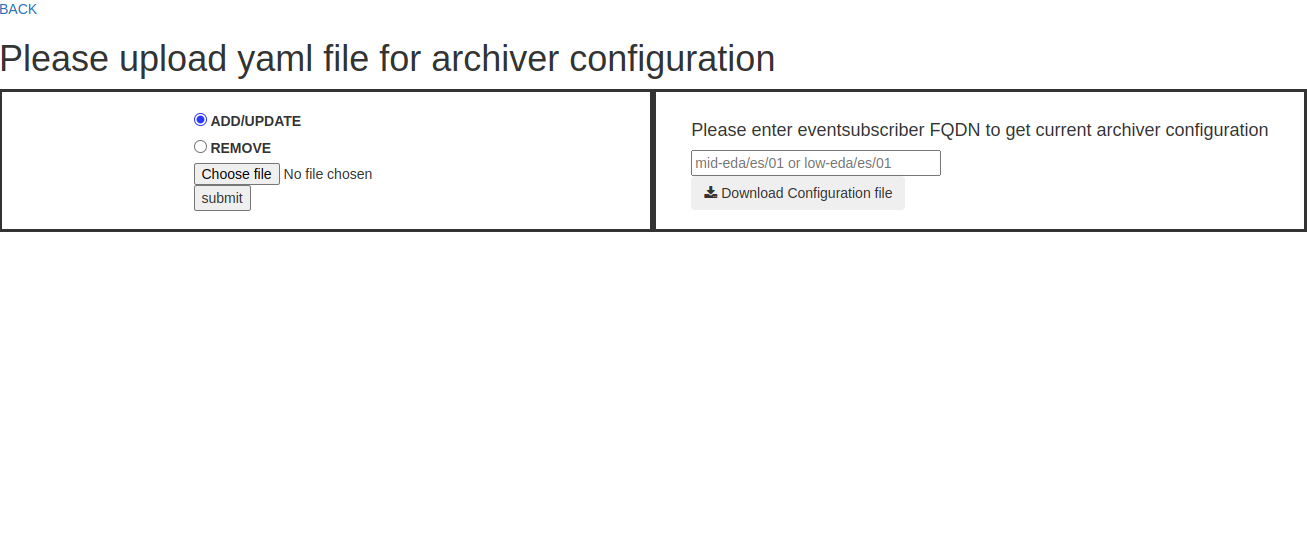
minikube service configurator -n <KUBE_NAMESPACE> --urlto get the url of configuration tool.Click on the link, then the title page that would be followed by configurator tool UI as shown below will appear.
Steps to access configurator deployed inside cluster.
Once deployment is completed , insert the details in below link to access configurator tool.
http://configurator.{KUBE_NAMESPACE}.svc.cluster.local:8003
KUBE_NAMESPACE: Namespace of the deployment
please note: VPN access will be required to access the link.
Link will load the UI as shown above.
- UI DETAILS:
The UI consists of:
- Radio options :
Add/update - This option adds attributes present in the yaml file or changes the configuration if the attributes are present already.
Remove - This option removes attributes present in the yaml file.
- File Upload box :
This option helps to upload the user’s yaml file. Only yaml files are allowed to be uploaded.
- input text:
This text accepts event subscriber FQDN which will be used to provide current configuration.
- Download button:
Click once to download configuration file of given event subscriber.
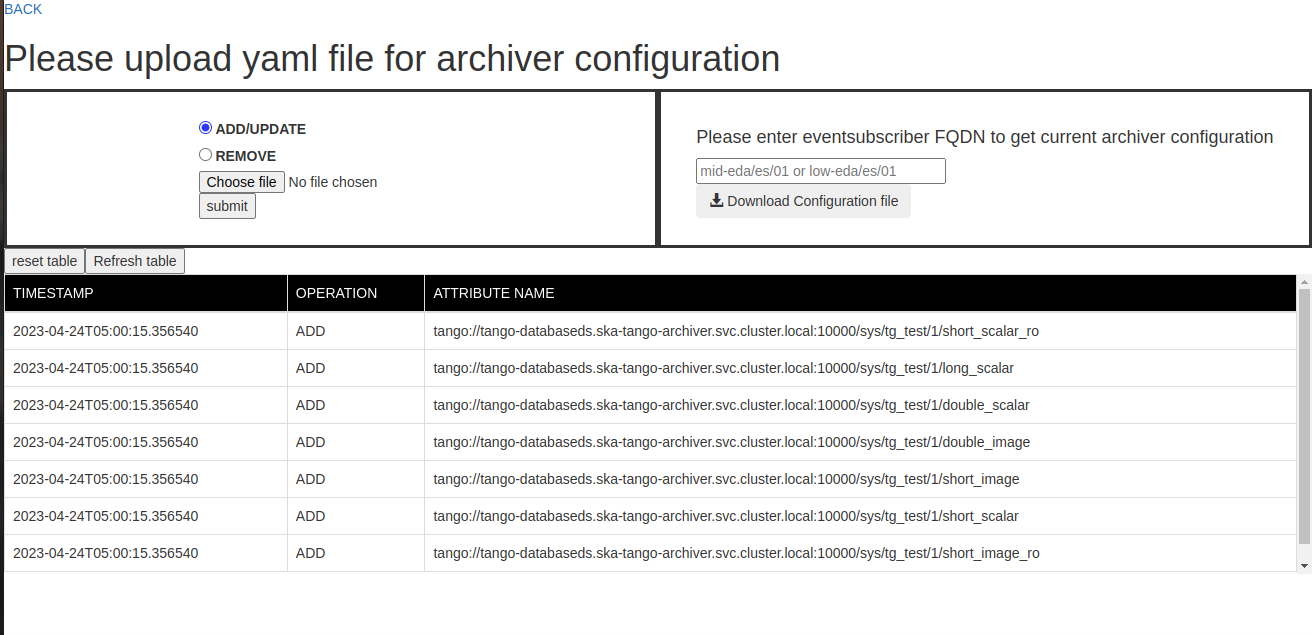
- Reset Table button:
Click once to erase the contents of the table.
- Refresh Table button :
Once clicked will sync table with latest operations performed with other clients.
- Table :
This will be visible once you perform any operation like add/remove/update.The table consists of timestamp, operation performed and Attribute name.
HOW TO CONFIGURE:
User can upload the yaml file containing attribute configurations and choose one of the option [add/update,remove].
Once submitted , user will able to see table as shown below containing data of attributes archived in the system.
HOW TO DOWNLOAD:
User can enter eventsubscriber FQDN in the input box and then click download button to get configuration present in the system.
API DETAILS:
- configure-archiver:
This API helps to configure archiver using yaml file and options[“add_update”/”remove”].
 curl -X 'POST' \
'http://<IP>:8003/configure-archiver' \
-H 'accept: application/json' \
-H 'Content-Type: multipart/form-data' \
-F 'file=@<YAML FILE>;type=application/x-yaml' \
-F 'option=add_update'
curl -X 'POST' \
'http://<IP>:8003/configure-archiver' \
-H 'accept: application/json' \
-H 'Content-Type: multipart/form-data' \
-F 'file=@<YAML FILE>;type=application/x-yaml' \
-F 'option=remove'
- download-configuration:
This API accepts eventsubscriber name and provides yaml file with current attributes archived into the system.
curl -X 'GET' \
'http://<IP>:8003/download-configuration/?eventsubscriber=mid-eda%2Fes%2F01' \
-H 'accept: application/json'
- [GET]configurations:
This API provides history of all the operations performed in the system.
curl -X 'GET' \
'http://<IP>:8003/configurations' \
-H 'accept: application/json'
- [DELETE]configurations:
This API deletes history of operations performed. .. code-block:
curl -X 'DELETE' \
'http://<IP>:8003/configurations' \
-H 'accept: application/json'