Diagnostic Data Products
This page describes diagnostic data products generated by the pipeline.
RFI Flagging Report
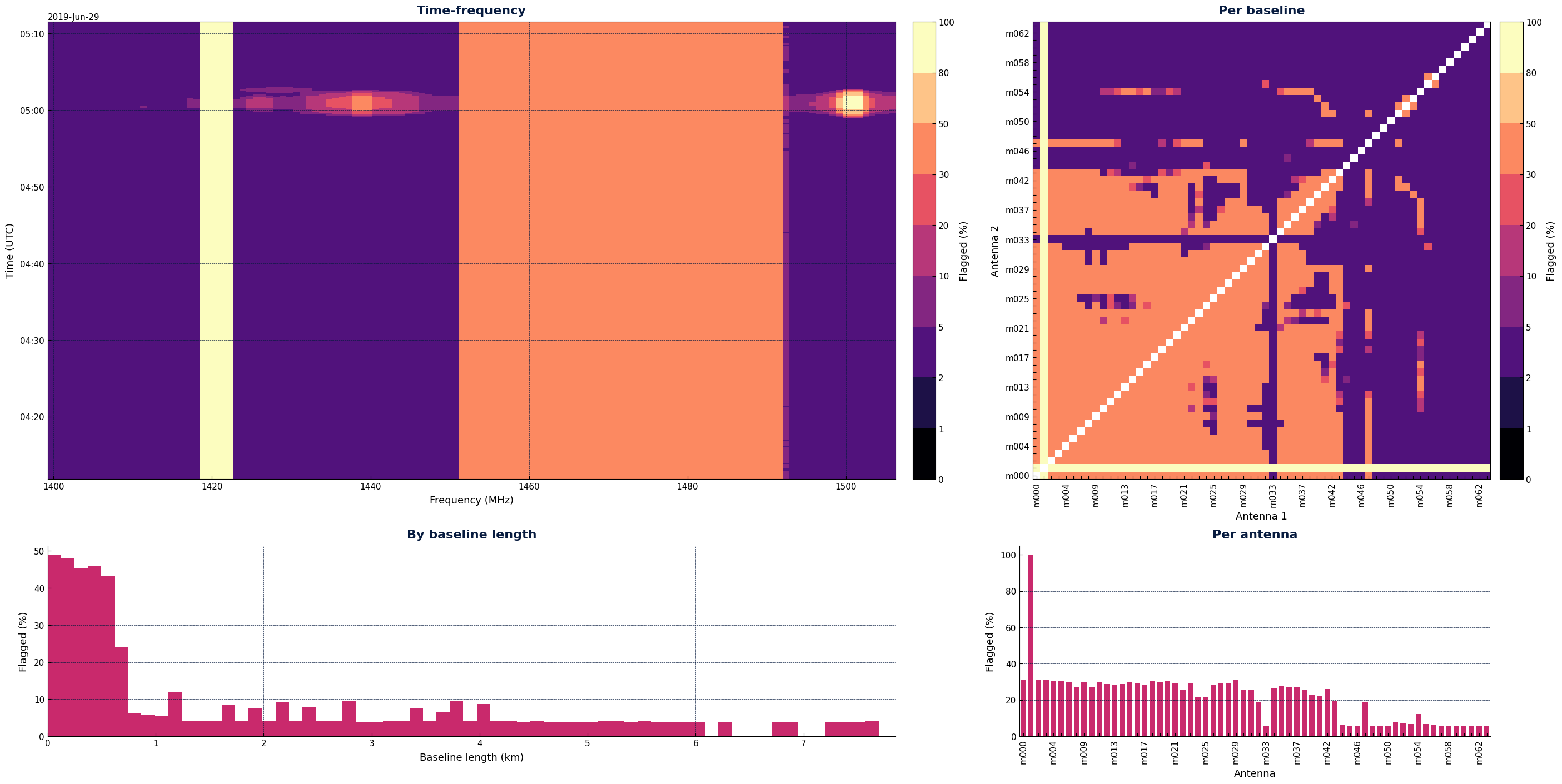
The RFI Flagging Report summarises the fraction of visibility data flagged as radio-frequency interference in each output dataset, across time, baseline, and frequency. Reports are saved as xarray datasets, which are self-descriptive collections of labeled multi-dimensional arrays that share dimensions and coordinate axes.
For each input visibility dataset, a corresponding report is saved in the main pipeline output directory as
<INPUT_NAME>_flagging_report.zarr.
A corresponding plot of the report is saved as a PNG file as <INPUT_NAME>_flagging_report.png.
Standalone CLI app
It is also possible to generate a flagging report for any Measurement Set independently of the
main pipeline, using the ska-sdp-flagging-report command:
ska-sdp-flagging-report path/to/dataset.ms
This saves dataset_flagging_report.zarr and dataset_flagging_report.png in the current
working directory. The app uses a local Dask cluster sized to the number of available CPU cores.
Example Plot
Here is an example plot of a flagging report as saved by the pipeline, after a run on a small MeerKAT dataset. Note that you can generate your own plots from the xarray dataset, see below.
Loading and working with reports
All you need is the xarray library to load and inspect flagging reports. For example:
import xarray as xr

report = xr.open_zarr("mydataset_flagging_report.zarr", chunks=None)
print(report)
This should print something similar to:
<xarray.Dataset> Size: 3MB
Dimensions:                 (baseline_id: 1953, frequency: 64, time: 224)
Coordinates:
    baseline_antenna1_name  (baseline_id) <U4 31kB ...
    baseline_antenna2_name  (baseline_id) <U4 31kB ...
* baseline_id             (baseline_id) int64 16kB 0 1 2 3 ... 1950 1951 1952
* frequency               (frequency) float64 512B 1.4e+09 ... 1.505e+09
* time                    (time) float64 2kB 5.068e+09 5.068e+09 ... 5.069e+09
Data variables:
    BASELINE_LENGTHS            (time, baseline_id) float64 3MB ...
    SUMS_BY_TIME_BASELINE       (time, baseline_id) int64 3MB ...
    SAMPLES_BY_TIME_BASELINE    (time, baseline_id) int64 3MB ...
    SUMS_BY_TIME_FREQUENCY      (time, frequency) int64 115kB ...
    SAMPLES_BY_TIME_FREQUENCY   (time, frequency) int64 115kB ...
You can easily access the data variables and coordinates by name. For example:
import matplotlib.pyplot as plt
import numpy as np

sums = report.SUMS_BY_TIME_BASELINE.values
samples = report.SAMPLES_BY_TIME_BASELINE.values
frac_by_time = np.nansum(sums, axis=1) / np.nansum(samples, axis=1)
plt.plot(report.time, frac_by_time)
plt.xlabel("Time (JD seconds)")
plt.ylabel("Fraction Flagged")
plt.show()
Data Schema
The RFI Flagging Report xarray dataset contains the following coordinates and data variables:
Coordinates
Name |
Dimensions |
Data type |
Description |
|---|---|---|---|
|
|
|
Timestamp in JD seconds (CASA convention). |
|
|
|
Baseline unique ID. |
|
|
|
Channel centre frequencies in Hz. |
|
|
|
Antenna name for 1st antenna in baseline. |
|
|
|
Antenna name for 2nd antenna in baseline. |
Data Variables
Name |
Dimensions |
Data type |
Description |
|---|---|---|---|
|
|
|
Projected baseline length in metres for a given (time, baseline) pair. NaN for (time, baseline) pairs absent from the data. |
|
|
|
Number of flagged visibility samples for a given (time, baseline) pair, summed across frequency and polarisation. |
|
|
|
Total number of visibility samples for a given (time, baseline) pair, summed across frequency and polarisation. |
|
|
|
Number of flagged visibility samples for a given (time, frequency) pair, summed across baselines and polarisation. |
|
|
|
Total number of visibility samples for a given (time, frequency) pair, summed across baselines and polarisation. |