Octopus Suite Overview
Octopus Suite
Disclaimer This suite repository and setup are not an official SKAO deployment. It is intended for rapid testing of new functionalities and for simulating the devices we work on at k8s.stfc.skao.int/integration-octopus/ska-octopus-frontend.
The Octopus Suite repository glues together the backend and frontend services, plus their Helm charts, Docker Compose files, and helper scripts.
SKA-Octopus-Backend (📘 ska-octopus-backend): Ariadne (GraphQL + subscriptions), in-memory pub/sub, MongoDB for user preferences storage
SKA-Octopus-Frontend (📘 ska-octopus-frontend): React 19 + Vite + Apollo Client + Redux Toolkit + react-grid-layout
Dev & Deployment: K8s helm charts or Docker + Docker Compose
⚙️ How It Works
Octopus-Backend
HTTP & WebSocket: FastAPI serves GraphQL queries and real-time subscriptions.
Async Resolvers: Fully non-blocking
async deffunctions.In-memory Pub/Sub: Live feeds are pushed and streamed via an in-process pub/sub bus.
User Preferences:
preferences(userId: String!): JSON!querysetPreferences(userId: String!, config: JSON!): JSON!mutationData stored in MongoDB (
motor) underuser_id.
Octopus-Frontend
Apollo Client: Splits HTTP queries and WebSocket subscriptions.
Redux Store: All live data (history, feeds, etc.) managed globally.
Widget System:
Each data source gets its own independent widget.
Layout is responsive and supports drag/drop widgets placement.
User Preferences UI:
Settings modal for toggling “Edit mode” and other preferences.
State saved immediately via GraphQL mutations.
Dev Environment
Kubernetes:
make k8s-install-chartsDocker Compose:
docker-compose up --build
🏗️ Architecture Overview
Backend service mesh:
ska-octopus-backendunifies multiple backends (TangoGQL, HDB++, EDA, ODA, OET) behind a single GraphQL API. A dynamic SDL is generated via the config-ui (see the Config UI section) and merged with the static widget schema, ensuring subscriptions, queries, and mutations remain discoverable across widgets.Frontend application shell:
ska-octopus-frontendinitializes preferences, handles user authentication, and renders workspaces. On load it fetcheswidgets/widgetBundle, streams IIFE bundles throughsrc/widgets/remoteLoader.ts, and allows widgets to self-register without requiring a host rebuild.Shared contract: Preferences, workspaces, and widget metadata flow consistently through GraphQL. The backend’s in-memory pub/sub powers live updates, MongoDB persists user preferences and widget catalog entries, and Docker/Helm integrate both services within this suite repository.
The suite repository (ska-octopus-suite) serves as the orchestration layer—packaging charts, Docker Compose configurations, and end-to-end tests—while the frontend and backend evolve independently.
🧩 Why this stack?
Concern |
Choice |
Rationale |
|---|---|---|
API & Realtime |
FastAPI + Ariadne |
Async-first ASGI framework with GraphQL subscriptions for realtime data. |
Pub/Sub transport |
In-process bus |
Ultra-low latency pub/sub without external dependencies; great for dashboards. |
Background tasks |
Async-only (no Celery/Dramatiq for now) |
Current tasks are lightweight; no separate worker queues needed yet. |
Data storage |
MongoDB + Motor |
Flexible, schema-less JSON storage per user. |
Frontend framework |
React 19 + Vite |
Fast bundling, React Suspense and startTransition support. |
State management |
Apollo Client + Redux Toolkit |
Subscriptions + centralized store for multi-widget reactivity. |
Layout system |
react-grid-layout |
Drag-and-drop, responsive dashboard widgets. |
Dev environment |
K8s or Docker Compose |
Easy local setup; consistent deployment experience. |
Note: If heavier background jobs are introduced later (e.g., long-running processing, scheduled tasks), an external broker can be added alongside the existing in-memory pub/sub. Current architecture is async-only by design for simplicity and high performance.
⚙️ Config UI
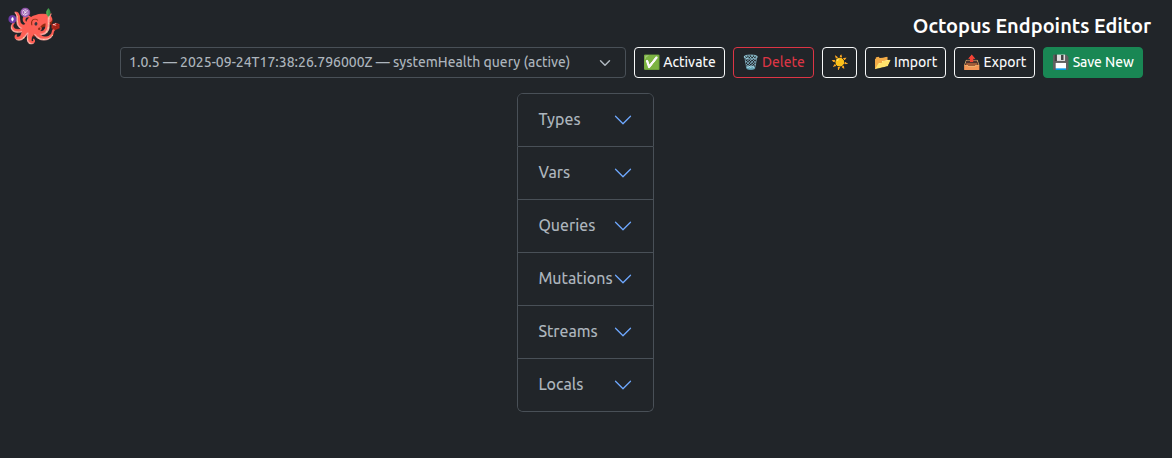
The Config UI allows dynamic editing, adding, and removal of the JSON structure defining the application’s behavior. Integrated with CodeMirror, it provides a Python code editor to customize local functions that combine or convert different data sources, enhancing flexibility and ease of configuration.
Key features:
Dynamic JSON configuration: Modify app endpoints and schema easily.
Python function customization: Write local Python code directly within the configuration UI.
Realtime feedback: Immediate validation and linting of Python code.
Import/Export configurations: Quickly migrate or backup settings with simple JSON import/export.
🧱 Detached Widget Model
Backend registry: Administrators add or upgrade widgets via
⚙️ -> Widgets Store. Only whitelisted hosts/scopes (artefact.skao.int, unpkg…) [Configurable by a deployment varWIDGET_ALLOWED_NPM_SCOPES] are accepted, bundles are fingerprinted, and multiple versions can coexist for safe rollback.Runtime delivery: The frontend iterates over the catalog, downloads bundles through
ska-octopus-backendusing GraphQL, and evals them in the browser. Each widget callsOctopus.registerWidget, so layout grids redraw immediately and streams/queries/subscriptions start only when needed.Error isolation: Each widget is wrapped in an
ErrorBoundaryso that rendering failures or runtime errors in a single widget do not crash the entire dashboard. Instead, users see a clear ⚠️Failed to load this widgetmessage with more details, while other widgets continue operating normally, preserving overall resilience.Operational blast radius: Faulty widgets can be removed from the catalog or pinned to an earlier version without redeploying the core app. Backend caching (memory + tarball cache) avoids thundering herds, and per-widget subscriptions prevent one component from starving another.
Developer ergonomics: Local development can point to
iife/builds, while production widgets ship as npm packages with their own pipelines. The detached model lets teams iterate on domain-specific UI without waiting for a monolithic release train.
🔮 Why This Architecture Rocks
Async > Threads: Single-threaded async serves thousands of connections efficiently.
In-memory Pub/Sub > Polling: Real-time data pushed instantly to clients without external brokers.
GraphQL Subscriptions > Custom WebSockets: Declarative schema-based real-time updates.
Persisted Preferences: User settings stored server-side, surviving across sessions and devices.
Isolated Components: Widgets don’t block or crash each other.
Monolithic Dev Setup: Easy K8s or Docker Compose with hot reload for frontend and backend.
Memory footprint note
Each uvicorn worker loads the full stack (FastAPI, Ariadne, motor, asyncpg, PyTango, etc.), so expect ~350–400 MiB RSS per worker. Adjust
WORKERSto trade concurrency for total RAM.We currently keep heavy libs like PyTango to allow full environment exploration; as TangoGQL becomes the sole path for Tango data, we’ll drop those deps to slim the baseline.
🆚 Grafana Comparison
Strengths vs Grafana GraphQL-native telemetry that matches SKAO datasets; detached widget packaging for bespoke React apps; per-user workspaces and preferences without Grafana’s tenancy constraints; leaner deployment footprint tailored to SKAO auth and infrastructure.
Gaps vs Grafana Smaller widget ecosystem and fewer generic visualizations; limited built-in alerting/RBAC/provisioning compared to Grafana’s batteries-included stack; widget maintenance depends on internal teams rather than a global marketplace; multi-tenant guardrails are still emerging.
🚀 Quick Start
Prerequisites
K8s installation (
recommended) or Docker & Docker Compose(Optional for Devs) Node.js & npm for local ska-octopus-frontend or widgets development
Docker Compose Branding Overrides
Drop your logo files under
assets/(or a subfolder) so docker-compose mounts them into/usr/share/nginx/html/branding/inside the frontend container.Point
MAIN_LOGO,SECONDARY_LOGO_WHITE, andSECONDARY_LOGO_DARKinruntime-config.jsto/branding/<filename>or a full URL to switch the header artwork without rebuilding the image.Override
FOOTER_COPYRIGHT_LABELfor the owner name andFOOTER_COPYRIGHT_YEAR(set toautoor a specific year string) in the same file to customise the footer text.Apply your changes with
docker-compose up -d --force-recreate ska-octopus-frontendor a fulldocker-compose up -dto refresh the container with the new branding.
Run with Kubernetes
make k8s-install-charts
The target installs the packaged ska-octopus Helm chart into the namespace
defined by KUBE_NAMESPACE (defaults to ska-octopus-suite) using the release
name stored in HELM_RELEASE (defaults to ska-octopus). Override the
variables on the command line if you want to deploy to a different namespace or
use a different release name:
HELM_RELEASE=my-octopus KUBE_NAMESPACE=my-namespace make k8s-install-charts
Run with Docker
# From repo root
docker-compose up --build
SKA-Octopus-Backend on
http://localhost:8000/graphql(HTTP + WS)SKA-Octopus-Frontend on
http://localhost:3000/
Local SKA-Octopus-Frontend Dev
cd ska-octopus-frontend
npm install
npm run dev
env file (ska-octopus-frontend/.env):
VITE_GRAPHQL_HTTP=/graphql
VITE_GRAPHQL_WS=ws://localhost:3000/graphql
Configure secrets (Kubernetes)
Create the Kubernetes secrets you want the chart to read from. Example secrets that match the defaults:
# EDA DSN exposed to the backend as HDBPP_PG_DSN_EDA
kubectl -n ska-octopus-suite create secret generic octopus-eda-readonly-postgresenv \
  --from-literal=HDBPP_PG_DSN='postgresql://postgres:tango@hdbpp-hdbpp-db:5432/hdb' \
  --dry-run=client -o yaml | kubectl apply -f -

# Optional secondary DSN exposed as HDBPP_PG_DSN_SECONDARY
kubectl -n ska-octopus-suite create secret generic octopus-secondary-eda-readonly-postgresenv \
  --from-literal=HDBPP_PG_DSN='postgresql://postgres:tango@hdbpp-hdbpp-db:5432/hdb' \
  --dry-run=client -o yaml | kubectl apply -f -

# JWT secret consumed by the backend deployment
kubectl -n ska-octopus-suite create secret generic octopus-jwt \
  --from-literal=token='s3cr3t' \
  --dry-run=client -o yaml | kubectl apply -f -

# Config UI password exposed to the backend as CFG_UI_PASSWORD
kubectl -n ska-octopus-suite create secret generic octopus-config-ui-password \
  --from-literal=cfg-ui-password='super-secret-password' \
  --dry-run=client -o yaml | kubectl apply -f -

# Local auth users exposed as OCTOPUS_AUTH_USERS (JSON payload)
kubectl -n ska-octopus-suite create secret generic octopus-auth-users \
  --from-literal='auth-users.json=[{"username":"admin","password":"change-me","role":"Admin"}]' \
  --dry-run=client -o yaml | kubectl apply -f -
Point the chart at the secrets
The backend Helm chart expects each environment variable under vars to be defined as a map. Each field has a specific meaning:
value: A literal fallback used if the referenced secret is missing.secretName/secretKey: Identify the Kubernetes secret and key that the chart should read.useSecretLookup:true(default) → the chart checks if the secret exists and falls back to value if it does not.false→ only use if the Helm release itself creates the target secret.
The default configuration in ska-octopus/charts/ska-octopus/values.yaml is already set up for the commands shown above:
ska-octopus-backend:
  authUsers:
    secretName: octopus-auth-users
    secretKey: auth-users.json
    optional: false
  # Environment variables exposed individually remain under `vars`
  vars:
    JWT_SECRET:
      secretName: octopus-jwt
      secretKey: token
      useSecretLookup: true
    HDBPP_PG_DSN_EDA:
      secretName: octopus-eda-readonly-postgresenv
      secretKey: HDBPP_PG_DSN
      useSecretLookup: true
    HDBPP_PG_DSN_SECONDARY:
      secretName: octopus-secondary-eda-readonly-postgresenv
      secretKey: HDBPP_PG_DSN
      useSecretLookup: true
If your cluster uses different secret names or keys, override these values (or add new entries under vars) in your own values file.
To bake the JSON payload directly into a release-managed secret, set authUsers.createSecret: true and provide authUsers.value with compact JSON (list or dict of user specs). The backend parses this JSON at startup to seed the local /auth/login user database.
At runtime, both the backend and the Config UI can consume these environment variables. They can be used to connect to different backends, passed as parameters, or simply displayed.
🧪 End-to-End Testing
Run the Cypress smoke suite against an existing Kubernetes deployment with a single command:
make k8s-test
This delegates to .make/k8s.mk and launches an ephemeral pod running the
cypress/included image inside the target namespace. The pod receives the
cypress/ folder, installs dependencies with npm ci, executes
npx cypress run, and stores JUnit output under build/cypress/. To tweak the
service endpoints or switches, override the helper variables:
CYPRESS_BASE_URL=https://octopus.example.org \
CYPRESS_BACKEND_URL=https://api.example.org \
K8S_TEST_IMAGE_TO_TEST=cypress/included:13.8.0 \
make k8s-test