SKAO Octopus Frontend 🐙
A real-time, configurable dashboard used by SKAO Science Operations teams. The application unifies live telemetry, historical data, and operational tooling inside a workspace-driven React interface backed by GraphQL and MSAL authentication.
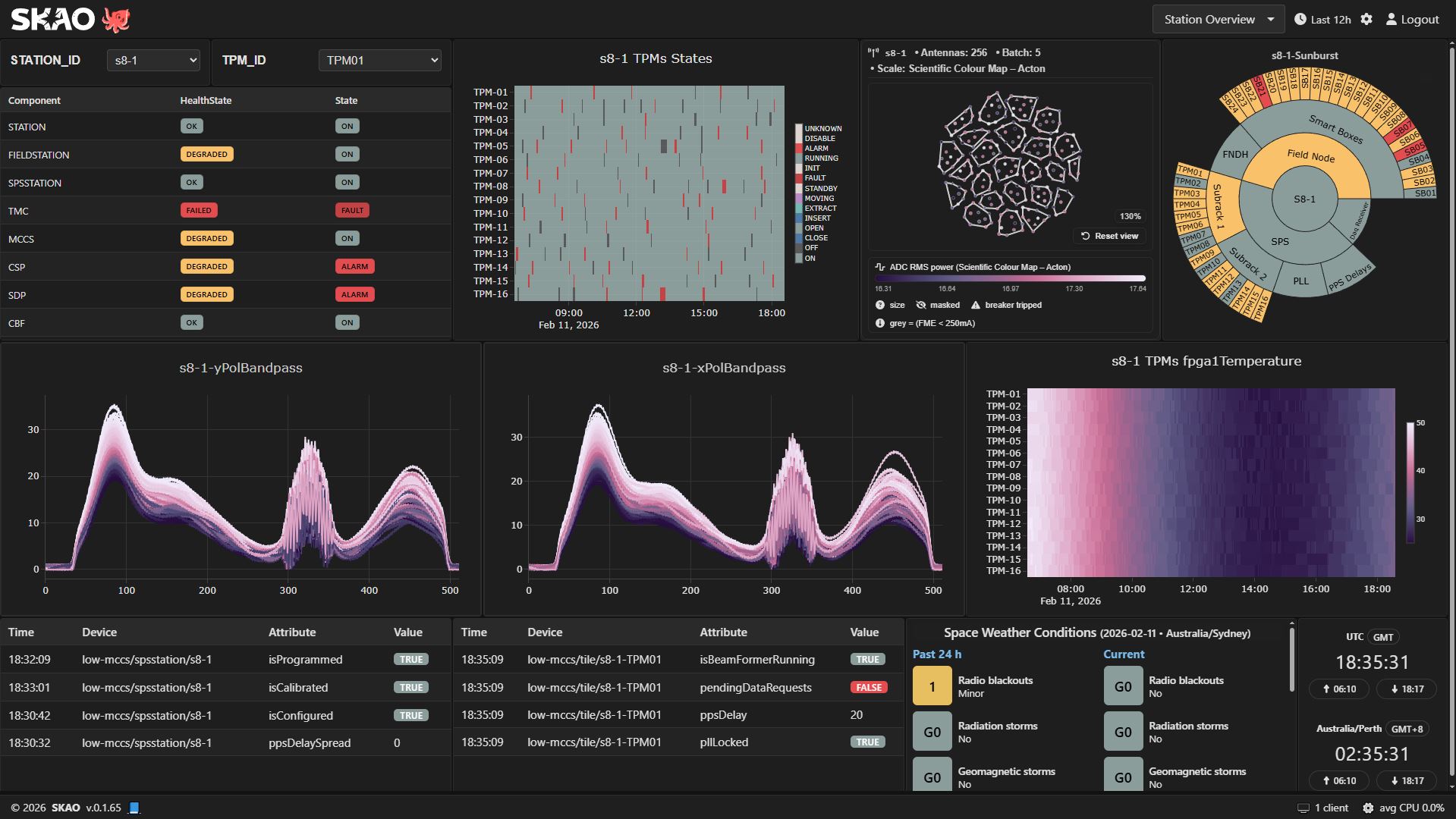
Table of Contents
Overview 🌍
Octopus provides a single landing zone for instrument status, science pipelines, and supporting services. Operators can arrange the layout, pick data sources, and share reusable workspaces across teams. Widgets stay visually consistent, react to the global time range, and expose a common brushing interface for cross-filtering.
Key Features ⚙️
Widgets consume merged history and live streams, or history-only and live-only modes when required.
Workspace state (layout, visibility, filters, time preset) is persisted per user through GraphQL preferences.
Authentication is pluggable: Microsoft Entra ID via MSAL, a local username and password flow, or a mock user for demos.
Widget bundles register themselves at runtime, allowing external packages to extend the dashboard without rebuilding.
GraphQL and upstream backend response errors are surfaced inline per widget, with expandable payload details for troubleshooting.
Layout is powered by react-grid-layout with drag, resize, and breakpoint awareness.
Theming is applied with CSS variables to support light, dark, and custom operations palettes.
Architecture Highlights 🏗️
Frontend stack: React 19, Vite 6, Redux Toolkit, Apollo Client, and graphql-ws subscriptions.
State: Core slices live under
src/storewith reducer injection to support widgets distributed as independent bundles.Streams:
src/streams/initStreams.tsinspects visible widgets and starts or stops the subscriptions they require.Widgets:
src/widgets/registry.tskeeps registry state, exposes helpers used bysrc/dashboard.ts, and publishes events for hot reloads.Runtime configuration:
src/env.tsmerges build-time environment variables withwindow.configfrompublic/config.js.Authentication helpers:
src/helpers/msal.tsselects the correct MSAL implementation based on the chosen auth provider.
Data Modes 🔄
Widgets determine how to query data based on the global time range maintained in src/store/timeSlice.ts.
Merged history and live: When the global end time includes now, widgets fetch a slice of history and continue with subscriptions.
Live only: Widgets skip the historical query and attach directly to subscriptions for real-time monitoring.
History only: When the selected interval is fully in the past, widgets use historical queries without opening streams.
Cross-widget brush and filter expressions live in src/store/brushSlice.ts, ensuring selections stay in sync.
Project Layout 🗂️
src/apollo: Apollo client setup, links, and cache helpers.src/components: Shared UI elements and layout primitives.src/widgets: Widget registry helpers and local widget definitions.src/streams: Stream definitions and lifecycle management.docs/: Sphinx-based documentation (make htmlfor local preview).charts/: Helm chart for deploying the built image.tests/: Vitest integration and slice-level tests.
Getting Started 🚀
Prerequisites 📋
Node.js 18 or newer (Node 22 is used in the project Dockerfiles).
npm 9+.
Optional: Docker and docker compose for container workflows.
Access to an Azure AD (Microsoft Entra) application if you intend to use real MSAL authentication.
Clone and Install ⬇️
git clone https://gitlab.com/ska-telescope/ska-octopus/ska-octopus-frontend
cd ska-octopus-frontend
npm install --legacy-peer-deps
Runtime Configuration 🔧
At runtime the app reads window.config from public/config.js. Copy the template and adjust values for your environment.
window.config = {
  AUTH_PROVIDER: 'mock', // 'msal' | 'local' | 'mock'
  MSENTRA_CLIENT_ID: '00000000-0000-0000-0000-000000000000',
  MSENTRA_TENANT_ID: '00000000-0000-0000-0000-000000000000',
  MSENTRA_REDIRECT_URI: 'http://localhost:3000/testdb',
  mockUserId: 'demo',
  mockUserName: 'Demo User',
  mockTenantId: 'local',
  DEPLOY_ENV: 'Low Site',
  grid_cols: 96,
  grid_rowHeight: 5,
  grid_width: 1200,
  refresh_rate_s: 60,
  widget_refresh_rates: {
    systemHealth: 60,
    weather: 60
  },
  remote_widgets: [
    // { url: 'https://example.com/widgets.js', type: 'script' }
  ]
};
Override the auth provider at build time with VITE_AUTH_PROVIDER=msal npm run build if you need to force a different mode for a static deployment.
Local Development 💻
npm run dev
# Opens Vite dev server on http://localhost:3000
Build a production bundle with:
npm run build
The output is written to dist/ and can be served by any static web server or the provided Docker image.
Testing and Quality ✅
npm testruns Vitest with coverage.npm run lintexecutes ESLint checks.npm run format:checkchecks formatting, andnpm run formatapplies Prettier.npm run check-unused-libsreports unused dependencies (powered by depcheck).npm installalso wires up the Husky pre-commit hook, which formats lint-staged files and runsnpm test --silentbefore allowing a commit.npm run scan:imagebuilds the container locally and runs a Trivy-based scan for HIGH/CRITICAL CVEs (used by pre-commit).
Docker Images 🐳
Build a development image that runs the Vite server:
docker build -f Dockerfile.dev -t ska-octopus-frontend:dev .
Build the production image that serves the static bundle through nginx:
docker build -t ska-octopus-frontend:latest .
The production image uses entrypoint.sh to inject the runtime base path before nginx starts.
Runtime Base Path 🧭
vite.config.ts sets base: './' for relative asset paths during development. In production the nginx entrypoint replaces <base href="${BASE_PATH}"> inside index.html based on the BASE_PATH environment variable. Set BASE_PATH before starting the container if you need to host the dashboard under a subdirectory.
When you deploy through the bundled Helm chart with the Makefile defaults
(KUBE_NAMESPACE=octopus, HELM_RELEASE=ska-octopus-frontend) the generated
base path becomes /octopus/ska-octopus-frontend. Requests to GraphQL continue
to be routed via nginx to the backend release, giving you
https://<ingress-host>/octopus/ska-octopus-backend/graphql from the same
ingress.
Contributing 🤝
We currently accept contributions through pull requests. Before opening a PR, run the test, lint, and formatting scripts listed above. Include updates to public/config.js or documentation when new configuration keys or widgets are introduced. For significant UI changes, add screenshots or reference material in the PR description.
License 📄
Distributed under the BSD 3-Clause License. See LICENSE for details.