Actions, Assertions and Synchronisation
Conceptual definition
The first logical building block to consider is the Action. An Action is a structured representation of an interaction with the SUT. Concretely, it can be any operation you may wish to perform on the SUT, such as sending a command, setting an attribute, or orchestrating something more complex.
We assume that most interactions with the SUT, whether simple or complex, can be represented as a sequence of the following three +1 steps:
The verification of certain pre-conditions, which must be satisfied before the action can be executed (e.g., ensuring the SUT is in a specific known state).
The execution of the action procedure itself (e.g., sending a command, setting an attribute, etc.).
The verification of certain post-conditions, which are expected to be met following a successful action execution (e.g., confirming the SUT has reached a given target state).
As we are working with distributed systems where interactions are highly event-based, post-conditions will typically need to be verified within a timeout. This is because the SUT may take time to reach the expected state, and waiting indefinitely is not practical. In this sense, post-condition verification is a form of synchronisation.
Additionally, since we are dealing with an event-based system, an action may require a setup phase to prepare for execution and condition verification. This setup phase may involve subscribing to certain events or clearing existing events to prevent false positives or negatives in verifications, thereby ensuring that the action can be executed multiple times.
Design and implementation
In ITH as a Platform, we provide a base class for actions
(SUTAction) that
implements the fundamental structure of an action, including setup,
pre-conditions, post-conditions, and timeout handling. This base class is
designed to be extended by custom actions, allowing users to implement
specific interaction logic for their SUT.
Since some requirements may be common across teams, we also provide
ready-to-use actions in both the
core layer and the
extensions layer. For example,
the TangoLRCAction
is a pre-built action that sends a Tango Long Running Command to a device,
waits for its completion, and synchronises with certain device state changes.
From your test code (whether in your customisation of the Test Harness or within your tests), you can utilise these ready-to-use actions, or you can create your own custom actions by extending the base class and implementing the necessary extension points.
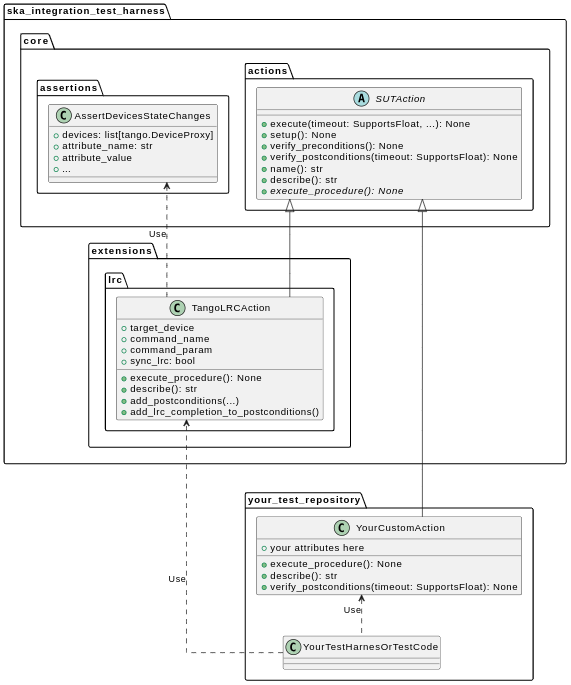
Here follow a few notes on the key components of the action mechanism.
SUTActionis a base class for executing operations on a SUT, supporting preconditions, postconditions (e.g., synchronisation), setup, and a defined procedure.execute()orchestrates the execution of specific methods. It also handles logging, timeouts, and other utilities.Subclasses must implement
execute_procedure(); other methods are optional and by default do nothing. You can create custom actions by extendingSUTActionor any of its subclasses.TangoLRCActionis a ready-to-use action for sending Tango Long Running Commands (LRCs) to devices, handling synchronisation, and monitoring device state changes.It resides in the Common Extensions package, as it incorporates SKA-specific knowledge of how Long Running Commands emit events.
TangoLRCActionsends a Tango command to a device, waits for LRC completion, and monitors device state changes and LRC errors. It achieves this by extending certainSUTActiondescendants and using structured representations of expected preconditions and postconditions, which are then synchronised with the tracer.
More details on this mechanism can be found in the following example and in the API documentation.
The core logic of actions is implemented in the following modules:
Usage Example 1 (simple): Command + LRC & State Synchronisation
In this first simple example, we demonstrate how to use the action mechanism with the provided blocks to execute a basic Tango command call, the subsequent LRC completion check, and the state synchronisation.
Assume we have a Tango device and want to send it a command. Also, assume that the command 1) is a Long Running Command (LRC) and 2) will cause the state of some other devices to change to a particular state. Suppose we want to ensure that the command executes correctly (without errors) and that the desired states are reached. To achieve this, we proceed as follows:
Define the command as an instance of
ska_integration_test_harness.extensions.lrc.TangoLRCAction.Define a pre-condition using an instance of
ska_integration_test_harness.core.assertions.AssertDevicesAreInStateto verify the initial state of the devices and ensure the action executes from a valid initial state.Define the expected state transitions as post-conditions using instances of
ska_integration_test_harness.core.assertions.AssertDevicesStateChanges.Add directives to impose a timeout, synchronise LRC completion, and fail early if an LRC error is detected.
Finally, execute the enriched action object with all the directives applied.
import tango
import json

from ska_integration_test_harness.extensions.lrc import TangoLRCAction

from ska_integration_test_harness.core.assertions import (
    AssertDevicesAreInState, AssertDevicesStateChanges,
)
from <...> import ObsState

# The device where the command will be sent
target_device = tango.DeviceProxy("tmc-low/centralnode/0")

# The devices expected to change state as a result of the command
subarray_devices = [
    tango.DeviceProxy("tmc-low/subarray/01"),
    tango.DeviceProxy("csp-low/subarray/01"),
    tango.DeviceProxy("sdp-low/subarray/01"),
    tango.DeviceProxy("mccs/subarray/01"),
]

# 1. Create an instance of an action that sends a command to a device
action = TangoLRCAction(
    target_device=target_device,
    command_name="AssignResources",
    command_param=json.read("low/input/assign_resources.json"),
)

# 2. Use pre-conditions to specify the expected initial state
# for the action to execute successfully. This is optional and
# often unnecessary, except for ensuring "stronger" tests.
action.add_preconditions(
    # Expect the devices to be in the EMPTY state
    AssertDevicesAreInState(
        devices=subarray_devices,
        attribute_name="obsState",
        attribute_value=ObsState.EMPTY,
    ),
)

# 3. Use post-conditions to specify the expected state changes
# after the action executes.
action.add_postconditions(
    # Expect a state change in the devices to the RESOURCING state
    AssertDevicesStateChanges(
        devices=subarray_devices,
        attribute_name="obsState",
        attribute_value=ObsState.RESOURCING,
    ),
    # Expect a state change in the devices to the IDLE state
    AssertDevicesStateChanges(
        devices=subarray_devices,
        attribute_name="obsState",
        attribute_value=ObsState.IDLE,
        previous_value=ObsState.RESOURCING,
    ),
)

# 4. Add directives to synchronise LRC completion, fail early on LRC
# errors, and set a timeout for the action.
action.add_lrc_completion_to_postconditions()
action.add_lrc_errors_to_early_stop()

# 5. Execute the action (within a timeout)
action.execute(postconditions_timeout=30)
Or, more generically, you can build yourself a untility function like this one to build commands with the desired pre- and post-conditions and directives for whatever subarray command:
from ska_tango_testing.integration.assertions import ChainedAssertionsTimeout
# (other imports)

subarray_devices = [
    tango.DeviceProxy("tmc-low/subarray/01"),
    tango.DeviceProxy("csp-low/subarray/01"),
    tango.DeviceProxy("sdp-low/subarray/01"),
    tango.DeviceProxy("mccs/subarray/01"),
]

# NOTE: this is a simplification for the sake of the example.
commands_target = subarray_devices[0]

def build_subarray_command_action(
    command_name: str,
    command_param: Any,
    verify_initial_state: ObsState | None = None,
    wait_states: list[ObsState] | None = None,
    wait_lrc_completion: bool = True,
    fail_on_lrc_errors: bool = True,
) -> TangoLRCAction:
    """
    Build a TangoLRCAction for a subarray command.

    :param command_name: The name of the command to send.
    :param command_param: The parameter to send with the command.
    :param verify_initial_state: If specified, a pre-condition will be added
        to verify that the subarray devices are in this state before executing
        the command.
    :param wait_states: If specified, post-conditions will be added to verify
        that the subarray devices change to these states after executing the
        command. The order of states in the list will be used to verify the
        sequence of state changes.
    :param wait_lrc_completion: If True, a post-condition will be added to
        wait for the LRC completion after executing the command.
    :param fail_on_lrc_errors: If True, an early stop condition will be added
        to fail the action immediately if an LRC error is detected.

    : return: A TangoLRCAction instance with the specified command,
        pre-conditions, post-conditions, and directives.
    """

    action = TangoLRCAction(
        target_device=commands_target,
        command_name=command_name,
        command_param=command_param,
    )

    if verify_initial_state is not None:
        action.add_preconditions(
            AssertDevicesAreInState(
                devices=subarray_devices,
                attribute_name="obsState",
                attribute_value=verify_initial_state,
            ),
        )

    for state in wait_states or []:
        AssertDevicesStateChanges(
            devices=subarray_devices,
            attribute_name="obsState",
            attribute_value=state,
        ),

    if wait_lrc_completion:
        action.add_lrc_completion_to_postconditions()

    if fail_on_lrc_errors:
        action.add_lrc_errors_to_early_stop()

    return action

# Example usage
assign_resources_action = build_subarray_command_action(
    command_name="AssignResources",
    command_param=json.read("low/input/assign_resources.json"),
    verify_initial_state=ObsState.EMPTY,
    wait_states=[ObsState.RESOURCING, ObsState.IDLE],
    wait_lrc_completion=True,
    fail_on_lrc_errors=True,
)
configure_action = build_subarray_command_action(
    command_name="Configure",
    command_param=json.read("low/input/configure.json"),
    verify_initial_state=ObsState.IDLE,
    wait_states=[ObsState.CONFIGURING, ObsState.READY],
    wait_lrc_completion=True,
    fail_on_lrc_errors=True,
)
scan_action = build_subarray_command_action(
    command_name="Scan",
    command_param=json.read("low/input/scan.json"),
    verify_initial_state=ObsState.READY,
    wait_states=[ObsState.SCANNING],
    # Assume we don't want to wait for LRC completion here
    wait_lrc_completion=False,
    fail_on_lrc_errors=True,
)
abort_action = build_subarray_command_action(
    command_name="Abort",
    command_param=json.read("low/input/abort.json"),
    # Assume we don't care about the initial state for this one
    wait_states=[ObsState.ABORTING, ObsState.ABORTED],
    wait_lrc_completion=True,
    fail_on_lrc_errors=True,
)

# run the actions, within the same timeout
shared_timeout = ChainedAssertionsTimeout(100)

assign_resources_action.execute(postconditions_timeout=shared_timeout)
configure_action.execute(postconditions_timeout=shared_timeout)
scan_action.execute(postconditions_timeout=shared_timeout)
abort_action.execute(postconditions_timeout=shared_timeout)
Some further comments on this code:
The pre-conditions are verified before the command is called. If they fail, an
AssertionErroris raised, and the command will not be called.The post-conditions are verified after the command is called. They are verified in the order they are added, and if one fails, subsequent ones are not checked. Verification is performed using a
TangoEventTracerto subscribe to events and check state changes through assertions.The timeout specifies the maximum wait time for post-conditions to be verified. It does not affect pre-conditions or the command call.
The LRC completion check is a post-condition. It is verified after the command is called and after other post-conditions are checked, all within the same timeout. You can specify which result codes count as successful completions. Verification subscribes to the
longRunningCommandResultstate change event and checks the result code for the stored LRC ID.The LRC error acts as a “sentinel,” monitoring events and halting post-condition verification early if an error is detected. You can specify which result codes are treated as errors. If an error is detected, an
AssertionErroris raised, stopping verification before the timeout.Synchronisation is managed internally by the
ska_tango_testing.integration.TangoEventTracer. All subscriptions and event resets are handled automatically, including storing the LRC ID.Provided the pre-conditions are satisfied, an action can be executed multiple times. Post-condition tracking and timeouts are reset with each execution.
In summary, the possible outcomes of an action execution are as follows:
Pre-conditions and post-conditions (including LRC completion) are satisfied: The action is successful.
A pre-condition fails: The action procedure (e.g., the command call) is not executed, and an
AssertionErroris raised.Pre-conditions are satisfied, but some post-condition (including LRC completion) fails: The timeout expires, and an
AssertionErroris raised.Pre-conditions are satisfied, but an LRC error is detected: An
AssertionErroris raised before the timeout or all post-conditions are verified.Pre-conditions are satisfied, but the action procedure encounters an error (e.g., a command call error): The error is uncaptured, and the action fails like normal Python code.
Would you like to try this approach? Here are some suggestions for further reading:
TangoLRCActionfor details on the action APIassertionsfor information on defining pre- and post-conditions, including how to create new ones
Usage Example 2 (intermediate): Custom action
Not all actions are simple command calls, and not all action synchronisation logic is standard. In this second example, we demonstrate how to create a custom action that operates on a Tango device attribute to configure a set of devices to be reachable (and waits for them to become so).
Let us assume we have a controller device that needs to be activated to make
itself and other devices reachable. The controller device has an attribute
adminMode that can be set to ONLINE to activate the devices. Assume
that to detect the reachability of these devices, we can subscribe to the
telescopeState event and consider the devices reachable when they are in
any of the following states: ON, OFF, or STAND_BY. However, the
subscription must occur after the controller device is activated
(otherwise it will not work). Finally, let us say this is a setup procedure
that is prone to failure, so we want to retry it up to 3 times with
exponential timeouts.
To achieve this, we proceed as follows:
Define a custom action by subclassing the base class
ska_integration_test_harness.core.actions.SUTAction, which is essentially an empty shell.Override the
execute_proceduremethod to implement the custom activation logic (in this case, setting theadminModeattribute).Override the
verify_postconditionsmethod to implement the custom synchronisation logic (in this case, subscribing to the event and waiting for the devices to be reachable). Also, override thesetupmethod to clean up the event tracer and allow multiple runs.Provide a semantic description of the action (used in failure messages).
Create an action instance and run it within a retry loop.
import tango

from ska_integration_test_harness.core.actions import SUTAction
from ska_tango_testing.integration import TangoEventTracer
from <...> import AdminMode

# Step 1: Subclass the base class SUTAction to create a custom action
# from scratch.
class ActivateSubsystem(SUTAction):
    """Activate a subsystem and ensure it is reachable."""


    def __init__(
        self,
        controller_device: tango.DeviceProxy,
        other_devices: list[tango.DeviceProxy],
        **kwargs
    ):
        """Initialise the action.

        :param controller_device: The device that must be activated.
        :param other_devices: The devices that must be reachable.
        :param kwargs: Additional parameters. See the base class
            :py:class:`ska_integration_test_harness.core.actions.SUTAction`
            for further details.

        """
        # Always call the super method and pass kwargs. This ensures
        # compatibility with the base class and its required parameters.
        super().__init__(**kwargs)

        self.controller_device = controller_device
        self.other_devices = other_devices

        self.tracer = TangoEventTracer()

    # (Pre-conditions are unnecessary here and can be skipped.)

    # ---------------------------------------------------------------------
    # Step 2: Implement the custom activation logic
    def execute_procedure(self):
        self.controller_device.adminMode = AdminMode.ONLINE

    # ---------------------------------------------------------------------
    # Step 3: Implement the custom synchronisation logic (and clean up)

    def verify_postconditions(self, timeout=0):
        # (Always good practice to call the super method)
        super().verify_postconditions()

        # Subscribe to the telescopeState event (deferred; usually
        # done in the setup method)
        self.tracer.subscribe_event(self.controller_device, "telescopeState")
        for device in self.other_devices:
            self.tracer.subscribe_event(device, "telescopeState")

        # Wait for the devices to be reachable
        assertpy_context = assert_that(tracer).described_as(
            self.description() +
            " The controller device must be reachable."
        ).within_timeout(timeout).has_change_event_occurred(
            self.controller_device, "telescopeState",
            # Define reachability based on these states
            custom_matcher=lambda event: event.attribute_value in [
                tango.DevState.ON,
                tango.DevState.OFF,
                tango.DevState.STAND_BY,
            ]
        )

        for device in self.other_devices:
            assertpy_context.described_as(
                self.description() +
                f" Device {device.dev_name()} must be reachable."
            ).has_change_event_occurred(
                device, "telescopeState", tango.DevState.ON
            )

        # Verify all devices are now in the ONLINE admin mode
        for device in self.other_devices + [self.controller_device]:
            assert_that(device.adminMode).described_as(
                self.description() +
                f" {device.dev_name()}.adminMode must be ONLINE."
            ).is_equal_to(AdminMode.ONLINE)

    def setup(self):
        # (Always good practice to call the super method)
        super().setup()

        # Clean up the tracer
        self.tracer.unsubscribe_all()
        self.tracer.clear_events()

    # ---------------------------------------------------------------------
    # Step 4: Provide a semantic description of the action

    def description(self):
        return (
            f"Activate the subsystem {self.controller_device.name} and "
            f"ensure the devices {', '.join(d.name for d in self.other_devices)} "
            f"are reachable."
        )

# ---------------------------------------------------------------------
# Step 5: Create an action instance and retry it up to 3 times
# with exponential timeouts

action = ActivateSubsystem(
    controller_device=tango.DeviceProxy("csp-low/centralnode/01"),
    other_devices=[
        tango.DeviceProxy("csp-low/subarray/01"),
        tango.DeviceProxy("csp-low/subarray/02"),
    ],
)

errors = []
timeout = 10
for i in range(3):
    try:
        action.execute(timeout)
        break
    except AssertionError as e:
        logger.warning(f"Attempt {i+1} failed: {e}")
        errors.append(e)
        timeout *= 2  # Exponential backoff
else:
    raise AssertionError(
        "The action failed after 3 attempts. Errors:\n" +
        "\n".join(errors)
    ) from e[-1]
Some further comments on this code:
The base class for actions is an empty shell, but it provides the fundamental structure for action execution, which follows this sequence when the
executemethod is called:The action is set up (via the
setupmethod).Pre-conditions are verified (via the
verify_preconditionsmethod).The custom procedure is executed (via the
execute_proceduremethod).Post-conditions are verified (via the
verify_postconditionsmethod) within the specified timeout.
The
setupmethod is always the first step in action execution, making it an excellent place to clean up resources and enable multiple runs.The
execute_proceduremethod is mandatory and serves as the location for implementing the custom logic of the action.The
verify_preconditionsandverify_postconditionsmethods are optional but are useful for ensuring that the action starts from a valid state and achieves the expected results.The
descriptionmethod provides a semantic description of the action and is used to generate meaningful error messages when the action fails.The retry loop is a simple way to retry the action up to three times.
Would you like to try this approach? Here are some suggestions for further reading:
actionsto learn more about the concept of actions.SUTActionto learn more about the base class for creating custom actions.TangoEventTracer Getting Started Guide to learn more about the event tracer, subscription mechanisms, and event assertion mechanisms.