

How It Works#
Understand the SKAO Vault structure, KV engines, and access control.
Vault as a secure configuration store#
SKAO treats Vault as a secure store for configurations, not just secrets. This approach provides:
Consistent management of both sensitive and non-sensitive configuration
Unified access control across all configuration data
Audit trails for tracking access and changes
Single source of truth for deployments across data centres
Note
While we use “configurations” and “secrets” interchangeably, secrets still require stricter handling and must never be leaked.
Understanding the structure#
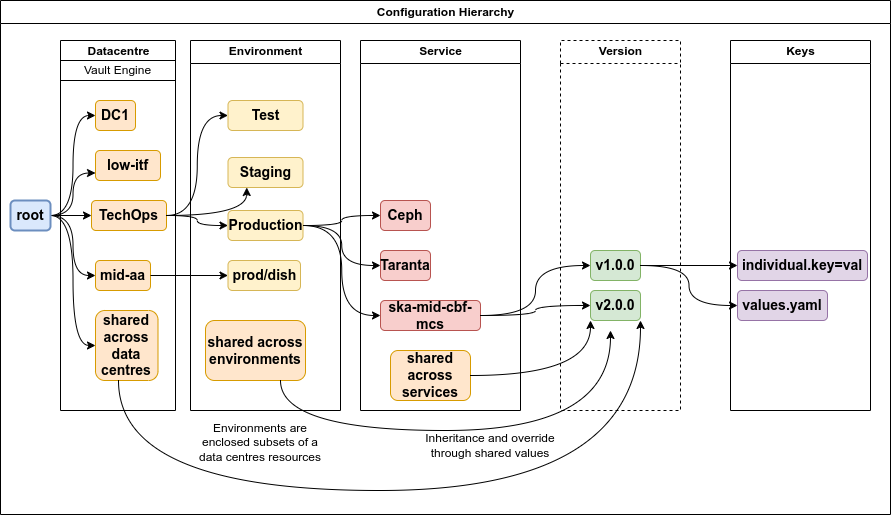
SKAO organises Vault data across three levels of ownership:
Level |
Description |
|---|---|
Data centre |
Physical infrastructure hosting multiple environments |
Environment |
Set of applications/services deployed together (e.g., staging, production) |
Application/Service |
Individual software component or infrastructure piece |
This hierarchy enables tight access control and efficient management at scale.
Path structure#
Every Vault secret follows this pattern:
<prefix>/<service>/<secret>
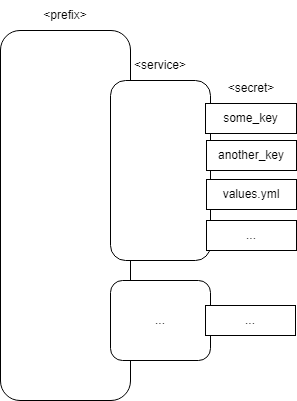
Where:
<prefix> — Context path (e.g.,
shared/global,<datacentre>/<environment>,dev/<team>)<service> — Application, service, or infrastructure component name
<secret> — Specific configuration or secret (credentials, config files, Helm values)
Example in SKAO context:
KV engines#
Vault organises secrets into KV (key-value) engines. SKAO uses three categories:
Engine |
Purpose |
|---|---|
Dev |
Development deployments and CI/CD |
Shared |
Cross-datacentre configurations (production-grade) |
Datacentre-specific |
Per-datacentre configurations with environment segregation |
Separating engines enables:
Simplified organisation and management
Easier access control policies
Reduced duplication through shared sections
Dev KV engine#
The Dev engine serves as a “meta-engine” for development teams, organising by team rather than data centre.
Per-team section:
Path:
dev/<team>/*/<service>/Contents: Team-specific secrets for development, integration, and staging
Users: SRE, AIV, and Development teams
Dev-shared section:
Path:
dev/shared/Contents: Secrets shared across teams for development environments
Users: SRE, AIV, and Development teams
Example structure:
dev/
└── some-team/
    ├── some-service/
    │   └── values.yml
    ├── another-service/
    │   └── database_credentials
    └── infra-component/
        └── config.yml
Note
Your team’s slug must match your GitLab group at ska-telescope/ska-dev. Contact the System Team if you need a group created.
Datacentre-specific KV engines#
Each data centre has its own KV engine with environment-based organisation.
Per-environment section:
Path:
<datacentre>/<environment>/Contents: Environment-specific configurations
Examples: Database configs, network settings, infrastructure component configs
Users: SRE and AIV teams
Datacentre-shared section:
Path:
<datacentre>/shared/Contents: Secrets shared across environments within the data centre
Users: SRE and AIV teams
Some datacentre engines (note that this list might not be updated, you should see the datacentres you have access on login):
stfc-techops/stfc-dp/aws-eu-west-2/mid-itf/low-itf/mid-aa/low-aa/psi-mid/psi-low/
Best practices#
Use the appropriate engine:
Development and CI/CD →
dev/<team>/Shared across environments →
shared/Production deployments →
<datacentre>/<environment>/
Follow the path pattern:
Always use
<prefix>/<service>/<secret>Create subdirectories — root paths don’t allow direct secrets
Minimise shared section changes:
Changes propagate to all consuming environments
Test thoroughly before modifying shared configurations
Replace GitLab CI variables:
Store secrets in Vault instead of GitLab CI variables
Use Vault How-to Guides for GitLab integration patterns
Deprecation notices#
Deprecated paths:
kv/users/groups/ska-dev/<team>/→ Usedev/<team>/insteadRemoval in Sprint #2 of PI 25
Deprecated integrations:
Vault Sidecar Injector → Use Vault Secrets Operator
Vault CSI Driver → Use Vault Secrets Operator
Support ends Sprint #2 of PI 25
ska-tango-utilv0.4.13+ migrates automatically